Quick Guide
IMPORTANT NOTE: Levelling the bed is an extremely important step and if it is not done
correctly every time, your prints will fail or be of poor quality.
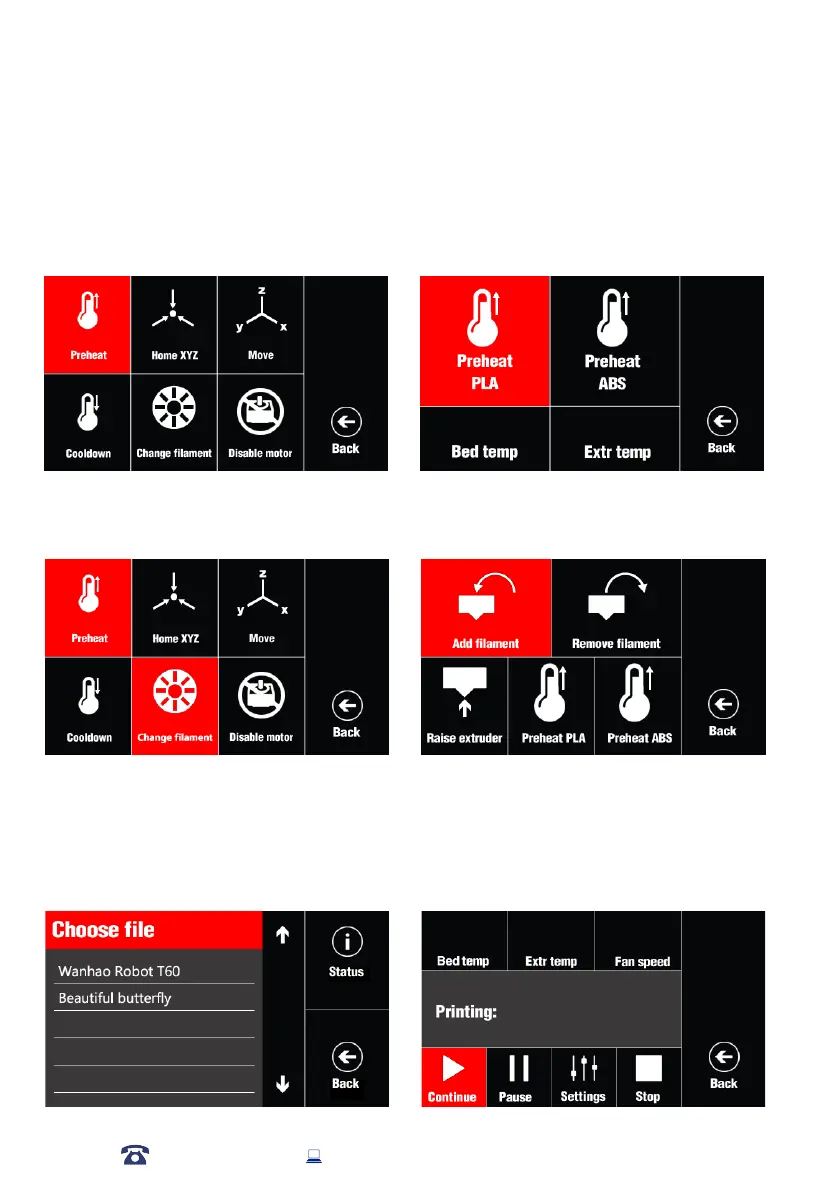
PREHEAT EXTRUDER
To reduce the heating time before printing, you may preheat extruder while you prepare the
printing file.The heating bed and extruder would reach the target setting and waiting for your
further command.
Click Utilities—Preheat—Preheat PLA/ABS
CHANGE FILAMENT
For your rst time printing, you need to load the lament. Or in case you want to change the color of
print, you would need to change the lament.
1. Click Utilities—Change Filament— Add/Remove Filament
2. You may need to raise the extruder, If the extruder is too near the bed which block
the lament from extrusion. Then click RAISE EXTRUDER.
AFTER SALES SUPPORT
86-571-23290996
support@wanhao3dprinter.com
Model : Duplicator 9
18
3. Or you may need to change the loading/unloading temperature. Here is option
Preheat PLA which would heat extruder to 210’C. And Preheat ABS which
would heat extruder to 230’C.
4. Turn on the 3D printer. Click on the PRINT---CHOOSE FILE. Then the printer
would start printing.














 To Next Page