EasyManua.ls Logo

Wansview Q3 - SD;TF Setting; Wifi Setting

Wansview Q3
56 pages
Print Icon
To Next Page IconTo Next Page
To Previous Page IconTo Previous Page
Loading...
www.wansview.com
41
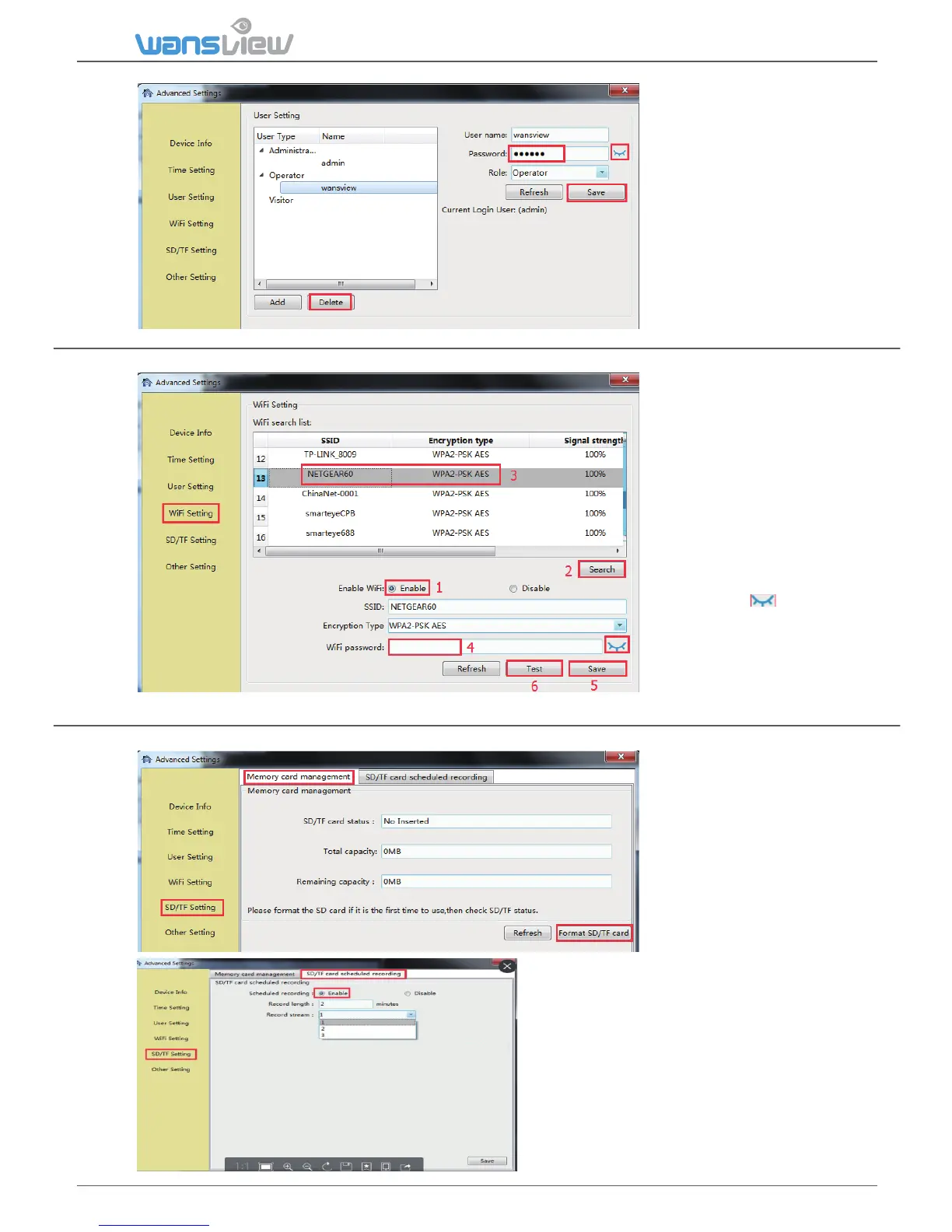
User can also edit the
account informaon,
such as change the
user name and
password and change
the role for each
account, then Save.
And Delete some
accounts if you need
5.3.2.4 WiFi Seng
5.3.2.5 SD/TF Seng
User can set up WiFi
for the camera is
connected Ethernet
cable, or change to
other available WiFi.
Search the available
WiFi, and choose the
one you want to
connect, then input
the WiFi password
(click the icon
behind to confirm if
the password is
correct). Save then
Open the Plan Record,
it will record
connuously to SD
card, each record
length can be set
between 2-15
minutes. The video
stream can be
recorded at
1080p(720p), 480p
and 240p.
User can record video to SD card.
Before recording, please kindly make
sure you have inserted a SD card, and
format it.
the record length can be set 2-15 minutes

Table of Contents

Related product manuals