EasyManua.ls Logo

Wansview Q3 - Other Setting

Wansview Q3
56 pages
Print Icon
To Next Page IconTo Next Page
To Previous Page IconTo Previous Page
Loading...
www.wansview.com
42
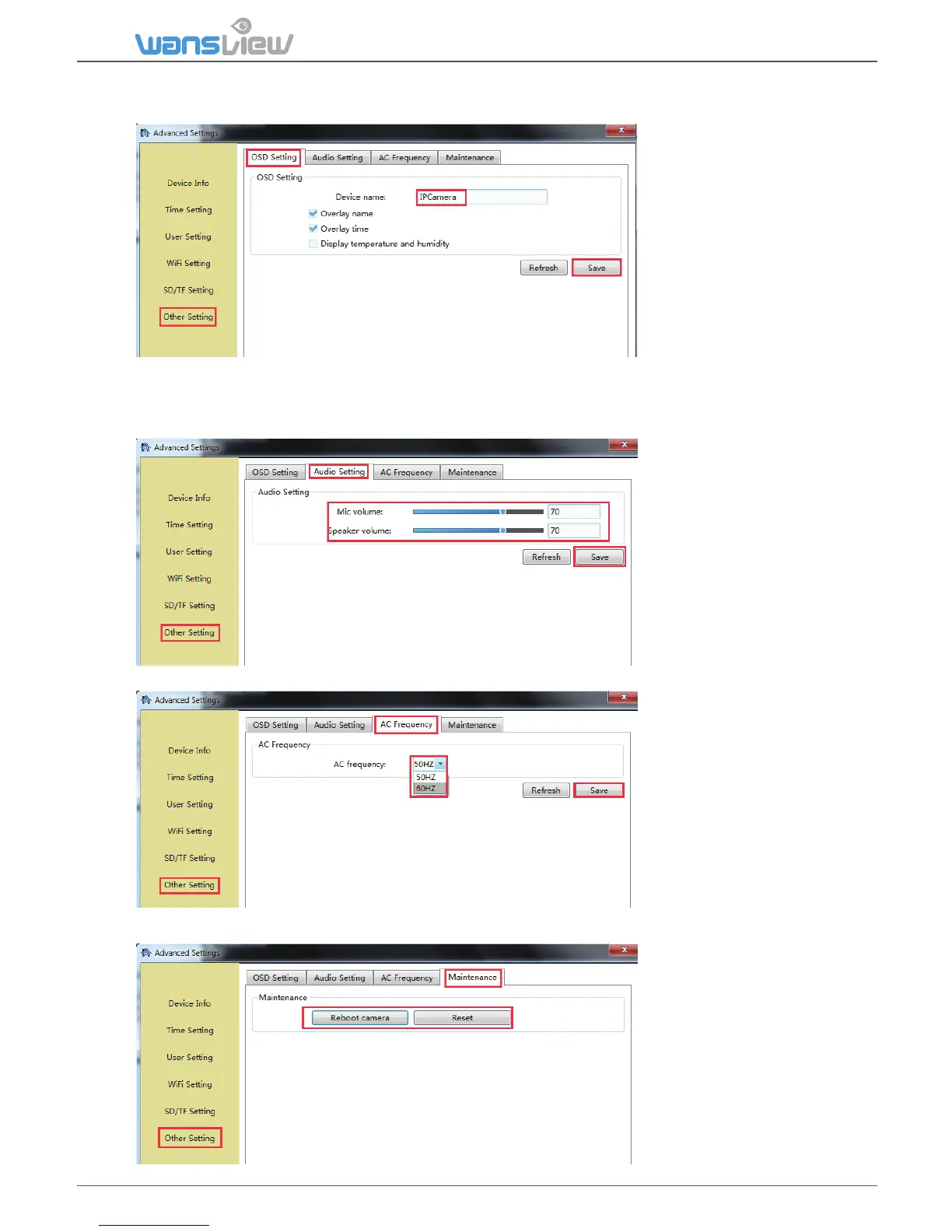
5.3.2.6 Other Seng
1) OSD seng
On the OSD seng, users
can set up the Overlay
name and Overlay me,
so user can check name
and me on the video
screen.
If Overlay name and
Overlay me and Display
temperature and
humidity are checked at
the same, the Device
name will show
Temperature and Humidity.
Note: The temperature and humidity are unavailable on this model.
2) Audio
User can adjust the
power frequency, Power
frequencies include:
50HZ(220V voltage
selects 50HZ),
60HZ(110V voltage
selects 60HZ), 60HZ used
in Japan, Canada et
3) AC Frequency
4) Maintenance
User can adjust the
power frequency, Power
frequencies include:
50HZ(220V voltage
selects 50HZ),
60HZ(110V voltage
selects 60HZ), 60HZ
used in Japan, Canada
User can reboot and
reset (restore) the
camera.
Tips: To reset the
camera, the camera will
restore to factory
seng.

Table of Contents

Related product manuals