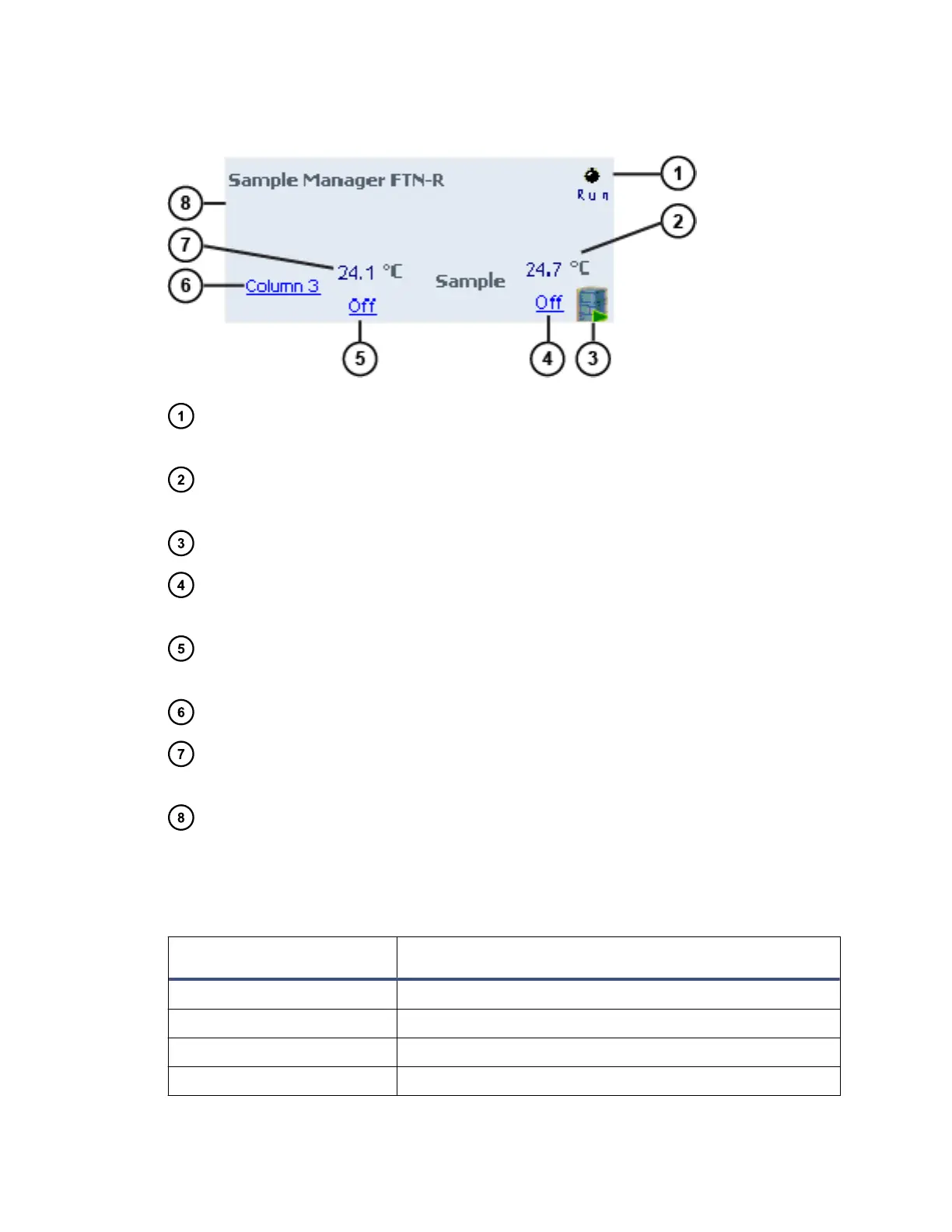
Figure 3–1: SM FTN-R control panel
Run LED – Mirrors the run status LED on the sample manager's front panel,
unless communications are interrupted.
Current sample heater temperature – Displays the current temperature of the
sample heater.
Display console icon – When clicked, launches the console software.
Sample heater temperature set point – Displays the temperature set point for
the sample heater.
Column compartment temperature set point – Displays the temperature set
point for the column compartment.
Selected column – Displays the currently selected column.
Current column compartment temperature – Displays the current temperature
in the column compartment.
Status – Displays the status of the current operation.
You can access these additional functions by right-clicking anywhere in the SM FTN-R
control panel.
Table 3–4: Additional functions in the SM FTN-R control panel
Control panel function Description
Prime Displays the Prime dialog box.
Wash needle Displays the Wash Needle dialog box.
Launch Console Launches the console software.
Reset module Resets the SM FTN-R following an error condition.
June 12, 2015, 715004747 Rev. A
Page 36












 To Next Page