Table 3–4: Additional functions in the SM FTN-R control panel (continued)
Control panel function Description
Help Displays the console online Help.
3.3.2 QSM-R control panel
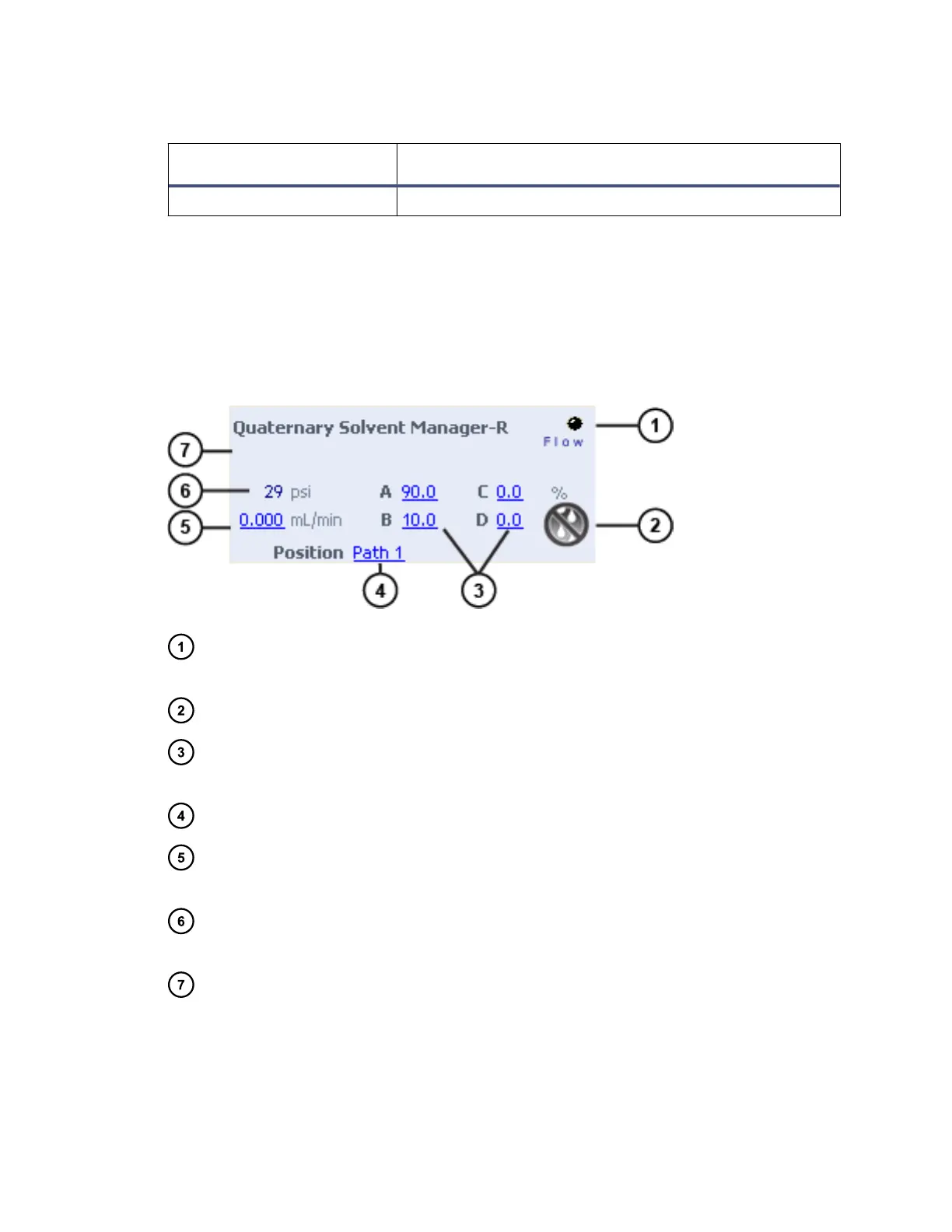
The control panel of the Quaternary Solvent Manager-R (QSM-R) displays system
pressure, total flow rate, and solvent composition.
Figure 3–2: QSM-R control panel
Flow LED – Mirrors the flow status LED on the solvent manager's front panel,
unless communications are interrupted.
Stop flow – When clicked, immediately stops all flow from the solvent manager.
Solvent composition – Displays the percentage of solvent to be drawn from
solvent lines A through D. Composition values range from 0.0 to 100.0%.
Valve position – Displays the solvent-manager path currently in use.
Flow rate – Displays the flow rate of solvent through all lines of the solvent
manager.
System pressure – Displays system pressure, in kPa, bar, or psi. You can
specify pressure units in the console software.
Status – Displays the status of the current operation.
You can access these additional functions by right-clicking anywhere in the QSM-R
control panel.
June 12, 2015, 715004747 Rev. A
Page 37












 To Next Page