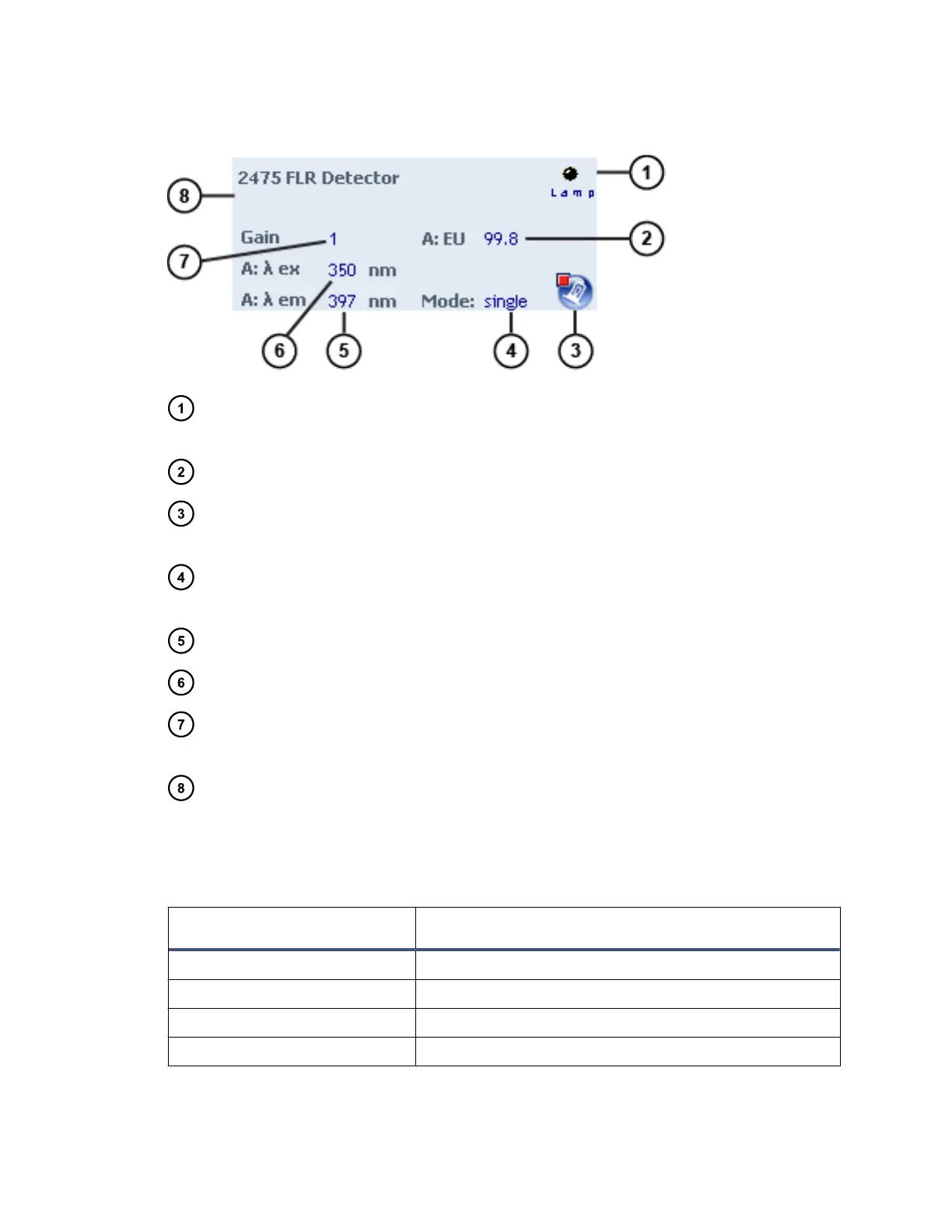
Figure 3–5: 2475 FLR detector control panel
Lamp LED – Mirrors the lamp status LED on the front panel of the detector,
unless communications with the detector are lost.
Emission units or energy units – Displays the emission units or energy units.
Lamp icon – When clicked, ignites or extinguishes the lamp. If the icon is green,
the lamp is ignited. If the icon is red, the lamp is extinguished.
Operating mode – Displays the current operating mode of the detector: single
channel, multichannel, spectrum scanning, or 3D.
Em λ – Displays the emission wavelength.
Ex λ – Displays the excitation wavelength.
Photomultiplier tube gain factor – Displays the current photomultiplier-tube gain
factor.
Status – Displays the status of the current operation.
You can access these additional functions by right-clicking anywhere in the detector
control panel:
Table 3–9: Additional functions in the 2475 FLR detector control panel
Control panel function Description
Autozero Resets the detector offsets.
Launch Console Launches the console software.
Reset module Resets the detector after an error condition.
Help Displays the console online Help.
June 12, 2015, 715004747 Rev. A
Page 42












 To Next Page