80 V2.0/02.11
Keysandfunctions
4.1 Symbolsandusingthemenus
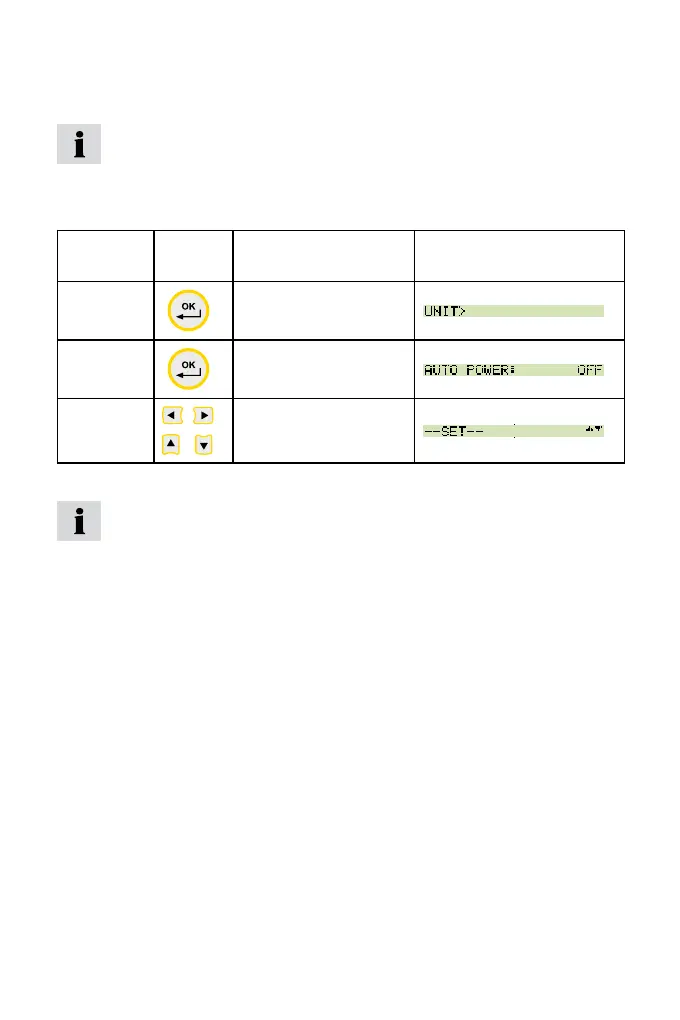
If the the sign '>' is displayed at the end of a menu function,
press the OK key to enter an associated submenu.
If the sign ':' is displayed, press the OK key to conrm the respec-
tive entry.
Menu
symbols
Key Function Example
>
Call up a submenu/
setting
:
Conrm
s t
Select
Key assignments and symbols associated with the menu func-
tions are consistent throughout this device; therefore, there will
be no further explicit explanation given.
Whatthefunctionkeysdowithinthemenus
Use the arrow keys to scroll between functions when several functions
are available for selection in a window or a menu. The arrow keys move
the cursor in the direction in which the arrow is pointing.
Press the OK key each time you wish select a function or submenu;
when making alterations or adding values you must press OK to conrm
your action. The OK key is used to save all settings. Press the STOP/
ESC key if you wish to leave a menu or do not wish to save an entry.
Key assignment and mode of operation of these three keys is always the
same no matter in which menu they are used.



 To Next Page