Home
Weidmüller
Label Maker
PrintJet ADVANCED
Page 92
Weidmüller PrintJet ADVANCED - Page 92
166 pages
Manual
Save Page as PDF
To Next Page
To Next Page
To Previous Page
To Previous Page
Loading...
Operation
92
1449820000/1.4/04.17
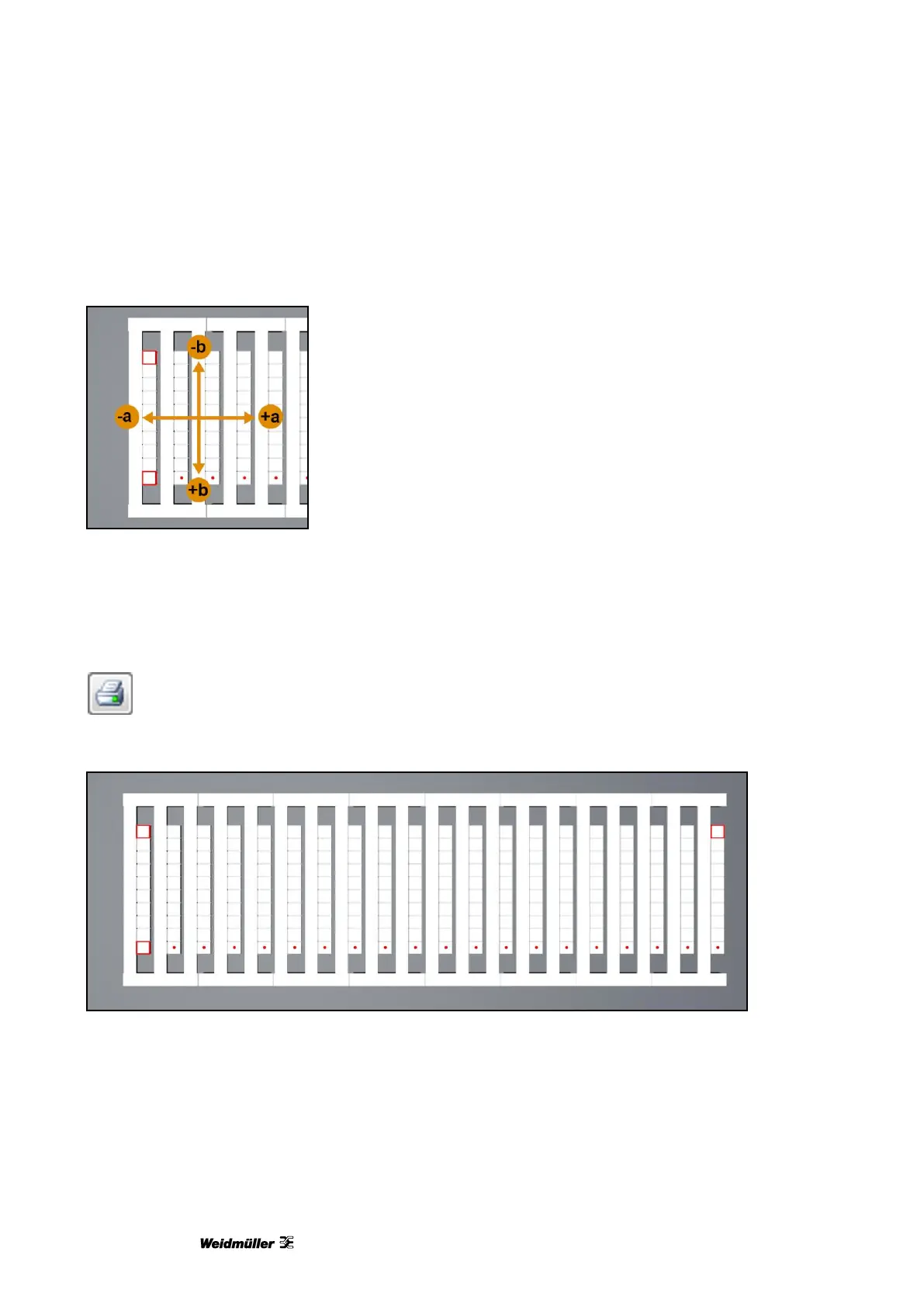
Enter the required va
lues in the ‛Offs
et (a)’ and ‛Offset (b)’ f
ields to adjust the of
fset.
Figure
106
Adjusting the offset
5
Insert, for exam
ple, a DEK 5/5 MC-
10 NEUTRAL W
S MultiCard in the printer (also see sec
tion “
5.1.2
Inserting MultiCards/
MetalliCards
”).
6
Click the printer
icon:
The printed MultiCard
looks like this:
Figure
107
Mul
tiCard
Three squares an
d one row of dots
were printed on the
MultiCard.
91
93
Table of Contents
Main Page
Default Chapter
3
Table of Contents
3
1 Introduction
7
Notational Conventions
8
Warranty and Liability
9
Copyright
9
Guarantee Terms
9
2 Safety Information
11
General Safety Information
12
General Operating Information
13
Safety Measures for Environment Protection
14
Symbols and Information Used on the Device
14
Intended Use
15
Residual Risks When Using the Device
15
Hazards Due to Electricity
16
Hazards Due to Hot Surfaces
17
Hazards Due to Incorrect Spare Parts
17
Safety Devices and Guards
17
Obligations of the Plant Operator
17
Personnel Requirements
18
Qualifications Required by Personnel
18
Obligations of Personnel
18
Responsibilities
18
3 Printer Description
19
Printer
21
Overview
21
Connectors
23
Rating Plate
23
Multicards and Metallicards
24
4 Setup
27
Unpacking
28
Scope of Supply
28
Installing the Printer
28
Removing the Transport Restraints
30
Fitting the Output Rail
31
Positioning the Touch Panel
31
Connecting the Power Plug
32
Methods of Connecting the Printer
34
Connection Via the Network Interface
34
Connection Via USB
34
Turning the Printer On/Off
35
Choosing the Language for the Touch Panel
36
Installing the Standard Version of the M-Print® PRO Software
39
Connection Via Network Cable
45
Connection Via USB Cable
50
Installing the Network Version of the M-Print® PRO Software
54
4.14.1 Description
54
4.14.2 Tasks to be Done on the Central Computer/Server
55
4.14.3 Tasks to be Done on the Clients
69
Activating M-Print® PRO
71
Setting up and Adjusting a Multicard for the Printer
73
Running a Print Test
74
5 Operation
77
General Operation
78
Important Information
78
Inserting Multicards/Metallicards
79
Processing a Single Multicard/Metallicard
80
Processing a Stack of Multicards
80
Software Settings
81
Starting M-Print® PRO
81
Mapping and Calibrating the Printer
82
Setting the Printer Correction
87
Setting Material-Dependent Slip
89
Adjusting Multicards
91
Printing Multicards/Metallicards
95
Curing Settings / Heating Level
95
Selecting the Print Quality
95
Touch Panel
96
Menu Structure of the Touch Panel
97
Main Menu
98
Submenus
99
System Info
99
Changing the Printer Name
100
Changing the IP Address and Subnet Mask and Activating DHCP
102
Selecting the Language
105
Changing the USB Port
106
Ink Level
107
5.3.10 Protocol
108
5.3.11 Information
109
5.3.12 Tools
110
5.3.13 Print Jobs
111
5.3.14 Templates
112
5.3.15 Printing the Templates from the USB Stick
113
6 Cleaning and Maintenance
115
Tools Menu
116
Printhead Cleaning
117
Printhead Flushing
118
Executing a Sensor Check
120
Executing a Nozzle Check
122
Replacing Ink Cartridges
124
Replacing the Wastepad
130
Replacing the Dust Filter
132
Cleaning the Printer Enclosure
133
Cleaning the Touch Panel
133
Updating the Printer Software
134
Replacing the Cleaning Unit
135
Opening the Service Cover
135
Removing the Cleaning Unit
135
Cleaning the Printheads by Hand
137
Installing the Cleaning Unit
137
Closing the Service Cover
138
Replacing the Cleaning Fluid Bottle
139
7 Troubleshooting
141
General Information
142
General Troubleshooting
142
List of Events
144
8 Transporting the Printer
151
Decommissioning the Printer
152
Packing the Printer
152
Disposing of the Printer
153
9 Annex
155
Technical Data
156
Ordering Data
157
Declaration of Conformity
158
List of Figures
159
List of Tables
164


 To Next Page