22 Welch Allyn
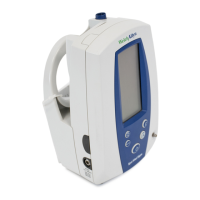
Controls, Indicators, and Connections
Note: In this section, all drawing and text are representative of the Spot Vital Signs with all available
options. Your device may not include all functions, depending on the options purchased.
Front Panel Functions
Description Function
A Power Button This on/off button controls power to the device. Battery
power is used unless the device is powered through the AC
power transformer.
B Start/Stop Blood
Pressure Button
Pressing this button initiates a new blood pressure cycle.
Pressing this button again cancels the cycle and immediately
deflates the cuff.
C Next Patient/ Clear
Button
• Pressing this button while the display is active, clears the
display.
• Pressing this button while the device is in standby mode,
recalls the last patient information.
• Pressing this button a second time clears the screen.
D Print Button Pressing this button initiates a print operation.
E Mode Button • Pressing this button for 2 seconds while the display is
active, turns off/on the backlight.
• Pressing this button while the device is in standby mode,
recalls the last patient information.
• With the temperature probe removed from the probe
holder, pressing the Mode button switches the
temperature from Oral to Axillary mode.
F Pressure Hose
Connector
Connector for black, coiled pressure hose.
SpO
2
%
SYS
(mmHg)
kPa
/ min
M
P
DIA
(mmHg)
kPa
MODE
C



 To Next Page
 Loading...