EasyManua.ls Logo

Westerbeke 5.0KW BCD - Remote Oil Filter (Optional)

Westerbeke 5.0KW BCD
61 pages
Print Icon
To Next Page IconTo Next Page
To Previous Page IconTo Previous Page
Loading...
REMOTE
OIL
FILTER
(OPTIONAL)
INSTALLATION
This
popular accessory
is
used
to
relocate
the
engine's oil
fil-
ter
from
the
engine
to
a more convenient location such
as
an
engine
room
bulkhead.
NOTE:
Westerbeke
is
not responsible for
engine
failure
due
to
incorrect installation
of
the
Remote
Oil
Filter:
NOTE:
Refer
to
ENGINE OIL CHANGE
in
this manual for
instructions on removing
the
oil
filter:
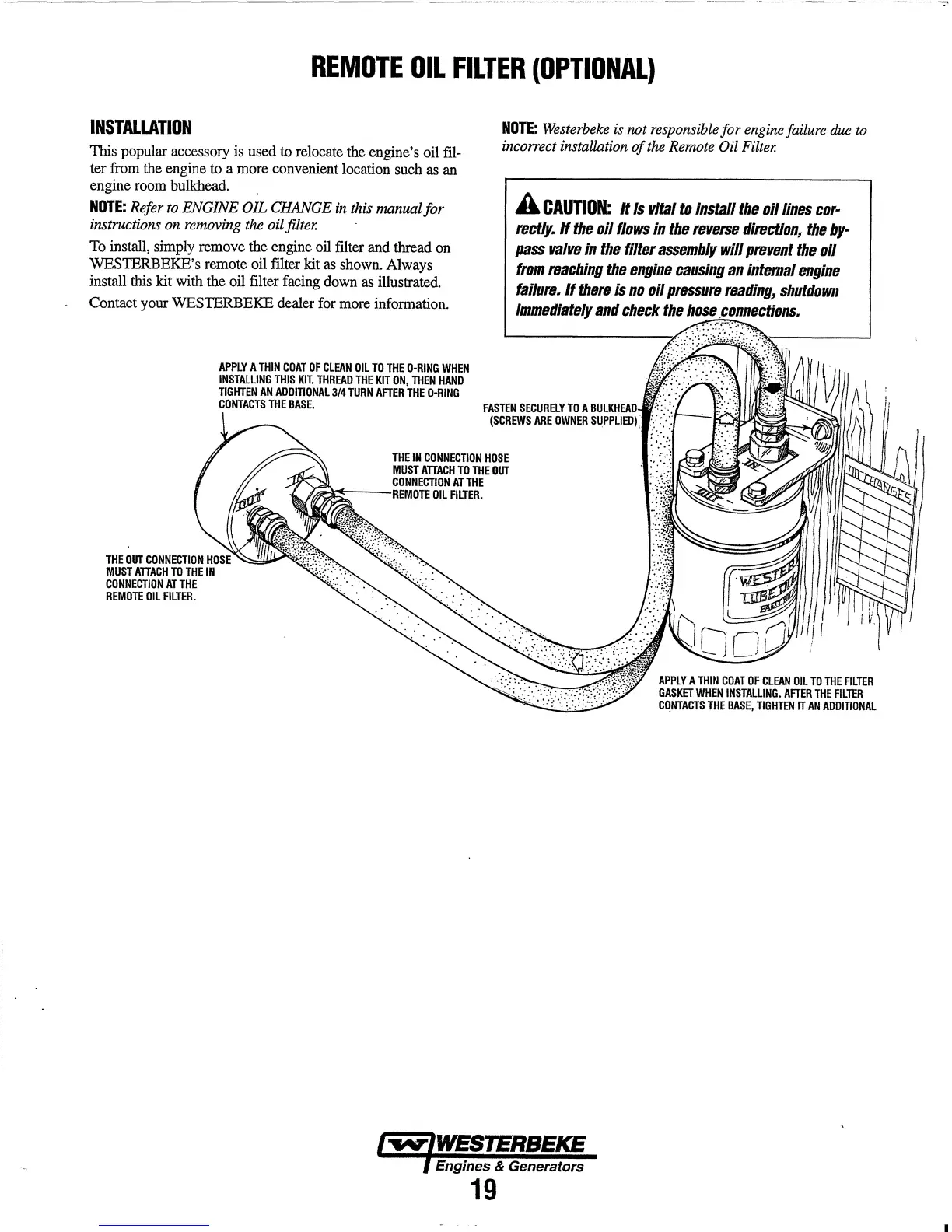
To
install,
simply
remove
the
engine
oil
filter
and
thread
on
WESTERBEKE's remote
oil
filter kit
as
shown.
Always
install
this
kit
with the oil filter
facing
down
as
illustrated.
Contact
your
WESTERBEKE dealer
for
more
information.
THE
OUT
CONNECTION
MUST
ATTACH
TO
THE
IN
CONNECTION
AT
THE
REMOTE
OIL
FILTER.
APPLY
A
THIN
COAT
OF
CLEAN
OIL
TO
THE
O-RING
WHEN
INSTALLING
THIS
KIT.
THREAO
THE
KIT
ON,
THEN
HAND
TIGHTEN
AN
ADDITIONAL
3/4
TURN
AFTER
THE
O-RING
CONTACTS
THE
BASE.
THE
IN
CONNECTION
HOSE
MUST
ATTACH
TO
THE
OUT
CONNECTION
AT
THE
~~--'Rl'annTI'
OIL
FILTER.
A
CAUTION:
It
is
vital
to
install
the
oil
lines
cor-
rect/y.
If
the
oil
flows
in
the
reverse
direction,
the
by-
pass
valve
in
the
filter
assembly
will
prevent
the
oil
from
reaching
the
engine
causing
an
intemal
engine
failure.
If
there
is
no
oil
pressure
reading,
shutdown
immediately
and
check
the
hose
"c
onn"CI:lons.
APPLY
A
THIN
COAT
OF
CLEAN
OIL
TO
THE
FILTER
GASKET
WHEN
INSTAlliNG.
AFTER
THE
FILTER
CONTACTS
THE
BASE,
TIGHTEN
IT
AN
ADDITIONAL
Engines & Generators
19

Table of Contents

Related product manuals