28
9 Start-up
9 Start-up
Forstart-upthehand-heldsweeperisbroughtfromtherestpositionto
theworkingposition.
9.1 Adjusting the handle height
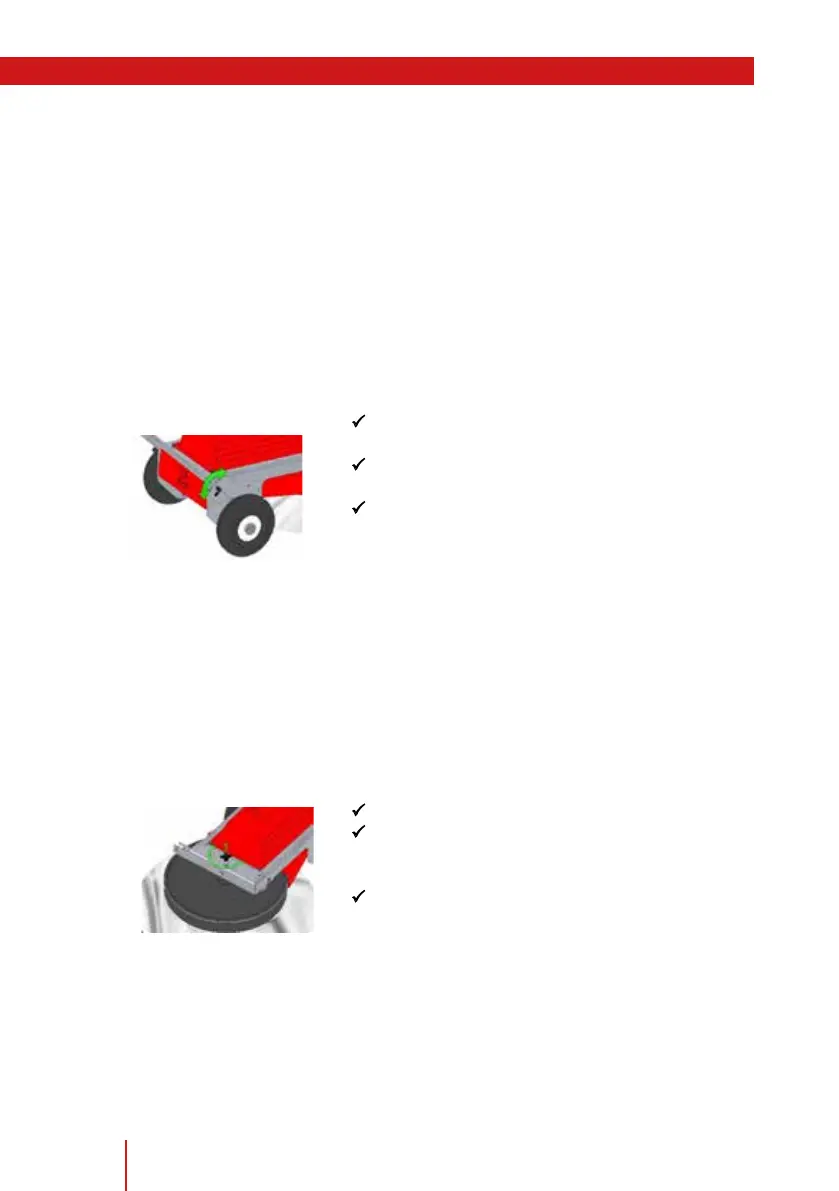
Toadjusttheheightofthehandle,ahandleheightadjustmentisprovided
allowingtheheighttobesetwithouttools.Thus,thehandleheightcan
beeasily,quicklyandergonomicallyadjustedfordierentbodyheights.
9.1.1 Adjustment process
PUnlocklockingboltsaccordingtothediagram
onbothsides.
PMovethehandleintothedesiredworking
position.
PLockthelatchboltproperlyintheborehole
again.
9.2 Einstellen des Kehrbesens
Dependingonthedegreeofwearofthebristlesordependingonthede-
bris,theheightofthebrushcanbevariedcontinuously,e.g.forlong--
bereddebris(hay,straw)ahighersettingisrequiredthan,forexample,
forsand.
Thebrushheightisadjustedviathewingnut.
P Loosenthewingnut.
PTurntheadjustingknobuntilthedesiredbrush
heightisreached.Observethedirectional
markingsforliftingandloweringonthesweeper.
PFixtheadjustingknobbytighteningthewing
nut.
(Fig. 6 - Handle height)
(Fig. 7 - Brush adjustment)


 To Next Page