Instruction for use Examination and treatment table Easy Care
** Depending on model and configuration
D2151_01 - 09/2017 20/38
6.6.4 Switch off the heating
Switch-off the heating by pressing key (1) for approx. 2 seconds and the LED spot for the intensity selection
(11.4) extinguishes. As an alternative it is possible to reduce the radiation intensity to 0 mW/cm² and confirm.
The actual intensity display remains active until the residual intensity has fallen below 2 W/cm².
When all functions of the radiant warmer are switched off and the residual intensity is below 2 mW/cm², the
radiant warmer will automatically switch off the display after 2 minutes and change to stand-by mode. The
readiness of function is shown by repeated short lighting of the information lamp (10). When pressing either
key the stand-by mode is exited and the display (11) is switched on.
6.7 Illumination
For even and dazzle-free illumination of the overall patient deck two dimmable panel lights are integrated in
the radiant warmer which can be switched on at the head end of the radiant warmer, if required. The
brightness can be adjusted in 5 steps according to the requirements.
The colour temperature of the light sources is 4000 Kelvin and is optimal for a neutral appearance during
visual examination of the patient.
6.7.1 Switch on the illumination
If the radiant warmer is in stand-by mode (display is off and
the information lamp flashes), exit this mode by pressing
any key.
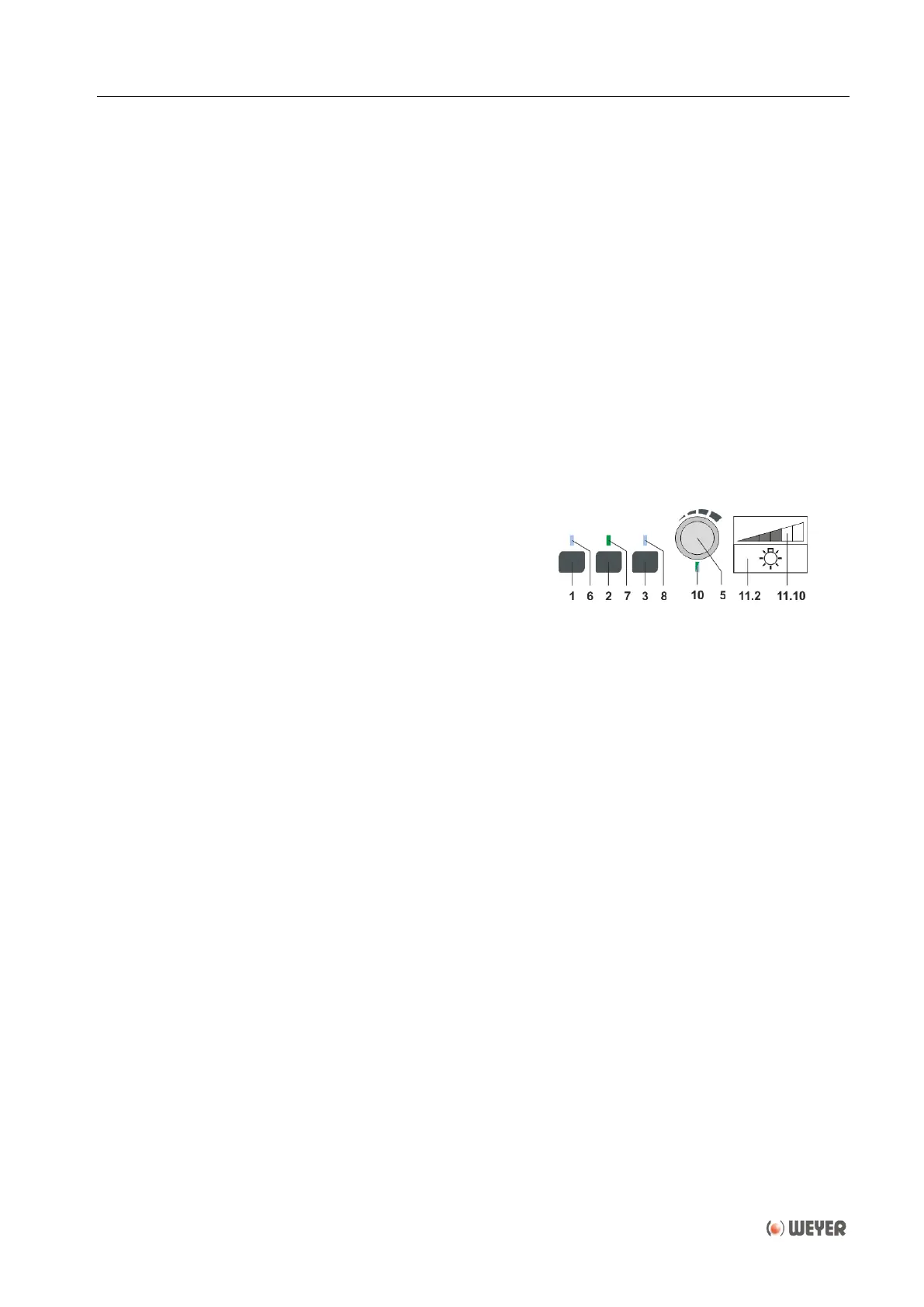
Switch on the illumination by pressing the middle key (2).
The green pilot lamp (7) above the key lights up and the two
panels lights illuminate.
The information lamp (10) flashes for 15 seconds. During these 15 seconds the brightness can be adjusted
with the the rotary push-button (5) and confirmed by pressing. During the adjustment the brightness changes
and the actual brightness level is indicated in the brightness display (11.10).
When no adjustment and confirmation is made within 15 seconds, the default value will be resumed.
6.7.2 Adjustment of brightness
For changing the brightness during operation, the brightness adjustment must be activated by pressing the
middle key (2). The information lamp (10) flashes for 15 seconds. During these 15 seconds the brightness
can be adjusted with the the rotary push-button (5) and confirmed by pressing. During the adjustment the
brightness changes and the actual brightness level is indicated in the brightness display (11.10).
6.7.3 Switch off the illumination
Switch-off the illumination by longer pressing the middle key (2).
When all functions of the radiant warmer are switched off and the residual intensity is below 2 mW/cm², the
radiant warmer will automatically switch off the display after 2 minutes and change to stand-by mode. The
readiness of function is shown by repeated short lighting of the information lamp (10). When pressing either
key the stand-by mode is exited and the display is switched on.


 To Next Page