17
Setup-FX Assign
Manual
Meters
Setup
Player
Scenes
System
21:20:30 2016/12/18
Music Show
FX A s sign
Defined L ayer
Mute G roup
Output P atch
GROUP1
AUX3AUX2 AUX4 GROUP2 GROUP3 GROUP4AUX1
L&R
Clear
MIC5
MIC3MIC2 MIC4 MIC6 MIC7 MIC8MIC1
MIC13MIC11
MIC10 MIC12 MIC14
MIC15
MIC16
MIC9
MIC 1
Modul 1 Modul 2 Delay 2 Reverb 1 Reverb 2 GEQ 2GEQ 1Delay 1
1
2
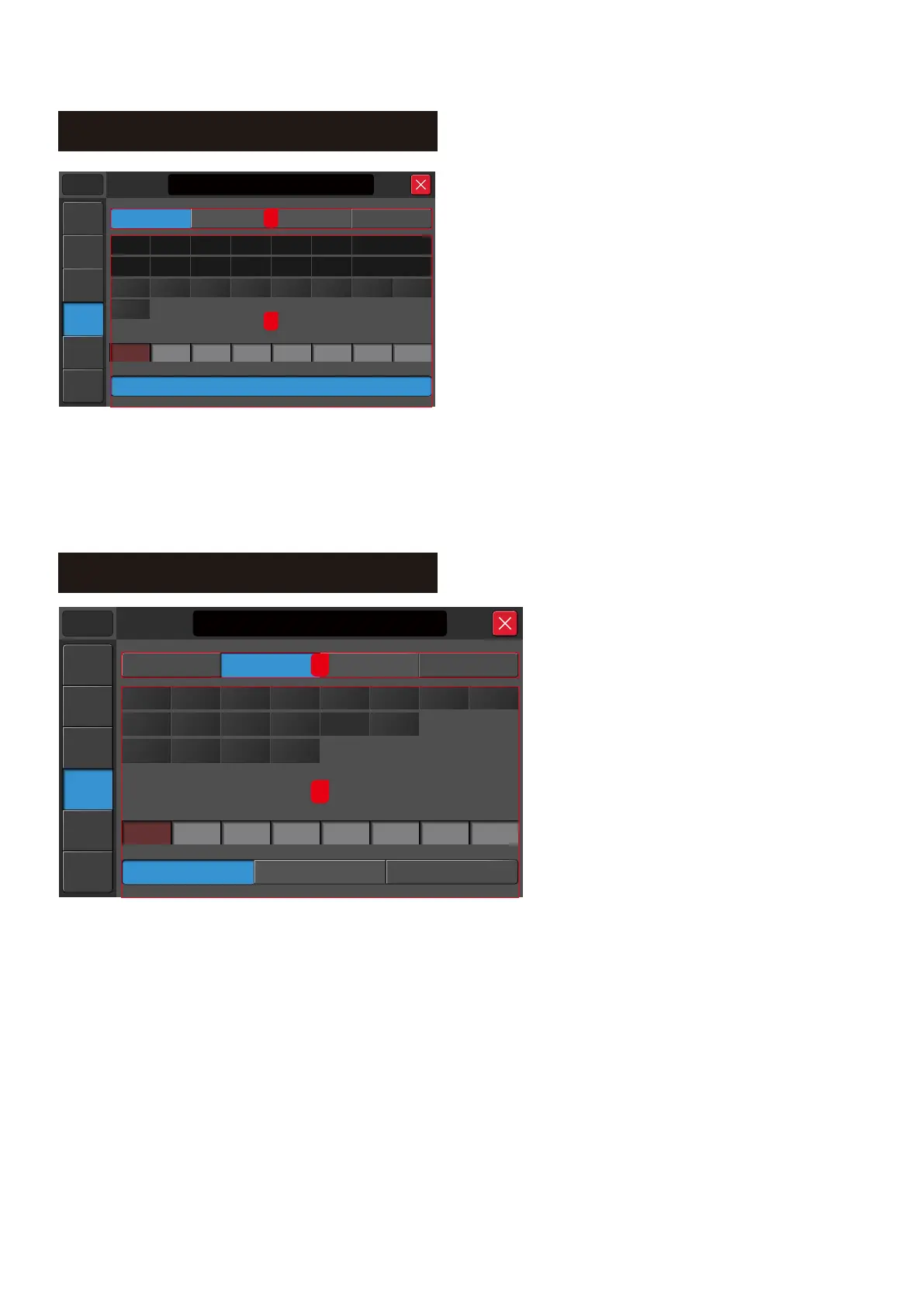
FX Assign:
This page allows the user to add the FX or GEQ module
to the Inputs or Output channel quickly without going
through 'channel by channel'.
1. Assignment type
Configuration of the FX, Output patch, Custom layer or
Mute group
2. Assignment section
2.1. Select a channel
2.2. FX Module selection
2.3. Clear button will clear all assignments
Note:
- Each FX/GEQ module can only be used once. If it was assigned to another channel, the same FX/GEQ
module assigned to another channel will be removed from the previous channel.
- Input or Output can have two FX/GEQ modules. Eg. Mod1/Rev1, Mod1/Rev2, Mod2/Rev1, Mod2/Rev2,
Mod1/GEQ1, Del/GEQ2 etc.O
Manual
Meters
Setup
Player
Scenes
System
21:20:30 2016/12/18
Music Show
Defined L ayer
Output P atch
FX A s s ign
Mute G roup
OUT1 OUT2 OUT4 Out 5 Out 6 Out 8Out 7OUT3 OUT5 OUT6 OUT8OUT7
Customer
Clear
GROUP4/L
OUT6
GROUP3/R
OUT5
GROUP4/R
OUT6
GROUP3/L
OUT5
GROUP1/L
OUT1
AUX3AUX2 AUX4
GROUP1/R
OUT2
GROUP2/L
OUT3
GROUP2/R
OUT4
AUX1
Master L
OUT7
Master R
OUT8
Default
USB L
OUT7
DIGI R
OUT8
DIGI L
OUT7
USB R
OUT8
1
2
This page allows the user to customise the output to any of the output
connectors or define their own preferences output format.
1. Assignment type
Configure the FX, Output patch, Custom layer or Mute group
2. Assignment section
2.1. Select a channel
2.2. Output Connectors
2.3. Default button will reset the output assignment back to factory setting.
2.4. Custom button will load the user defined custom output setting.
2.5. Clear button will clear the current setting
Setup-Output Patch



 To Next Page