19
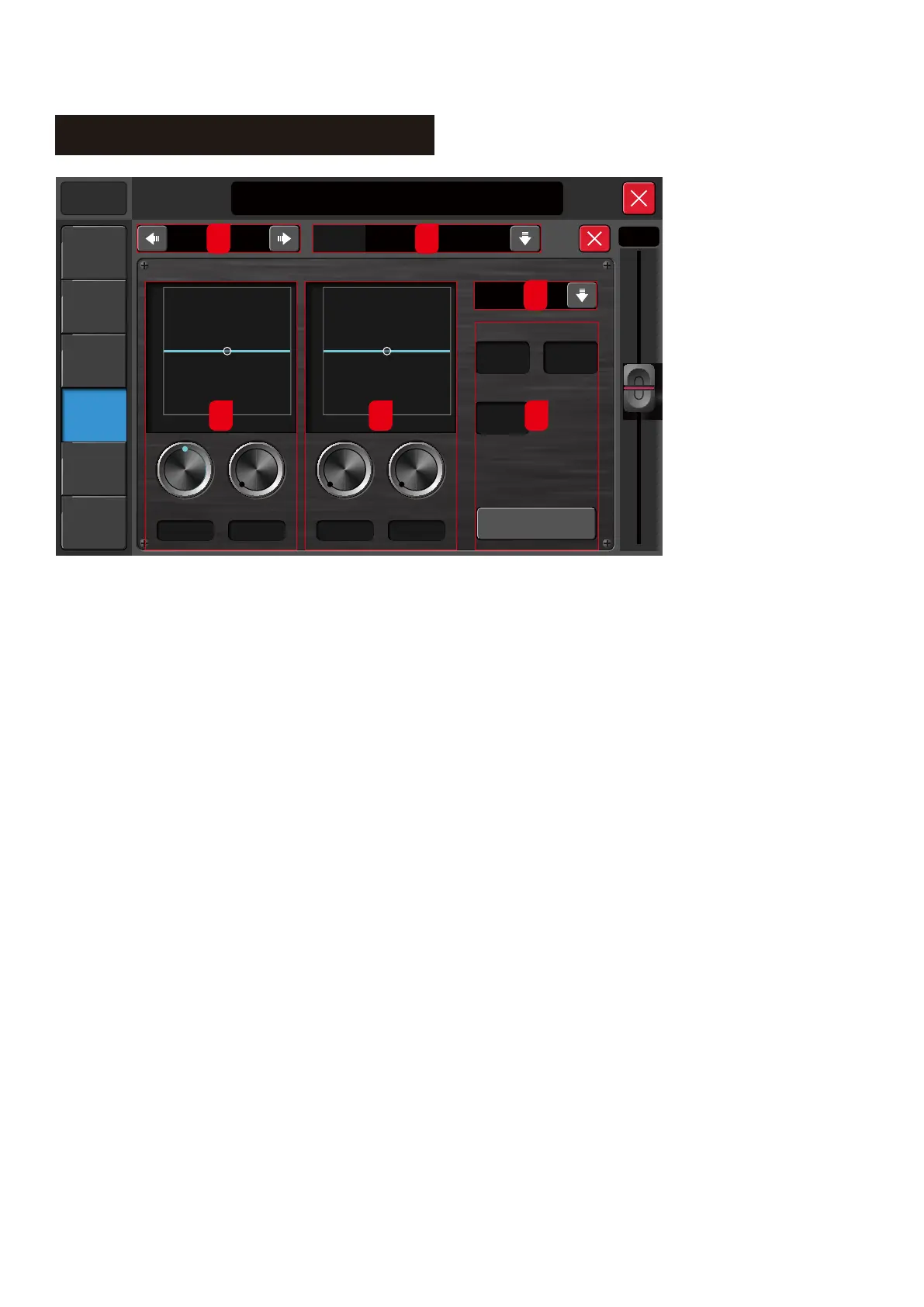
FX - Modulation
Modul 1
21:20:30 2016/12/18
Music Show
Manual
Meters
Scenes
System
Player
Setup
0.0 dB
Intens ity
0. 0
+18
-18
20 200 20k
0
+18
-18
20 200 20k
0
624 H z 0.0 d B 624 H z0.0 d B
S low c horus
S peed
0. 00.0
HP F LP F
Gain FreqencyFreqencyGain
FX-P res et
Dry-Wet
Library
Flat
1 2
5 6 4
3
1. FX Navigation
Change to Modulation 1, 2, Delay 1, 2, Reverb 1, 2 or GEQ 1, 2
2. FX Library
Click on this dropdown menu to display the FX Library page.
This Library page allows the user to create a new library, load
from an existing library, import, export or delete.
3. FX Preset
Click this dropdown menu to select the preset library.
4. Other Parameters
4.1. Dry or Wet Setting
Setting for the FX Dry or Wet. The Range is from 0 to 100.
4.2. Speed
Setting for the Modulation Speed. The Range is from 50dB to 200dB.
4.3. Intensity
Setting for the Modulation Intensity. The Range is from 50dB to 200dB.
5. High Pass Filter
5.1. Gain
The Gain setting for the HPF. The Range is from -18 to +18
5.2. Frequency Setting
The Frequency setting for the HPF. The Range is from 20Hz to 20kHz
6. Low Pass Filter
6.1. Gain
The Gain setting for the LPF. The Range is from -18 to +18
6.2. Frequency Setting
The Frequency setting for the LPF. The Range is from 20Hz to 20kHz



 To Next Page