7
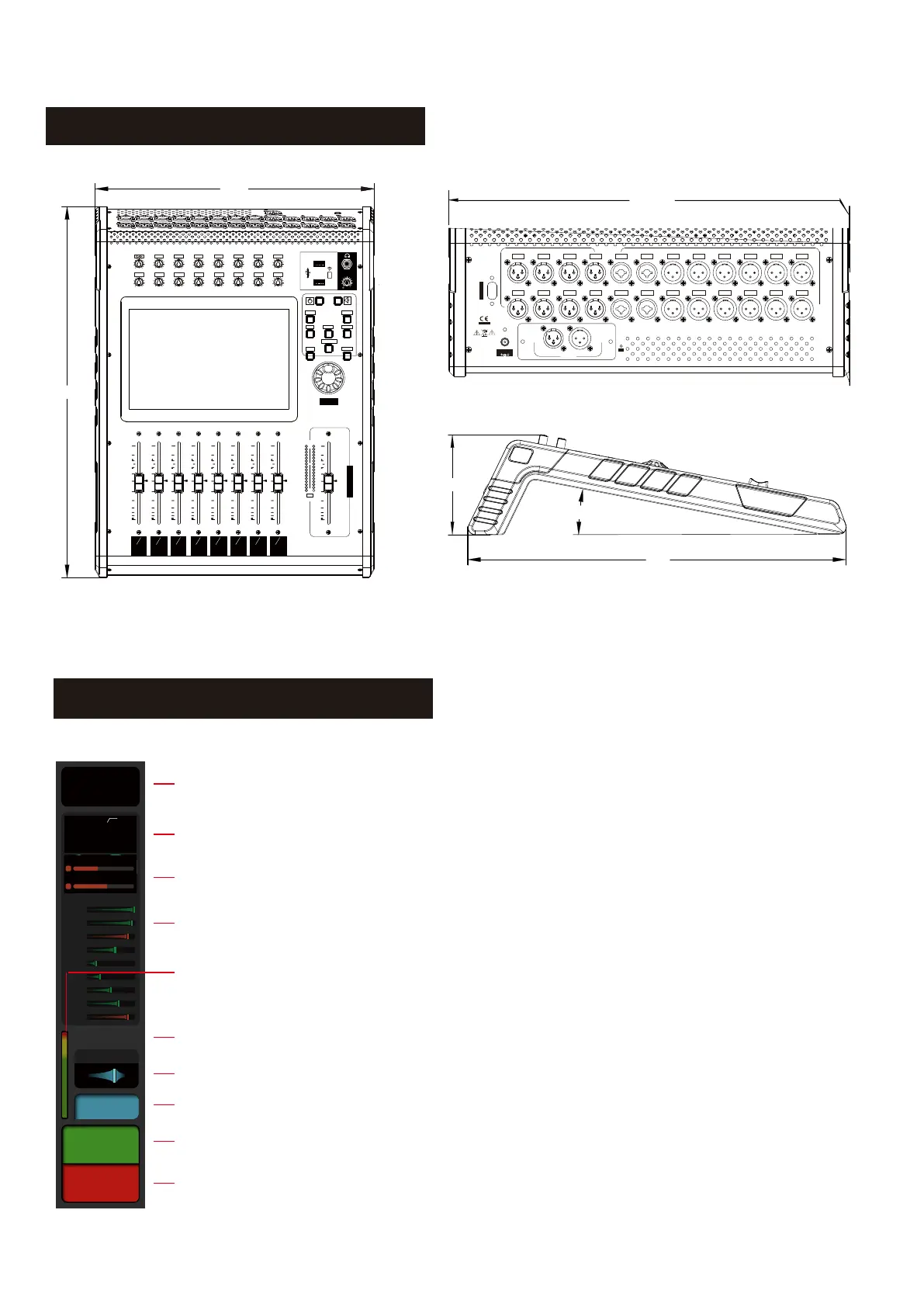
Dimensions
BUS-1
SEND-1
1
9
2
10
3
11
4
12
5
13
6
14
7
15
8
16
BUS-2
SEND-2
BUS-3
SEND-3
BUS-4
SEND-4
BUS-5&6
SEND-5
BUS-7&8
SEND-6
BUS-9&10
SEND-7
BUS-11&12
SEND-8
10
0
5
5
10
20
30
40
50
60
10
0
5
5
10
20
30
40
50
60
10
0
5
5
10
20
30
40
50
60
10
0
5
5
10
20
30
40
50
60
10
0
5
5
10
20
30
40
50
60
10
0
5
5
10
20
30
40
50
60
10
0
5
5
10
20
30
40
50
60
10
0
5
5
10
20
30
40
50
60
SIG
MIX
DIGITAL MIXING CONSOLE
PEAK
R
L
0
MIXOUTPUT
10
0
5
5
10
20
30
40
50
60
ADJUST
PRESS FOR FINE
1
GAIN
2
GAIN
3
GAIN
4
GAIN
5
GAIN
6
GAIN
7
GAIN
8
GAIN
60dB
0
60dB
0
60dB
0
60dB
0
60dB
0
60dB
0
60dB
0
60dB
0
60dB
0
60dB
0
60dB
0
60dB
0
60dB
0
60dB
0
60dB
0
60dB
0
9
GAIN
10
GAIN
11
GAIN
12
GAIN
13
GAIN
14
GAIN
15
GAIN
16
GAIN
SYSTEM DEFINED
IN 9-16IN 1-8 OUT 1-8
PLAY/PAUSE
SENDS
MASTER
+10
-
379
5 0 4
379
8
MIC
1 MIC
2
MIC
3
MIC
4 MIC
5
MIC
6
MIC
7
MIC
10 MIC
9
MIC
11 MIC
12 MIC13 MIC
14 MIC
15
MIC
16
MIC
24V/DC INPUT
M16
DIGITAL MIXING CONSOLE
1
OUT
2
OUT
3
OUT
4
OUT
5
OUT
6
OUT
7 OUT
8 OUT
CAUTION
RISK OF ELECTRIC SHOCK
DO NOT OPEN
RS-232/485
HU
AES/EBU
IN
OUT
5 13
13 6
11°
1. Mic input section: displays the current channels' Link, gain value, phantom power, phase, delay and
effect setting.
2. PEQ: Displays the parameter curve and switch status of the 4-band parametric equalizer.
3. Dynamic: Displays the operating status including the threshold and the compressor.
4. Send: Shows the level and status of the current channel sent to the Buss.
5. Channel level meter: Displays the input signal level of the current channel.
The default display mode is Pre-Fader but can be changed Post-Fader in the Setup Meter Page
if required.
6. Fader value: Displays the current input fader value.
7. Pan: Displays the pan value of the current channel.
8. Channel Name: Displays the name of the current channel. The name and colour of the channel name
can be changed in the channel setup page.
9. Solo: Click to send the selected signal to the monitor Buss, click again to exit the monitor mode.
10. Mute: Click to mute / unmute the selected signal.
-80dB
PAN
20
80
Solo
MIC1
Bus Name
MIC1
48V D FX
Φ
A1
A2
A3
A4
G1
G2
G3
Bus
G4
L&R
EQ
II
Mut e
G
C
MIC - Channel



 To Next Page