56 / 65
www.wireless-tek.com
16、EAPS configuration
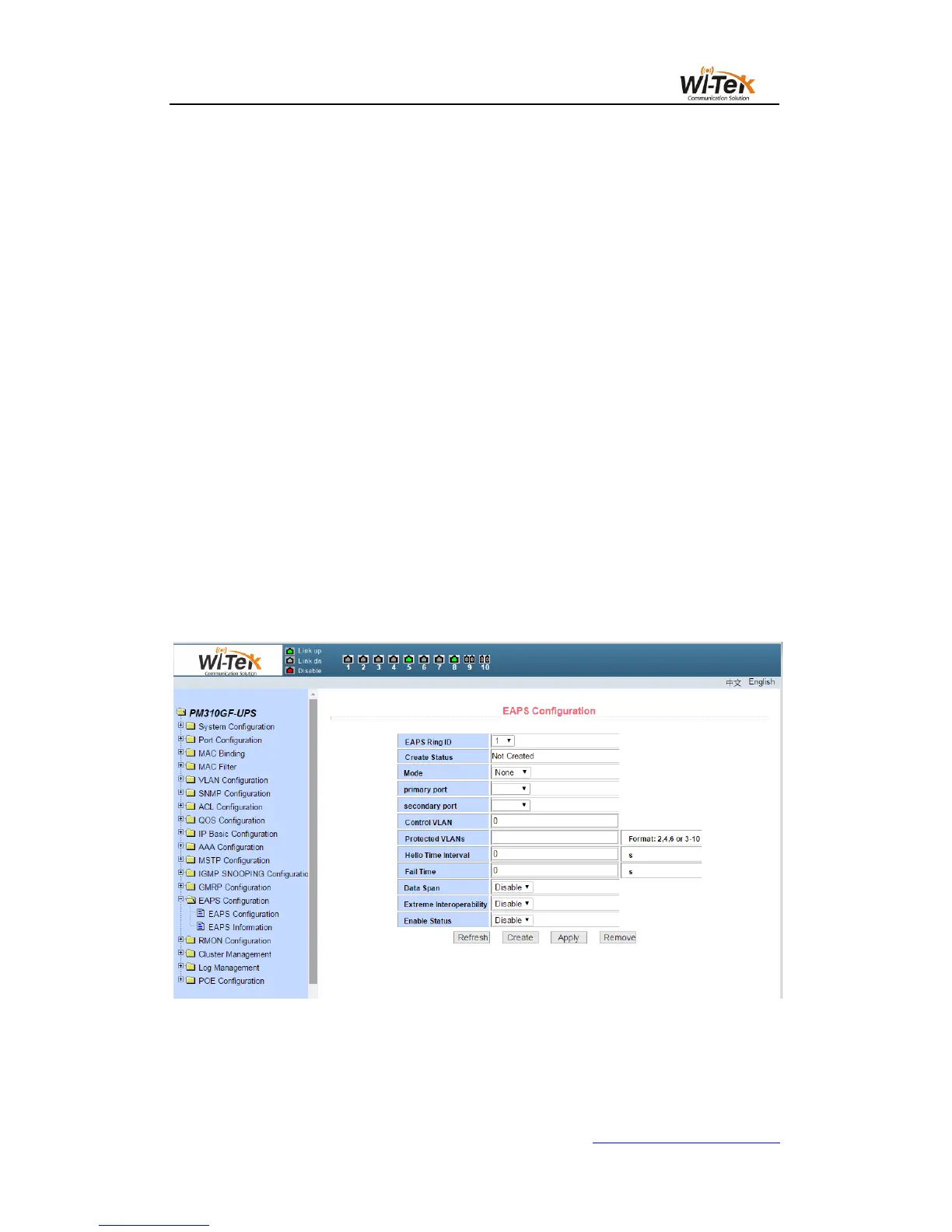
(1)EAPS configuration page
This page is used to create and configure EAPS information, and can also be used to
delete and display EAPS information.
EAPS Ring ID The specific ring ID, in the range of 1-16, can be selected according to
the drop-down box
Create two types, Not Created and Created ,If you don't create it, you have to create the
pattern Master and the Transit, The corresponding mode can be configured according to the
specific needs
Main port EAPS Main port,such as:fe1/1、ge1/1
Alternate port EAPS second port
Control vlan EAPS ring control vlan, the value of 2-4094
Protected vlan EAPS ring protection vlan
Hello time interval Hello message to send the time interval, the default is 1S
Fail time Detection of the fault time, the default is 3S
Data is forwarded across the ring In the case of multiple rings, this function is
required when data needs to be forwarded across the ring. The default is not turned on
EXtreme interoperability Compatibility with radical network devices, turned on by
default
Enabled state The last EAPS ring is enabled
Pic 60 EAPS configuration page
(2)EAPS information page
Figure 61 shows the EAPS information page.Users can view EAPS configuration



 To Next Page