61 / 65
www.wireless-tek.com
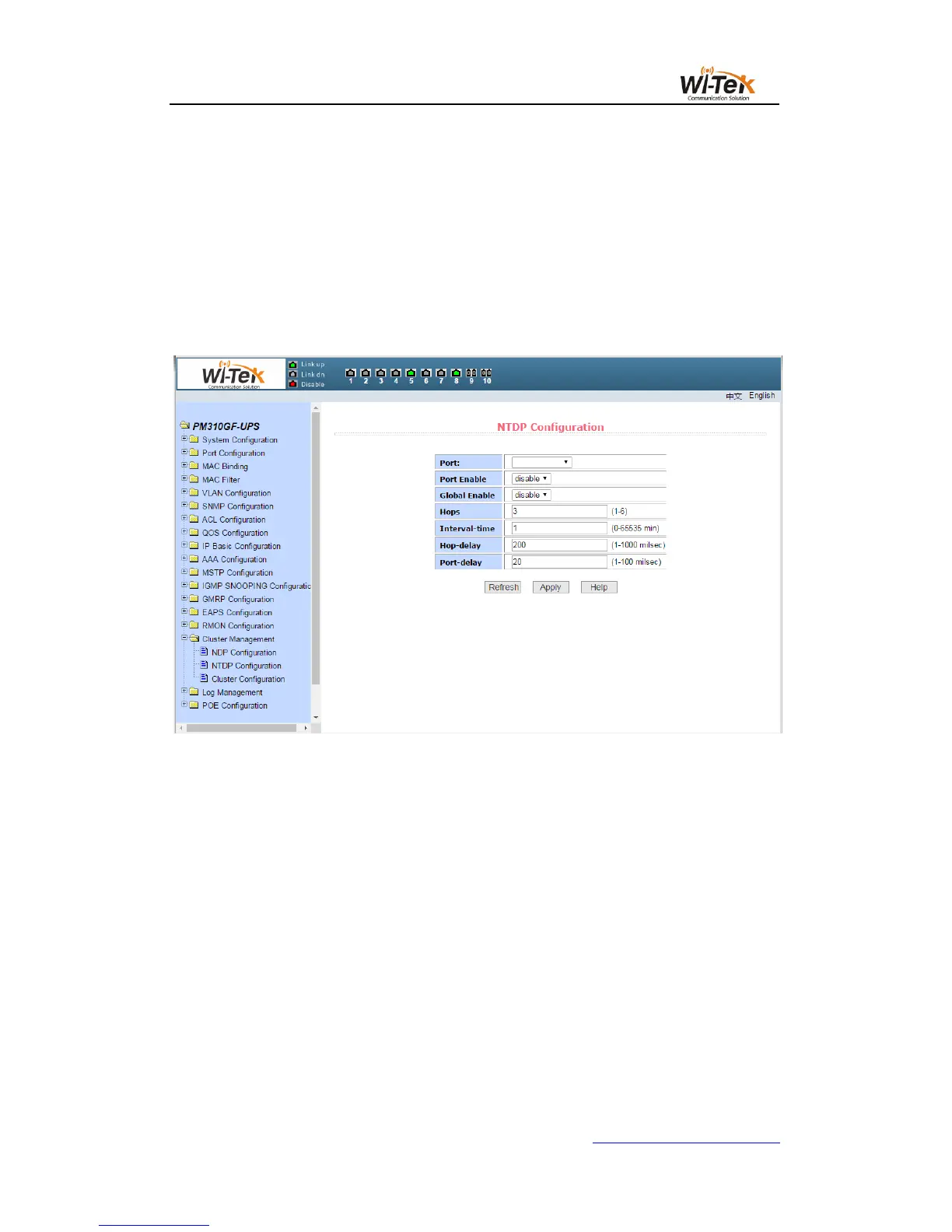
Configure the range of topology collection. The effective range is 1-6. In the default
topology, the maximum hop count of the device is 3.
Configure the interval for collecting topology information. The effective range is 0-65535
minutes. The default configuration is 1 minute.
Configure the delay time for forwarding packets on the first port. The effective range is
1-1000 milliseconds. The default configuration is 200 milliseconds.
Configure the delay time for forwarding packets on the first port. The effective range is
1-100 milliseconds. The default configuration is 20 milliseconds.
Pic 67 NTDP configuration page
(3)Cluster configuration page
Figure 68 shows the cluster configuration page, the user can configure the cluster through
this page and view the cluster member table.The information that can be set includes the
functions of enabling the cluster, configuring the management VLAN, the address pool of the
cluster, the interval for sending the handshake packets, the effective retention time of the
device, the name of the cluster, the way of joining the cluster, and deleting the cluster.
Enable the cluster function and enable the cluster function to function normally. You must
enable the cluster function first.
Configure a management VLAN with a valid range of 1-4094 and default to vlan1.
Configure the range of private IP addresses used by the member devices in the cluster.
The effective range of the IP address is 0.0.0.0 ~ 255.255.255.255. The effective range of the
mask length is 0 ~ 32.
The interval for sending the handshake packets is 1-255 seconds and the default is 10
seconds.



 To Next Page