12
Williams Serenade Piano
ALL: Demo Song
15
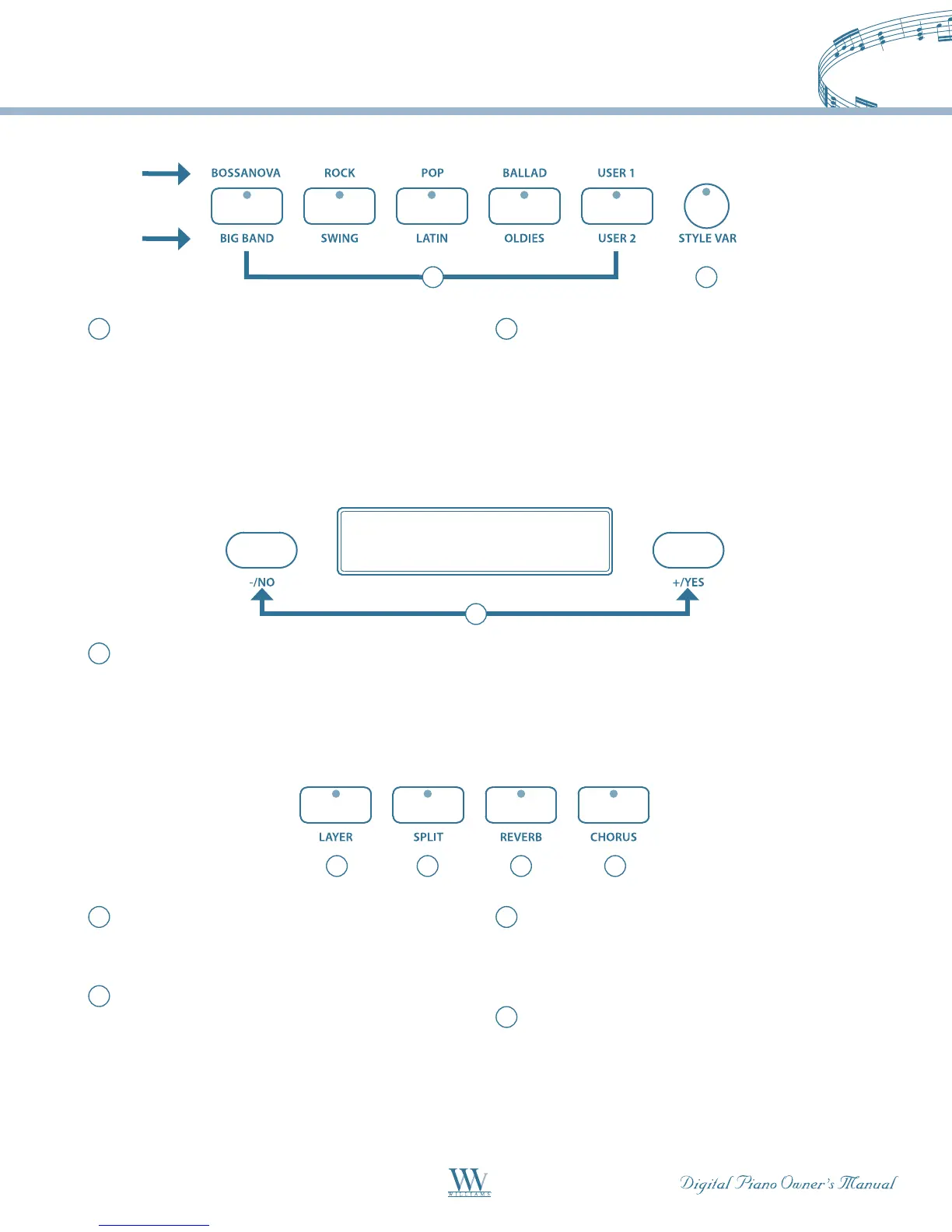
Enter Keys – Use the +/YES, -/NO buttons
directly while using the voice, style or other
settings. These buttons are also used to access or
alter many of the function features or when input
is necessary.
16
Layer–EngagingtheLAYERbuttonactivatesa
secondvoicethatis”tonemixed”withtheselected
keyboard voice.
17
Split – Divides the keyboard into two sections,
each assigned a different voice. In the right-hand
section, the original or layered voice will sound,
and in the left-hand section a different voice can
be assigned.
18
Reverb – Reverb adds space and ambience to
the sound, simulating the effect of playing in a
big room or hall where the sound reverberates off
the walls and ceiling.
19
Chorus – The Chorus effect adds depth and
spaciousness to the selected keyboard voices.
13
Quick Select Style Buttons – Each Style button
controlstwostyles,oneintheAbank(printed
above the style button) and one in the B bank
(printed below the style button) for a total of 10
QuickSelectstyles(8Presetsand2User-dened).
Please see the Rhythm Style section of this manual
for more information.
14
Style Var – The five quick select style buttons are
eachassignedtotheAandBbank.Pressthe
STYLEVARbuttontoalternatebetweenAandB
banks for Style Quick Select. The button indicator
is lit when the B bank is selected.
13 14
15
16 17 18 19
B BANK
A BANK















 To Next Page