15
8
Support02@wimius.com
EN
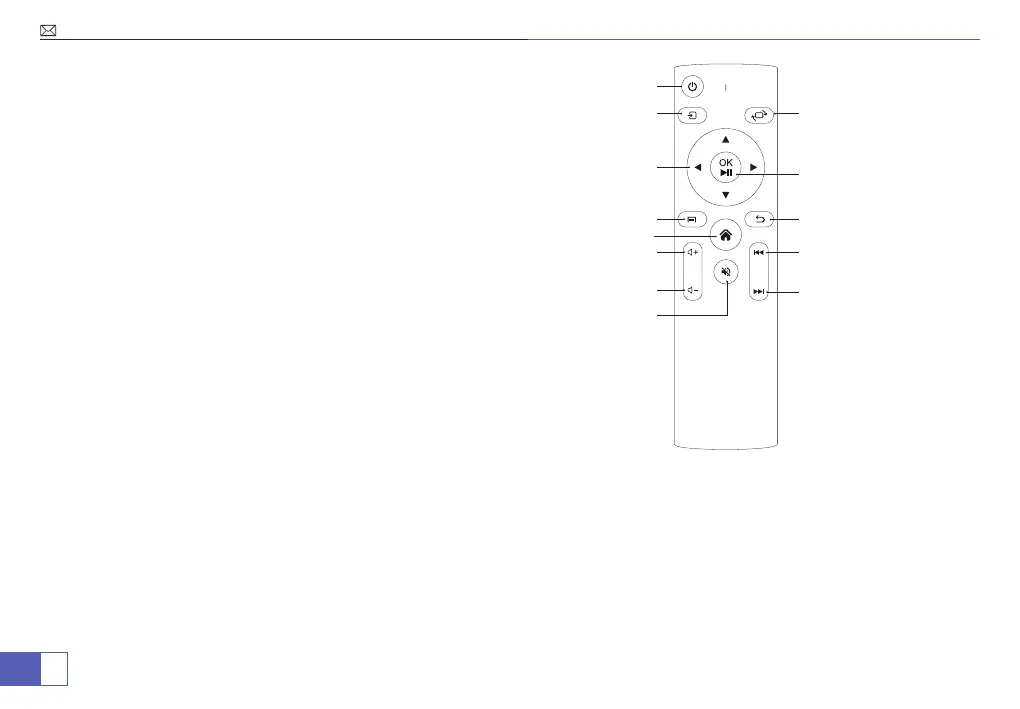
Remote Control
1. Power
2. Signal Source
3. Arrow keys
4. Menu
5. Home page
6. Volume+
7. Volume-
8. Mute
9. Flip
10. Conrm
11. Back
12. Previous
13. Next
1
2
9
3
10
4
11
13
12
5
6
7
8
1. Install 2 pieces of AAA batteries(not included) into the remote before using it. Do not combine new batteries with
old ones in remote controller, which can cause operation failure due to insufcient power supply.
2. When using the remote control, please make sure that the signal transmitter of the remote controller aims at
infrared signal of the projector.
3. When you are not using the remote controller for a long period. Please take out the batteries to prevent it from
leakage.
NOTE:



 To Next Page