15
9
Support02@wimius.com
EN
Installation
Installing the Projector
How to clean the “ Black Spot”?
Keep the projector vertical and towards the mid of projector screen, keep the projection image at on the screen.
The S26 has special clean door to help you clean the inner lens, it will greatly extend your use lifespan and
enhance the movie enjoyment!
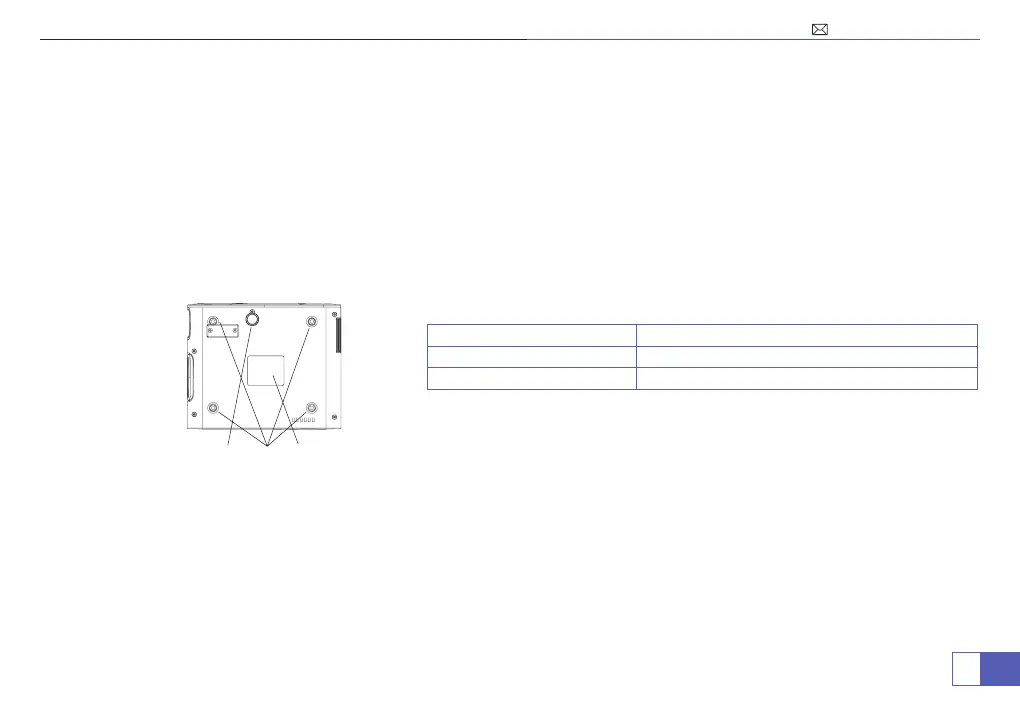
1. To adjust the tilt base, unscrew the support rod at the bottom of the projector, see below picture.
2. For Ceiling mount, there are 4 holes at the bottom of the projector (M5*10mm). Please slowly unscrew the 4 black
rubbers, then you can nd the holes for ceiling mount, see below picture.
NOTE: The hanging bracket or ceiling mount stand is not packaged.
1
2 3
1. Support base thread Adjust the height of the projector
2. Rubber Pads/Holes Fix with M5x10mm Screws
3. Dusting Mouth Cover Dismantle it to clean the screen inside
Please Kindly Note:
Any electrical appliances will automatically inhale dust during operation, so man dust falls
into the projector lens, it will have "Black dots" in the screen, it will make bad enjoyment to your use!



 To Next Page