6400 Reference Manual
13
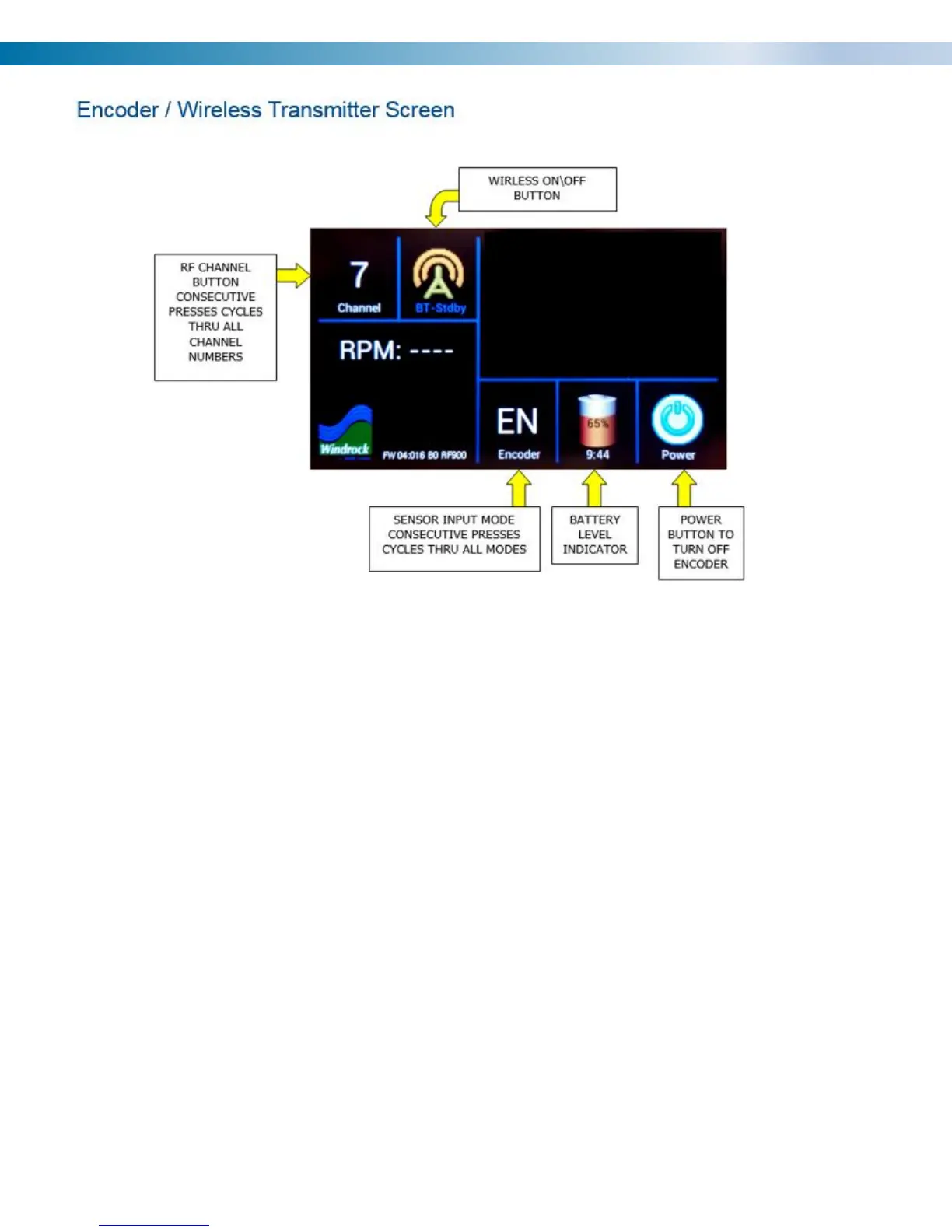
The encoder has a touch screen with icon buttons.
The 6400 encoder has the ability of choosing from 8 different wireless frequencies by selecting the channel the
encoder is to use.
Wireless Channels and Frequencies:
• Channel 0 = 903.37 MHz
• Channel 1 = 906.37 MHz
• Channel 2 = 907.87 MHz
• Channel 3 = 909.37 MHz
• Channel 4 = 912.37 MHz
• Channel 5 = 915.37 MHz
• Channel 6 = 919.87 MHz
• Channel 7 = 921.37 MHz
Note: If a 6320 analyzer is running in the general vicinity of a 6400 analyzer interference will occur with the
6400 encoder / wireless transmitter signal if it is set to Channel 7. The 6320 transmitter signal is not compatible
with the 6400 hardware.
Note: When powered off the screen will turn back on by touching the screen. Be sure to remove encoder /
wireless transmitter battery when storing in equipment case to prevent encoder / wireless transmitter from
turning on and lowering battery charge.


 To Next Page