6400 Reference Manual
32
Ultrasonic Gain Adjustment
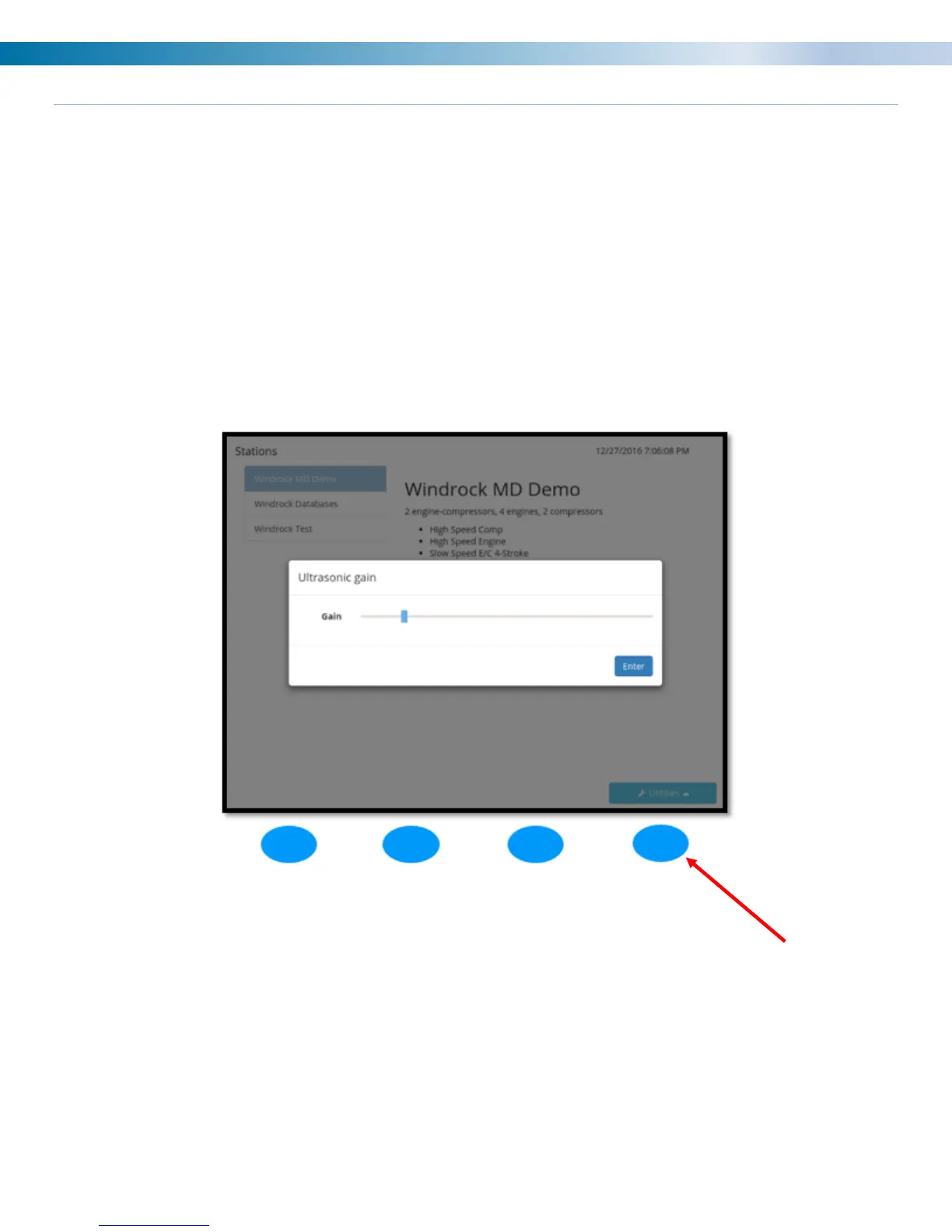
The ultrasonic sensor gain is adjusted via the Utilities menu on the 6400-analyzer screen. Once Utilities is
selected, a menu list will be displayed on the analyzer. Select option 4 (Ultrasonic gain) from the Utilities menu
and the adjustment box below will display on the analyzer screen. Use the arrows on the analyzer to adjust the
gain to the desired setting and then select the ENTER (blue) button on the analyzer to save the setting.
Note: When adjusting the gain, it is best to do so with an ultrasonic trace on the screen. By doing this will allow
visual adjustment.
Note: When setting the gain in the analyzer for the ultrasonic the setting is stored globally in the analyzer. This
means that when you set the gain using the ultrasonic, when you go to take data on another machine the gain
will still be set to where it was when last used.


 To Next Page