6400 Reference Manual
20
Selecting a Wireless Transmitter Channel
The 6400 encoder / wireless transmitter has the ability of choosing from 8 different wireless frequencies by
selecting the channel the transmitter is to use.
When picking a channel, the one with the least amount of RF traffic is most desirable. To determine this,
perform the following steps…
1) With the wireless encoder / wireless transmitter off, on the 6400 analyzer open the Utilities menu and
select option 5 (Encoder).
2) The analyzer will begin scanning all 8 available RF channels. Let the analyzer perform a complete scan
of all available channels.
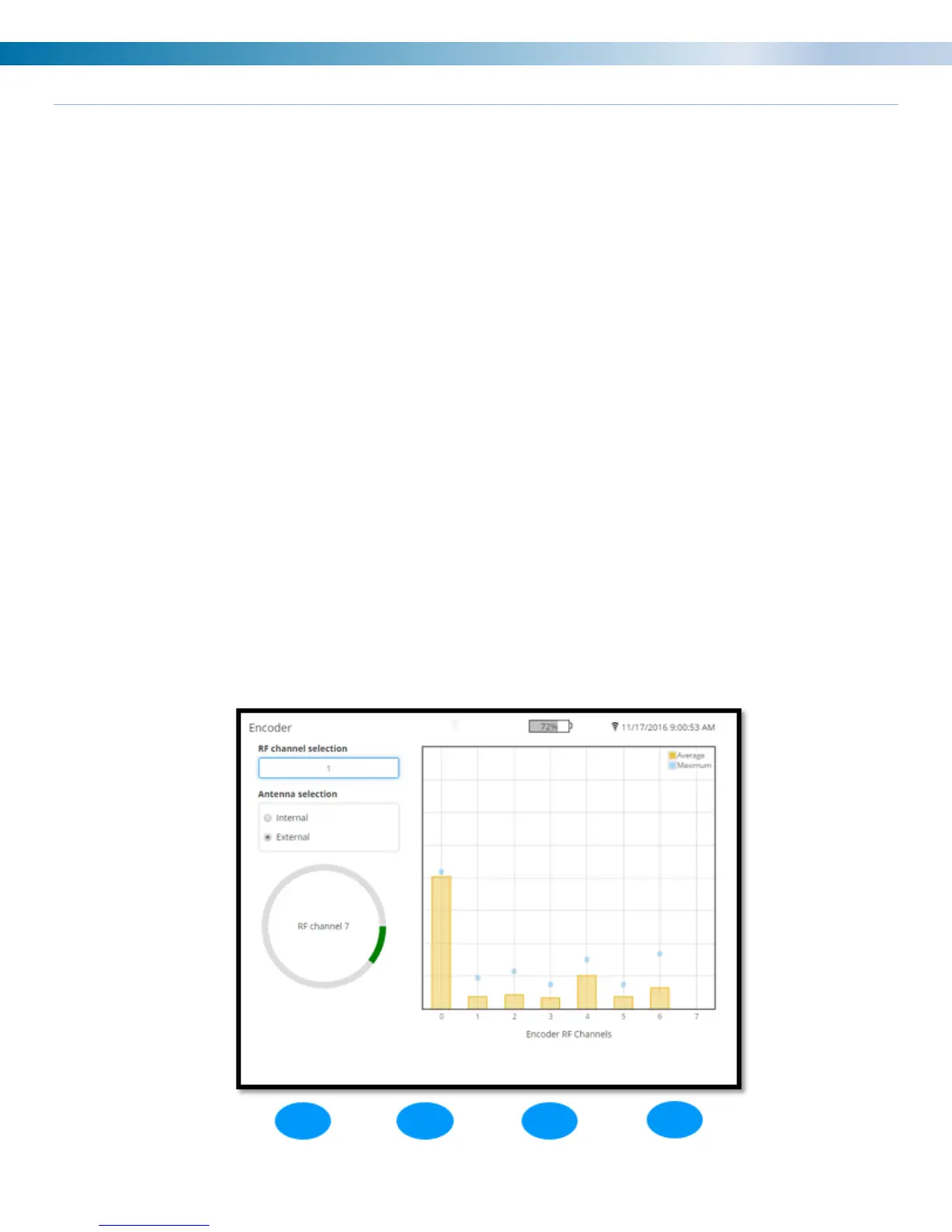
3) Upon performing the scan select the channel with the lowest bar. In the example below, based on the
performed scan we would want to select channels 1, 2, 3, or 5.
4) Once you have made your choice enter the RF channel number in the RF channel selection box by
using the keypad on the analyzer.
5) After entering the channel number on the analyzer push the down arrow to enter the antenna selection
field. Use the left and right arrows to toggle between the internal and external antenna choices. This is
in reference to the antenna on the analyzer. For achieving a stronger signal utilize the external antenna
option with the antenna attached to the analyzer.
6) Turn on the wireless encoder / wireless transmitter and select the channel that was chosen in the
previous step.
7) Press the BACK (green) button on the analyzer to exit out of the screen and retain the channel
selected.


 To Next Page