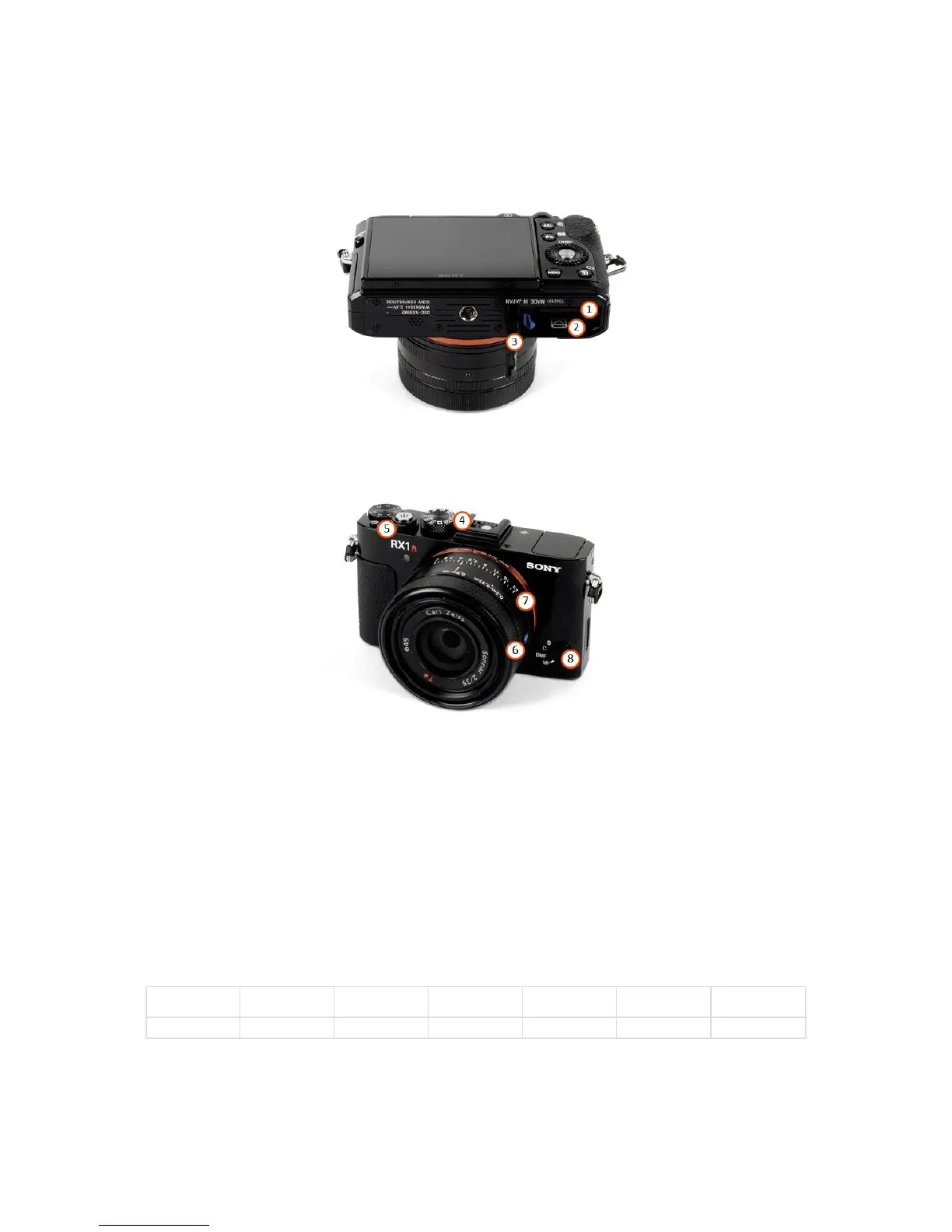
WingtraOne 40MP RX1R2
1. SD card slot (use at least 128GB SD card size)
2. Battery compartment
3. Closure lid - has to stay open
4. Mode dial - default "2"
5. Power ON/OFF switch - default "ON"
6. Focus ring
7. Aperture selection ring
8. Focus Mode dial
During the flight, the dummy battery powered by WingtraOne needs to be inserted into the battery compartment. To change the settings without powering on WingtraOne,
the external camera battery can be used. The Charging Accessories chapter tells you how to charge this battery.
Check and Adjust Camera Settings RX1R2
In most cases, the default camera settings (Mode Dial on 2) should be fine. If you want to change the settings, you have to power on WingtraOne and adjust the exposure
settings.
Camera
Program Mode
Metering Mode
Shutter Speed
[s]
Aperture,
f-Number
ISO Settings Image Quality Mode Dial
Manual Exposure Multi Segment 1/2000 4.5 Auto ISO fine 2
The default settings give good results in large range of light conditions. The maximum ISO the camera will adjust is ISO 6400. In case of dark conditions you can decrease
the shutter speed down to 1/1500s or open the aperture further (take the camera out and turn the aperture ring to a smaller number).
To save different exposure settings permanently they have to be stored as a memory recall function. Set the mode dial to "M" and adjust the desired settings on the
camera like file size, compression, metering mode, WB, shutter priority, shutter speed, or ISO. Go to the settings menu and save the settings to memory recall "1" or "3".
Make sure not to overwrite the default settings by Wingtra on "2". Then turn off and on the camera via the Power switch on the camera. To use the desired exposure



 To Next Page