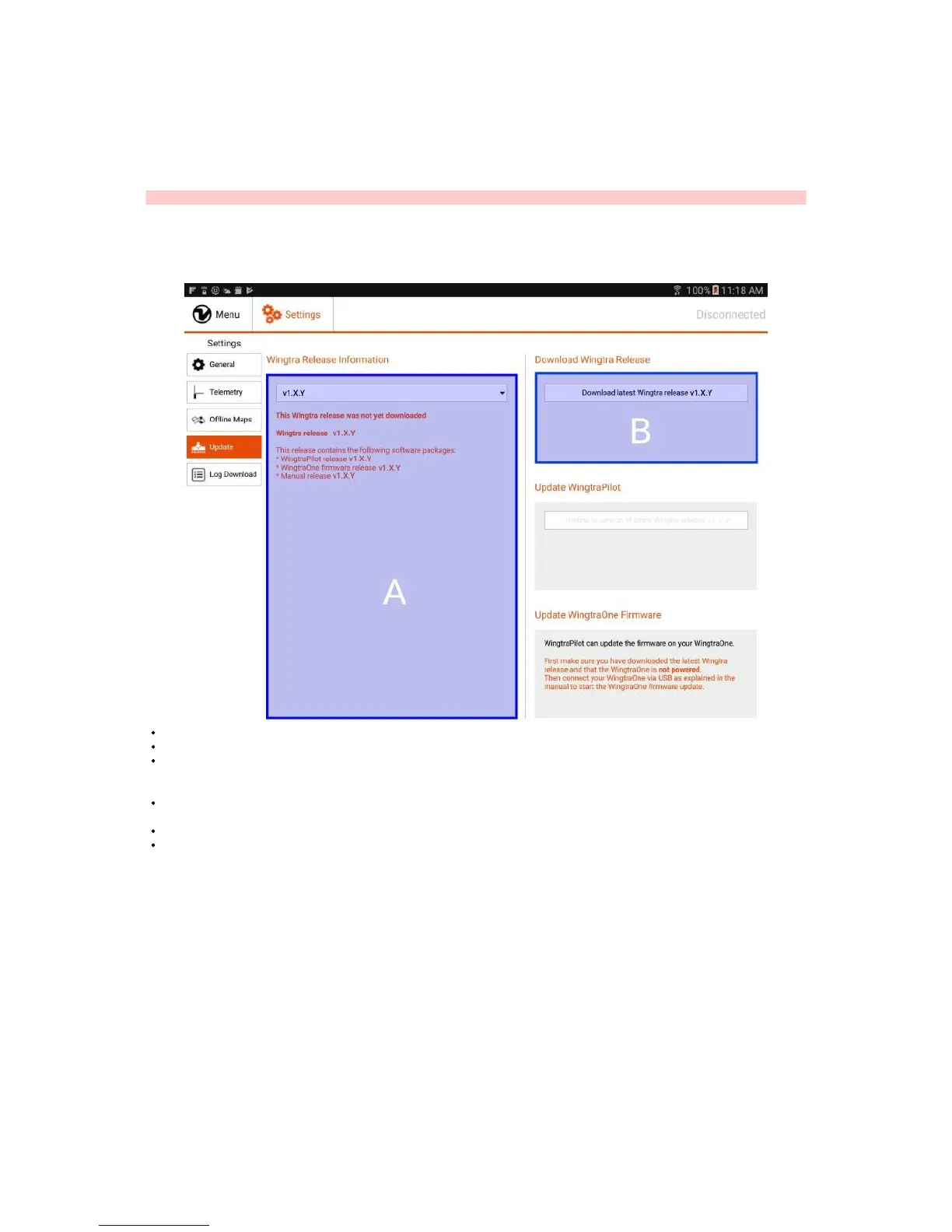
Update WingtraPilot & WingtraOne
You will profit from software updates Wingtra provides for both WingtraPilot and the WingtraOne firmware. When connected to the internet WingtraPilot will inform you
when a new update is available. To enable the latest software improvements please follow the instructions below to update your WingtraPilot and WingtraOne.
Caution: Do not update the operating system of the tablet unless we tell you to do so.
Update WingtraPilot
Step 1: Download Latest Wingtra Release
Start WingtraPilot.
In the welcome menu, click on "Update the WingtraOne firmware or WingtraPilot"
On the left side (A) you will see the release information of the latest Wingtra release and the information that this release hasn't been downloaded yet. The Wingtra
release contains both a WingraPilot and a WingtraOne Firmware release. Using the drop down menu you can also take a look at the release information of earlier
Wingtra releases.
On the right side (B), click on "Download latest Wingtra release v1.X.Y" to start the download of the latest Wingtra release. Make sure you are connected to the
internet.
Wait until the top progress bar is full and you see "Download completed" in (B). If the download does not complete within 5 minutes, close WingtraPilot and try again.
You can now continue with the WingtraPilot update.
Step 2: Update WingtraPilot



 To Next Page