SmartPAC PRO User Manual 1143100
Chapter 3 – SmartPAC PRO Initialization Mode 85
Chapter 3 – SmartPAC PRO Initialization
Mode
This chapter shows you how to make settings in SmartPAC PRO Initialization mode. Initialization
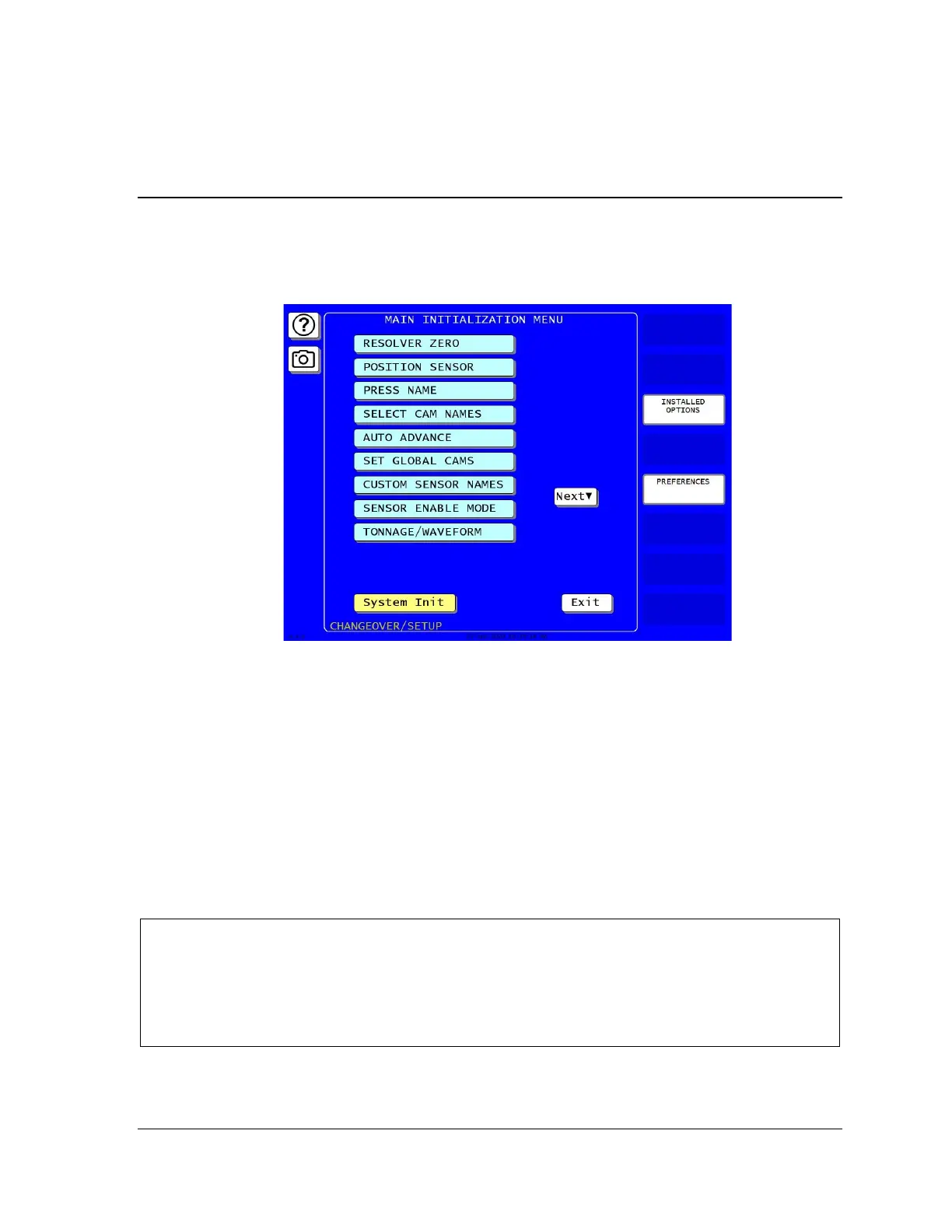
settings, which are entered via the Main Initialization Menu (see Figure 3-1), control operation of
SmartPAC PRO for all tools. You make settings for individual tools in Program mode, Chapter 4.
Figure 3-1. Main Initialization Menu
(Includes some options. Your display may look different.)
Enter the Initialization Mode by selecting “Initialization Menu” from the SmartPAC PRO main
programming menu.
The following sections cover zeroing the resolver, enabling the position sensor, setting the brake
monitor, controlling security access, setting communications parameters, and other operations. It also
documents functions related to programmable cams and die protection, such as entering custom cam
channel and sensor names and setting global cams.
If you have SmartPAC PRO options installed, also make Initialization settings for them. Refer to the
user manuals for the options you have purchased for instructions.
NOTICE
The following sections show you how to use the selections available on the Main Initialization Menu
to set initialization parameters for SmartPAC PRO with ProCamPAC and DiProPAC.
• DiProPAC: Chapter 6, DiProPAC in Initialization Mode, page 161
• ProCamPAC: Chapter 7, Initialization, page 202



 To Next Page