Noise Squelch
Noise squelch is a more powerful tool than RF squelch because it actually looks at the quality of the signal from
the TX relative to the noise floor on the channel which can vary over time. With the noise squelch set to ON
you can set the RF squelch to a much lower level.
Tone Squelch
MCR54 is able to detect a digital tone squelch generated by a Wisycom transmitter (ex.
MTH410/MTH400/MTP40S/ MTP41S/MTB40S/RPU500).
Tone squelch ON: when the tone squelch is enabled the audio is muted unless the correct carrier is detected.
Tone squelch allows to work with lower RF squelch, increasing the coverage and the robustness especially in
presence of digital television carriers (DVB-T).
Audio
Max audio level output can be set:
• from 0 to -30 dBFs (1 dB step) for digital AES3 output
• from 18 dBu to -24 dBu (1 dB step) for analog BASE output
• from 18 dBu to -24 dBu (1 dB step) for analog TOP output
PTT
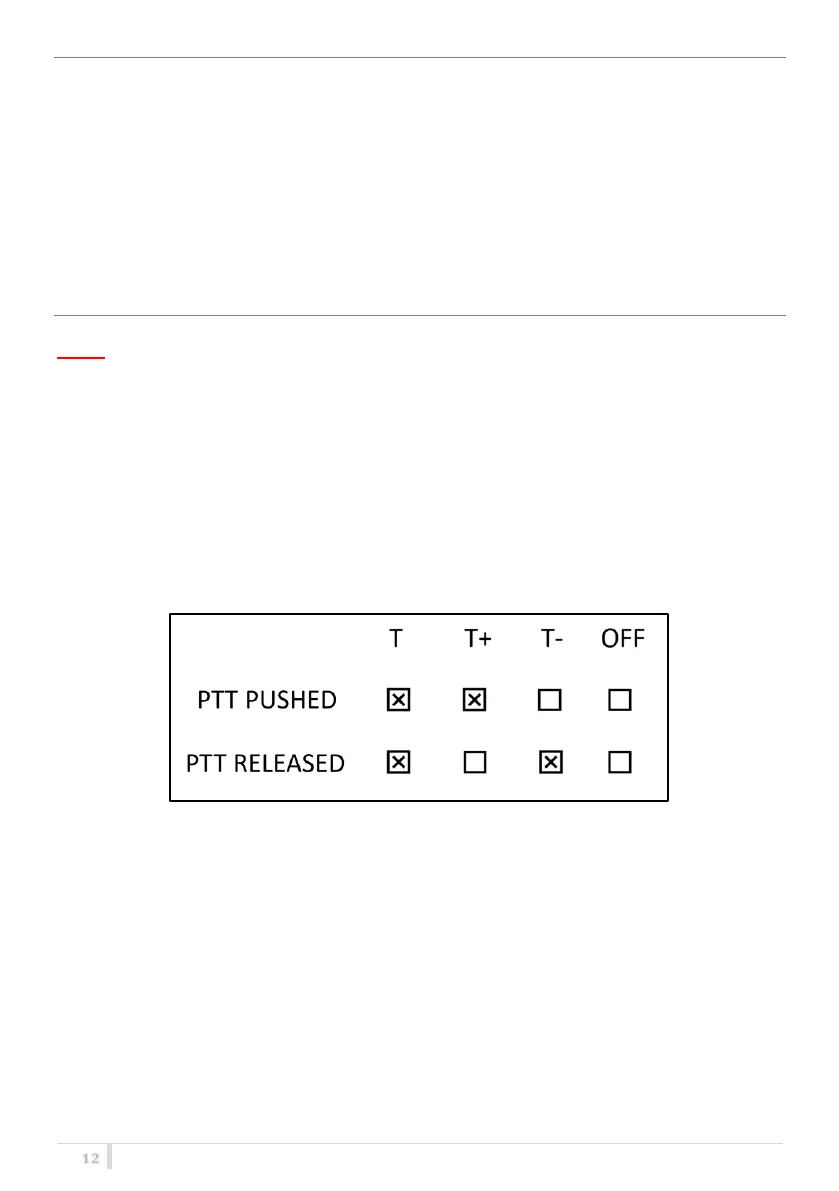
It’s possible to choose the status of audio output for the Base and the Top when transmitter’s PTT
button is pushed or released. The following table explains the logic used for the nomenclature:
[X]: indicates that audio output is enabled.
[ ]: indicates that audio output is disabled.
Phase
To change audio phase of 0° or 180°.
Cal. Tone
If Cal. tone is enabled, a calibration tone is transmitted from the outputs of the receiver and the
audio LED of the relative RX become blue (to turn off the calibration tone, go on the menu Advanced
> RX and press EXIT)



 To Next Page