5
2 Product info
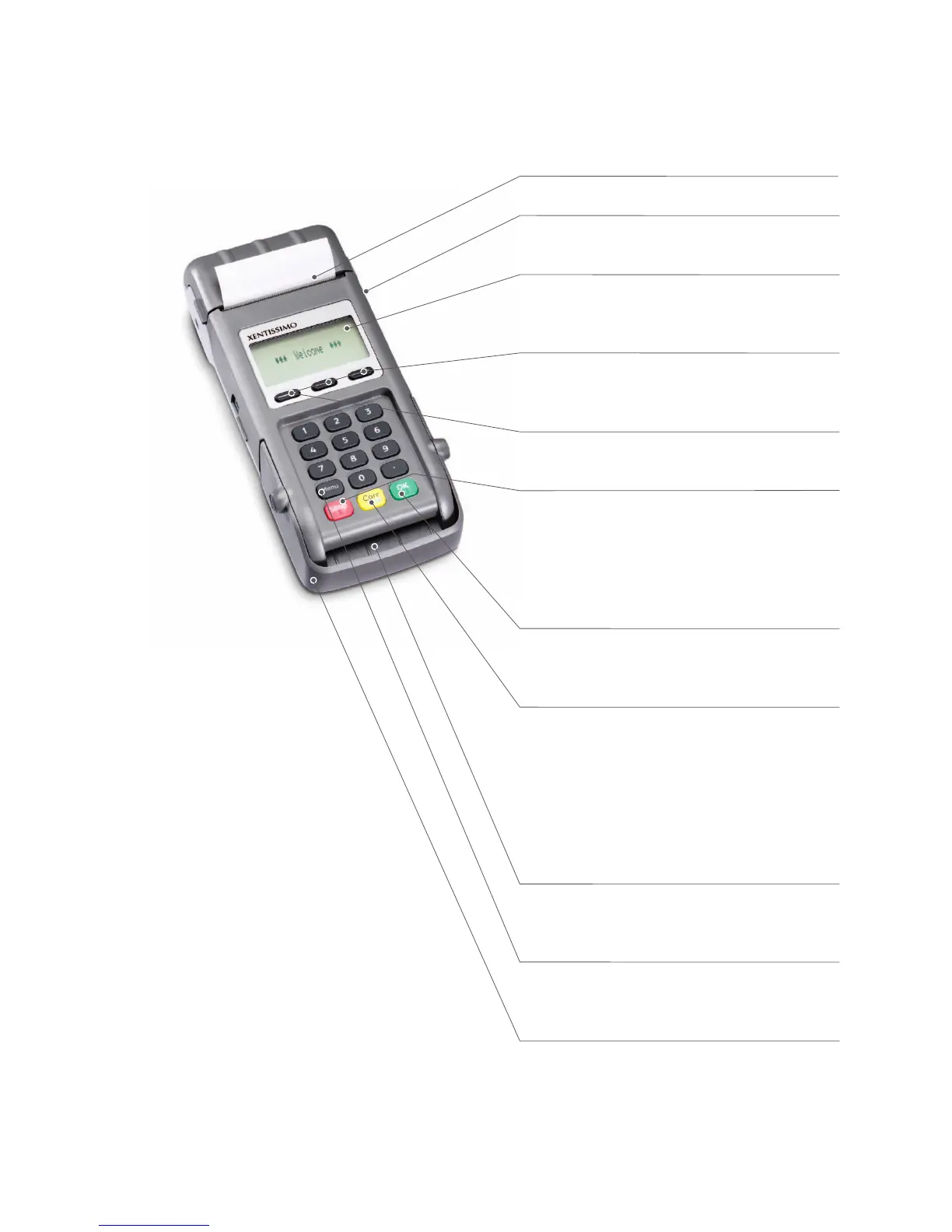
2.1 Terminal overview
Thermal printer
Magnetic strip reader (on the side)
For cards with magnetic strips.
Display
The next step to be taken is always shown on
the display.
Navigation buttons
You can use these three buttons to navigate
through the menu (up/down/conrm).
Special case
<Conrmation special signalization>.
<STOP> button
Active procedures can be stopped using this
button. The terminal can also be switched off
completely by pressing the button for more than
5 seconds (to do so, the terminal must not be
connected to the power supply).
<OK> button
All entries must be conrmed using the <OK>
button.
<Corr/On> button
– Incorrect entries can be corrected using the
<Corr> button.
– Press the button to activate the terminal from
stand-by mode.
– The terminal will restart if the button is
pressed for more than 5 seconds. All data will
be retained.
Chip reader
For chip cards (EMV-capable cards and post-
cards).
<Menu> button
Activates battery charging, displays reception
strength.
View protection
The swipe and chip reader can only be used
when the view protector is raised.
The view protection cannot be removed!



 To Next Page