6
2.2 Display symbols
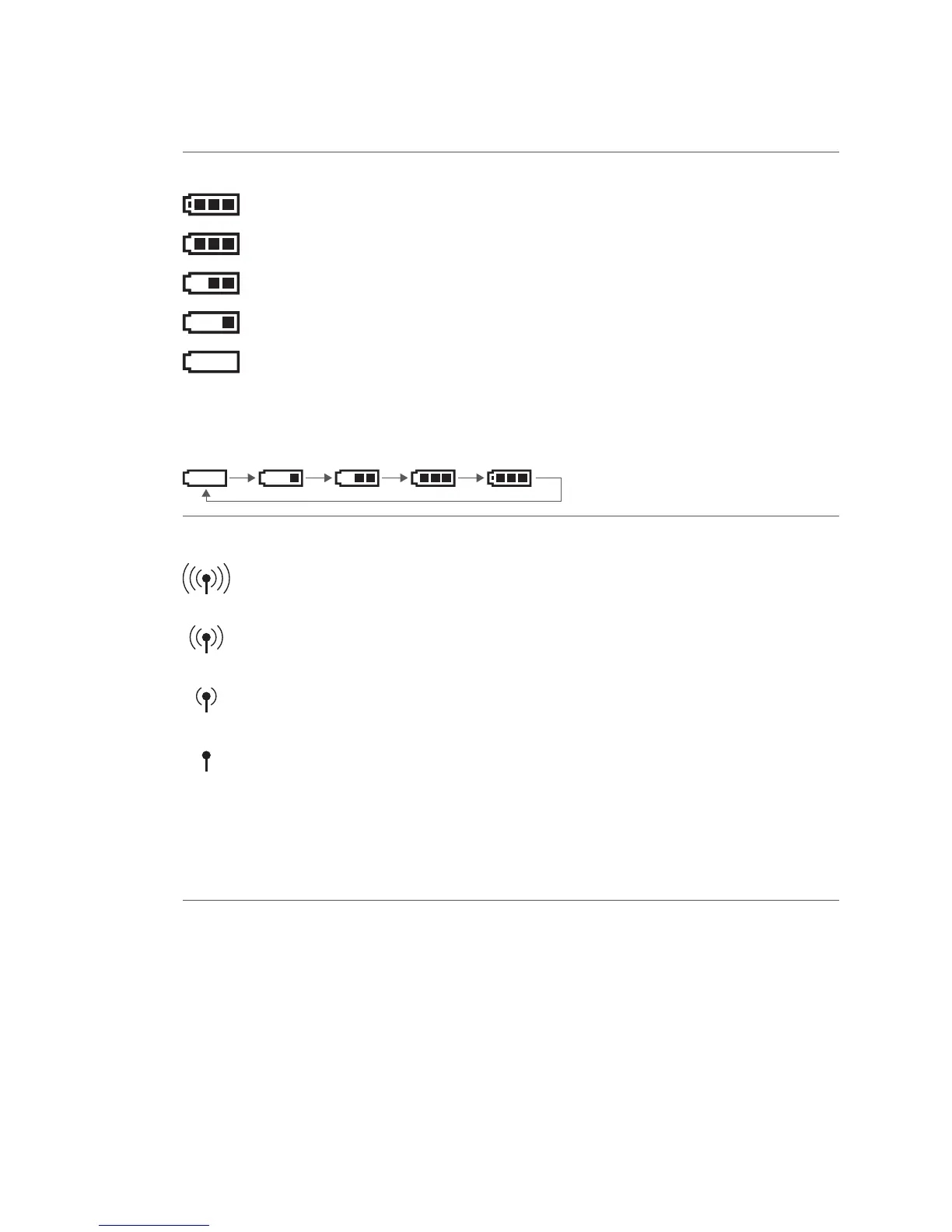
Battery
Battery level 95 – 100%
Battery level 66 – 95%
Battery level 33 – 66%
Battery level 10 – 33%
Battery level 0 – 10%
! If the battery symbol does not appear, the battery is empty.
Recharging: The symbols are shown in the following order when the battery is recharging:
WLAN Only appears when WLAN communication is used.
WLAN is connected to an access point, the IP address is valid, and the reception
strength is 100%.
WLAN is connected to an access point, the IP address is valid, and the reception
strength is greater than 66%.
WLAN is connected to an access point, the IP address is valid, and the reception
strength is greater than 33%.
WLAN is connected to an access point, the IP address is valid, but reception is
poor.
! If the WLAN symbol ashes, there is a connection to the access point, but the IP address is
invalid.
! If the WLAN symbol does not appear, either WLAN is not available or there is no connection to
the access point.



 To Next Page