page 32 of 84
4.6.2 DESCRIPTION OF VARIOUS DISPLAY FORMS ON THE BLUEMETER BASIC
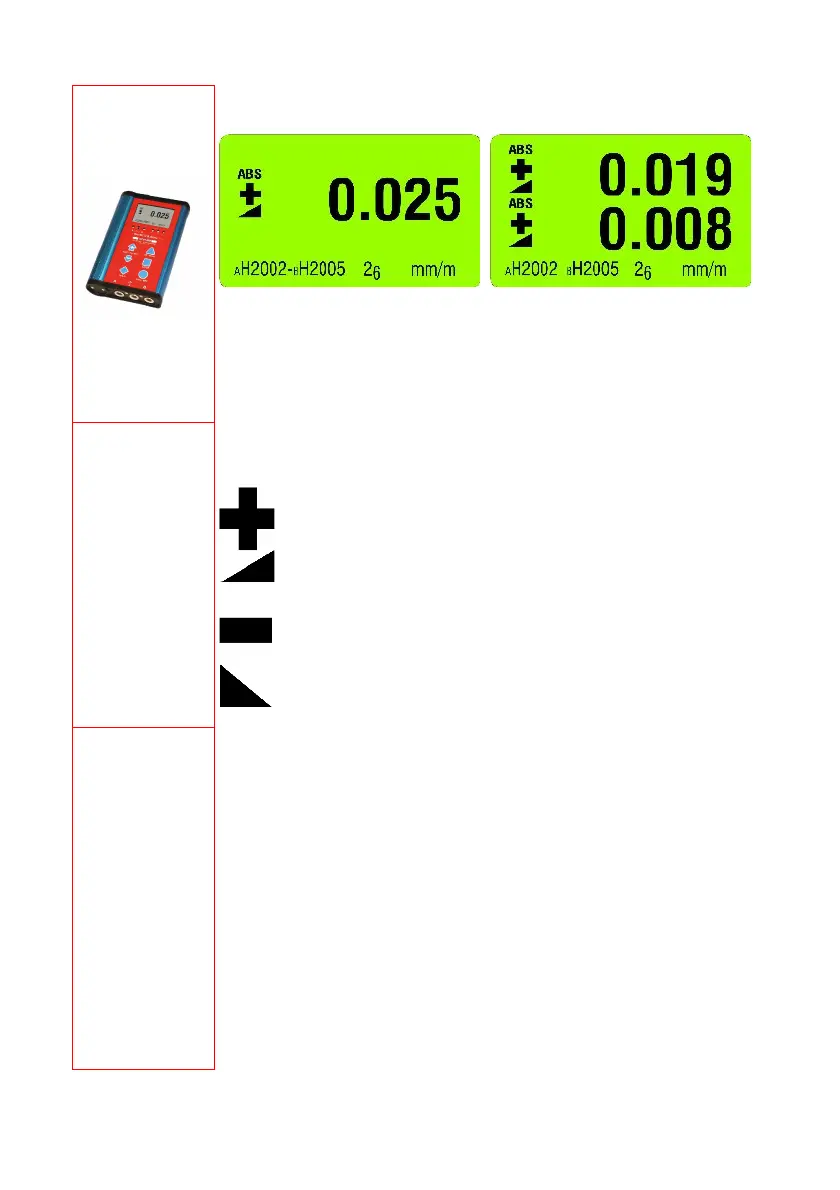
Main display
Display of the actual measured value
Display in [mm/m]
The display of the BlueMETER BASIC
shows the difference value between
instrument "A" H2002 and
instrument "B" H2005
Display in [mm/m]
The display of the BlueMETER BASIC
shows the measured values of the
instrument "A" H2002 (above) as well as
the instrument "B"“ H2005 (below)
Display of the
inclination
The picture shows the direction of the value’s inclination
Inclined to the right: positive
Declined to the right: negative
Menu
SENSOR
REFRESH
ABSOLUTE
REL.ZERO
UNIT
ABS.ZERO
FILTER
RADIO
JOIN
LEAVE
Setting the active sensors/ports and selection of the single or
differential measurement display. BlueMETER BASIC only
Update of the list of instruments
Standard measuring mode
Relative measurement
Setting the required units
Setting absolute zero
Setting a filter type (ZEROTRONIC only)
Switch radio mode ON or OFF
Joining a group of instruments
Leaving a group of instruments



 To Next Page