page 29 of 84
4.6 OPERATING THE BLUEMETER BASIC
4.6.1 DESCRIPTION OF THE VARIOUS KEYS
<ON/MODE> - Key
Function - 1 –
Starting the BlueMETER BASIC. Press the <ON/MODE> key until all the 5 LED‘s are
illuminated and on the display it is shown "SYSTEM TEST".
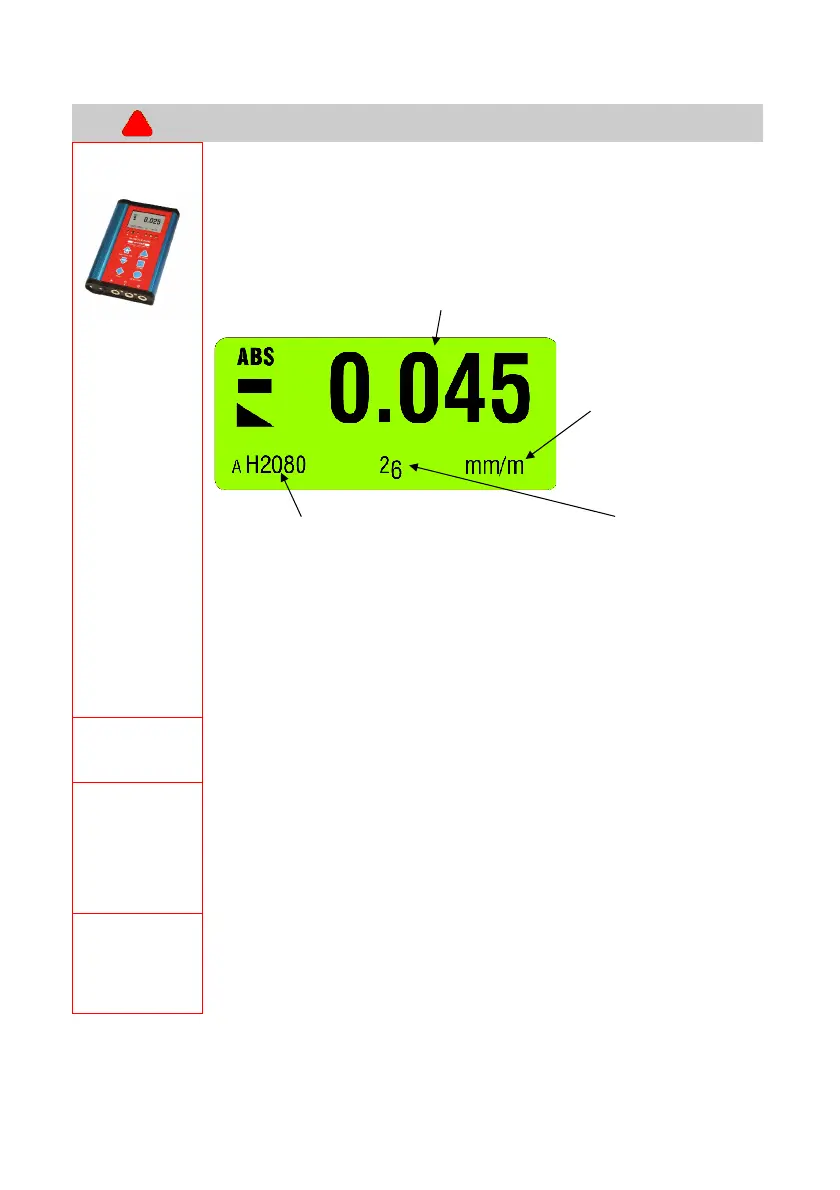
After starting the actual measured value as well as the last used unit is displayed.
E.g.:
Actual value and unit set
actual leading sign and showing the
measurement mode (in the example: ABS = ABSOLUTE mode)
Unit in
[mm/m], resp. [µm/m]
or in
[Arcsec]
Serial number of instrument used as identification.
Actual battery power
Deactivating the automatic instrument shut off of the BlueMETER BASIC:
When pressing the <ON/MODE> key at the starting of the instrument longer
than 10 seconds all LED’s start blinking and the automatic shut off is
deactivated.
Exception:
When the BlueMETER BASIC is connected to an external power supply the
instrument never shuts off automatically.
Function - 2 -
The key <ON/MODE> is used for handling the internal menu. When pressing several
times other menu points are displayed.
Function - 3 -
For shutting off the BlueMETER BASIC the key <ON/MODE> must be pressed
continuously until all 5 LED’s are on and the instrument’s display is completely off.
When the key <ON/MODE> is continuously pressed for longer than 15 seconds, a date
and a 4-digit number is displayed. This number shows the software version loaded in
the instrument.
Function - 4 -
Setting the displayed values (memory values) of the functions "REL.ZERO" and
"ABS.ZERO" to ZERO. When a value is displayed in this function the value can be set
to ZERO by pressing the key <ON/MODE> or the value can be altered step by step by
using the key <ZERO/SELECT
±>. The action must be confirmed by using <ENTER>.



 To Next Page