CI6X SERIES SPECTROPHOTOMETER
59
STRENGTH MODE
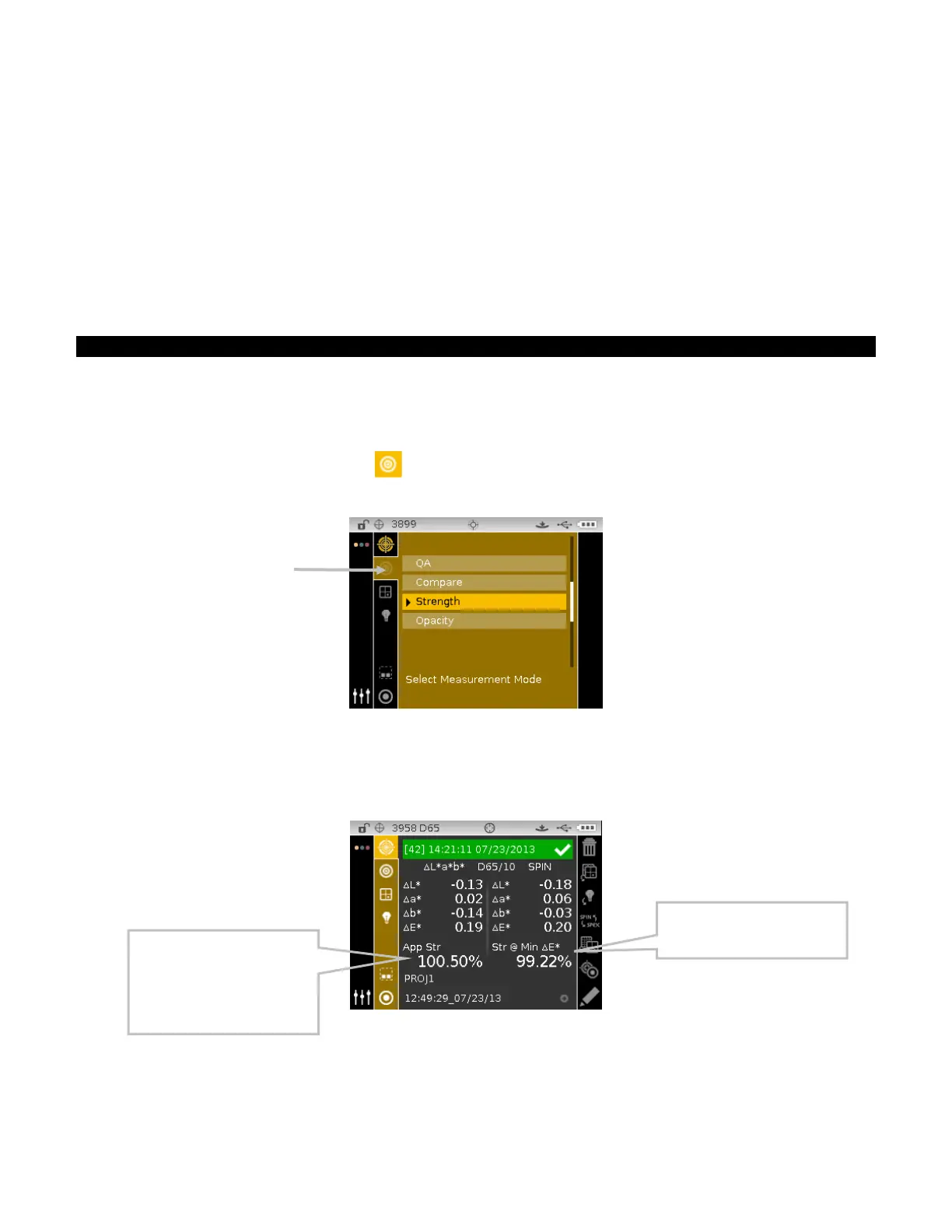
The Strength mode calculates the color strength of the measured sample compared to the current
standard. Strength is calculated using the method selected in the instrument configuration
(Apparent, Chromatic, or Tristimulus). Once measured, the color data can be calculated and
displayed for color at equivalent strength (@ 100%) and minimum Delta E*. Chromatic display is
Str @ wavelength (e.g. 440 nm) and Str @ Min dE*.
Several operations available in Strength mode are identical to those available in QA Mode. For
information covering Color Space, Illuminant/Observer, Project, and Standard selection refer to
the Measure Mode section.
Strength Measurement
The Strength mode displays the color strength of the measured sample. Difference data from the
standard is also displayed if a difference color space is selected.
To perform a strength measurement:
1. From the Measure screen, use the Up or Down navigation buttons to move the highlight focus
to the Measurement Mode icon
.
2. Select the Strength mode as previously explained.
3. Select the project, standard (if required), color space and illuminant/observer as previously
explained.
4. Position the instrument on the sample and take the measurement.
5. View measurement results.
.Predicted strength to achieve
minimum color values.
sample’s strength % and
method. If Chromatic is set, a
wavelength (e.g., 420 nm)
appears indicating the
calculation wavelength.












 To Next Page