Control Panel Messages
Phaser® 5550 Printer
6-69
Control Panel Messages
This topic includes:
■ Status Messages on page 6-69
■ Errors and Warnings on page 6-70
The control panel provides you with information and troubleshooting help. When an error or
warning condition occurs, the control panel displays a message informing you of the problem.
In many cases, the control panel also displays an animated graphic showing the location of the
problem, such as the location of a paper jam.
Press the Help button on the control panel to view additional information about the message or
menu displayed. The Help button is labeled with a ? symbol.
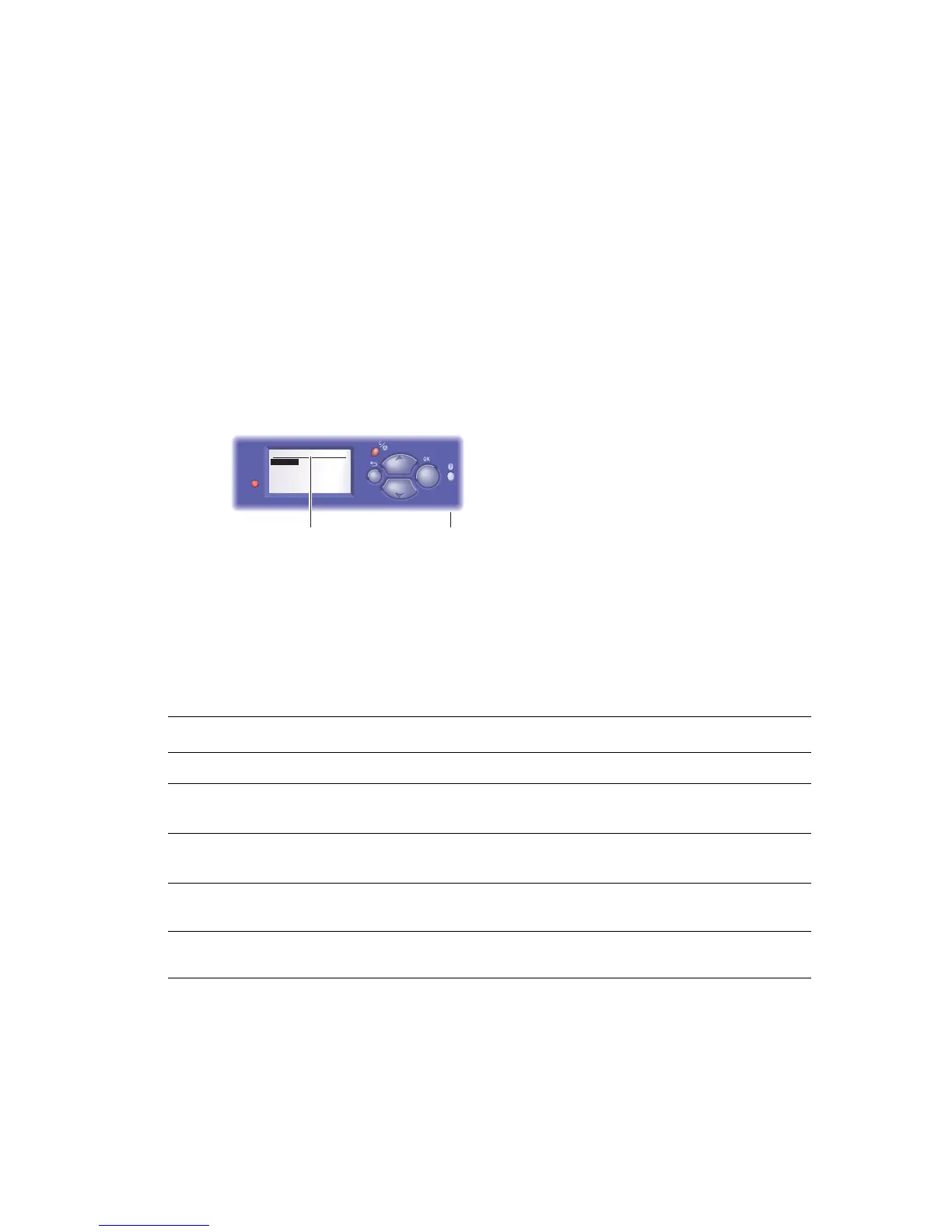
Some of the status messages that appear in the control panel are listed below:
Status Messages
1. Control panel display
2. Help button
Status Message Description
Ready to Print
The printer is ready to receive print jobs.
Processing data - Please wait The printer is processing data; wait until Ready
to Print
or Printing is displayed.
Receiving data - Please wait The printer is receiving data; wait until Ready to
Print
or Printing is displayed.
Printing page x of y A print job is printing; wait until Ready to Print
is displayed.
Warming up - Please wait
The printer is warming up. Print jobs can be
processed but not printed.
5550-120
2
Tray 2 Paper Type
Plain Paper
Heavy Plain Paper
Phaser Series-25 Premium
Transparency
Exit
1








 To Next Page