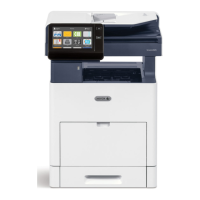
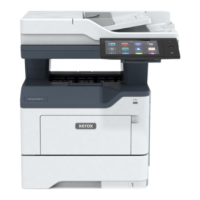
| N-up printing | 16 |
|---|
| Duplex printing | Yes |
|---|
| Print technology | Laser |
|---|
| Maximum resolution | 1200 x 1200 DPI |
|---|
| Duplex printing mode | Auto |
|---|
| Time to first page (black, normal) | 5.2 s |
|---|
| Print speed (black, normal quality, A3) | 17 ppm |
|---|
| Duplex print speed (ISO/IEC 24734, A3) black | 11 ppm |
|---|
| Print speed (black, normal quality, A4/US Letter) | 30 ppm |
|---|
| Optional connectivity | Wireless LAN |
|---|
| Wi-Fi | No |
|---|
| Cabling technology | 10/100/1000Base-T(X) |
|---|
| Security algorithms | 256-bit AES, FIPS 140-2, IPSec, SNMPv3 |
|---|
| Ethernet LAN data rates | 10, 100, 1000 Mbit/s |
|---|
| Mobile printing technologies | @PrintByXerox, Apple AirPrint, Mopria Print Service |
|---|
| Processor cores | 2 |
|---|
| Internal storage capacity | 320 GB |
|---|
| Sound power level (standby) | 4.1 dB |
|---|
| Sound power level (printing) | 6.8 dB |
|---|
| Copier resize | 25 - 400 % |
|---|
| Maximum copy resolution | 600 x 600 DPI |
|---|
| Maximum number of copies | 999 copies |
|---|
| Time to first copy (black, normal) | 4.3 s |
|---|
| Copy speed (black, normal quality, A4) | 30 cpm |
|---|
| Display | LCD |
|---|
| Control type | Touch |
|---|
| Product color | Blue, White |
|---|
| Display diagonal | 7 \ |
|---|
| Market positioning | Business |
|---|
| AC input voltage | 220 - 240 V |
|---|
| AC input frequency | 50 Hz |
|---|
| Power consumption (max) | 480 W |
|---|
| Power consumption (sleep) | 0.4 W |
|---|
| Power consumption (standby) | 94 W |
|---|
| Mac operating systems supported | Mac OS X 10.12 Sierra, Mac OS X 10.13 High Sierra, Mac OS X 10.14 Mojave, Mac OS X 10.15 Catalina, Mac OS X 10.15.3 Catalina, Mac OS X 11.0 Big Sur, Mac OS X 12.0 Monterey |
|---|
| Other operating systems supported | HP-UX 11, HP-UX 11.11, HP-UX 11.23, HP-UX 11.31, IBM AIX 5.3, IBM AIX 6.1, IBM AIX 7.1, IBM AIX 7.2, Solaris 10, Solaris 10 SPARC, Solaris 11, Solaris 11 SPARC, Solaris 8, Solaris 9, Solaris 9 SPARC |
|---|
| Server operating systems supported | Windows Server 2008, Windows Server 2008 R2, Windows Server 2012, Windows Server 2012 R2, Windows Server 2016 |
|---|
| Windows operating systems supported | Windows 10, Windows 11, Windows 7, Windows 8, Windows 8.1 |
|---|
| Scan to | E-mail, USB |
|---|
| Scan drivers | TWAIN, WIA |
|---|
| Scanner type | Flatbed & ADF scanner |
|---|
| Maximum scan area | 297 x 431.8 mm |
|---|
| Output color depth | 24 bit |
|---|
| Output grayscale depth | 8 bit |
|---|
| Image formats supported | JPG, TIFF |
|---|
| Document formats supported | PDF |
|---|
| Storage temperature (T-T) | 0 - 35 °C |
|---|
| Operating temperature (T-T) | 10 - 32 °C |
|---|
| Operating relative humidity (H-H) | 10 - 85 % |
|---|
| Faxing | - |
|---|
| PCL fonts | 83 |
|---|
| Printer fonts | PCL, PostScript |
|---|
| Printing colors | Black |
|---|
| Duplex functions | Copy, Print, Scan |
|---|
| Maximum duty cycle | 129000 pages per month |
|---|
| Number of PostScript fonts | 136 |
|---|
| Number of print cartridges | 1 |
|---|
| Page description languages | HP-GL, JPEG, PCL 5, PCL 6, TIFF, XPS |
|---|
| Total input capacity | 620 sheets |
|---|
| Total output capacity | 250 sheets |
|---|
| Paper tray 1 input capacity | 520 sheets |
|---|
| Multi-Purpose tray input capacity | 100 sheets |
|---|
| Auto document feeder (ADF) input capacity | 130 sheets |
|---|
| Custom media width | 139.7 - 297 mm |
|---|
| Custom media length | 182 - 431.8 mm |
|---|
| Duplex media weight | 60 - 169 g/m² |
|---|
| Paper tray media types | Bond paper, Card stock, Glossy paper, Heavy paper, Heavy printing media, Labels, Letterhead, Lightweight paper, Plain paper, Pre-Printed, Recycled paper |
|---|
| Paper tray media weight | 60 - 256 g/m² |
|---|
| ISO A-series sizes (A0...A9) | A3, A4, A5 |
|---|
| Multi-purpose tray media types | Bond paper, Envelopes, Glossy paper, Heavyweight paper, Labels, Letterhead, Plain paper, Preprinted forms, Recycled paper |
|---|
| Maximum ISO A-series paper size | A3 |
|---|
| Multi-Purpose Tray media weight | 60 - 216 g/m² |
|---|
| Auto Document Feeder (ADF) media weight | 38 - 128 g/m² |
|---|
| Current rating | 12 A |
|---|
| Browser supported | Microsoft, Internet Explorer, Microsoft Edge, Mozilla Firefox, Apple Safari, Google Chrome |
|---|
| Languages support | Multi |
|---|
| Supported network protocols | TCP/IP: HTTP/HTTPS, Internet Printing Protocol, LPR/LPD, Raw Socket Printing/Port 9100, IPv4/IPv6, WSD LDAP Bonjour/AirPrint FTP |
|---|



 To Next Page
 General
 Weight and Dimensions