Troubleshooting
WorkCentre 7800 Series Multifunction Printer 245
User Guide
Clearing Staple Jams
This section includes:
• Clearing Staple Jams in the Integrated Finisher .................................................................................................. 245
• Clearing Staple Jams in Office Finisher LX .............................................................................................................. 247
• Clearing Booklet Staple Jams in the Office Finisher LX ..................................................................................... 249
• Clearing Main Staple Jams in the Professional Finisher .................................................................................... 250
• Clearing Booklet Staple Jams in the Professional Finisher ............................................................................... 252
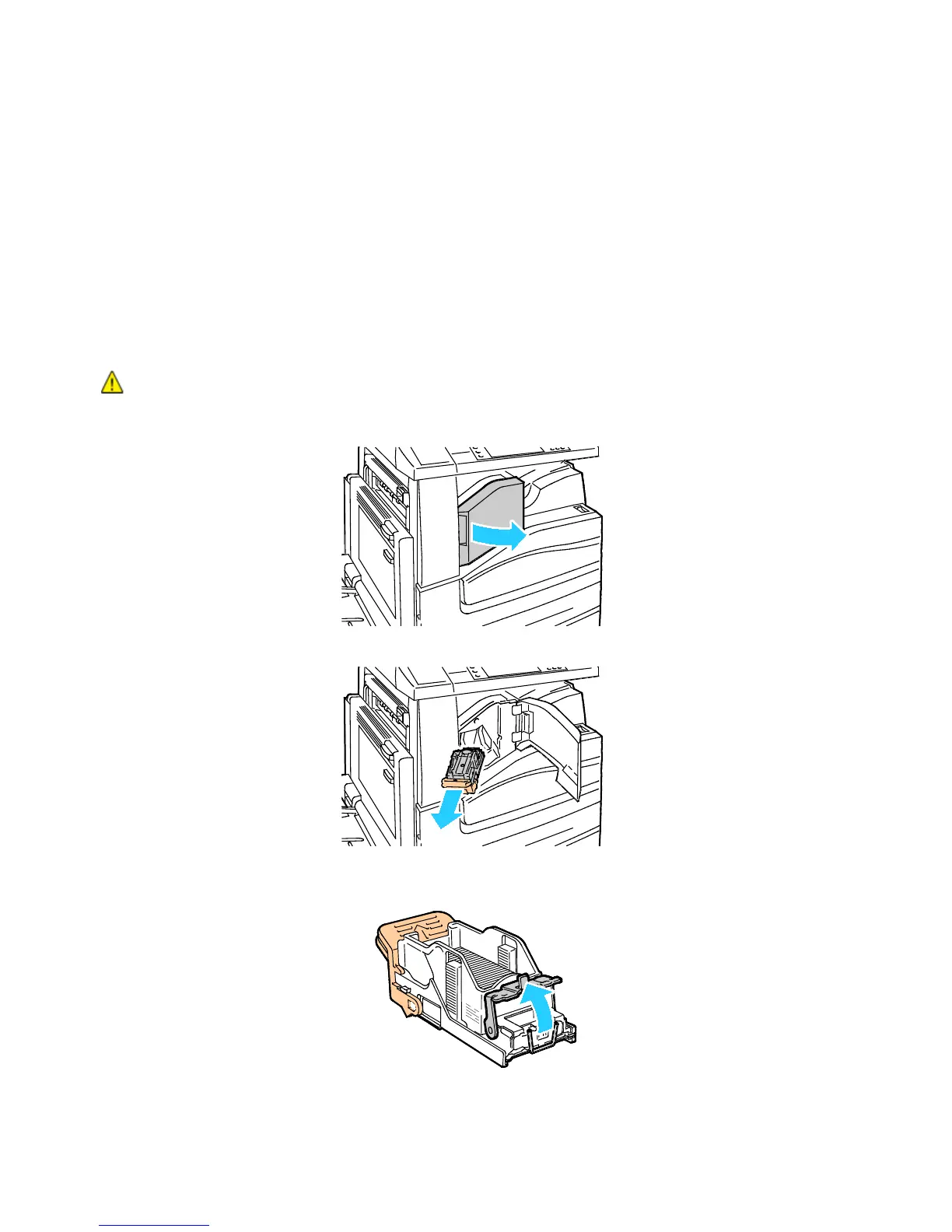
Clearing Staple Jams in the Integrated Finisher
WARNING: Do not perform this procedure while the printer is copying or printing.
1. Open the finisher door as shown.
2. Grip the staple cartridge by the orange handle and pull it firmly toward you to remove it.
3. Remove any loose staples or other debris from inside the finisher.
4. Pull the staple cartridge clamp firmly in the direction shown to open it.


 To Next Page
 Loading...