64
Connecting by Wi-Fi
Handset supports Wi-Fi (wireless LAN). Access the Internet
via a household Wi-Fi connection environment.
Automatic Updates for Optimizing Wi-
Fi Connection
While using Wi-Fi, updates for optimizing connection may
be received or applied automatically.
Selecting and Connecting to a Wi-Fi
Network
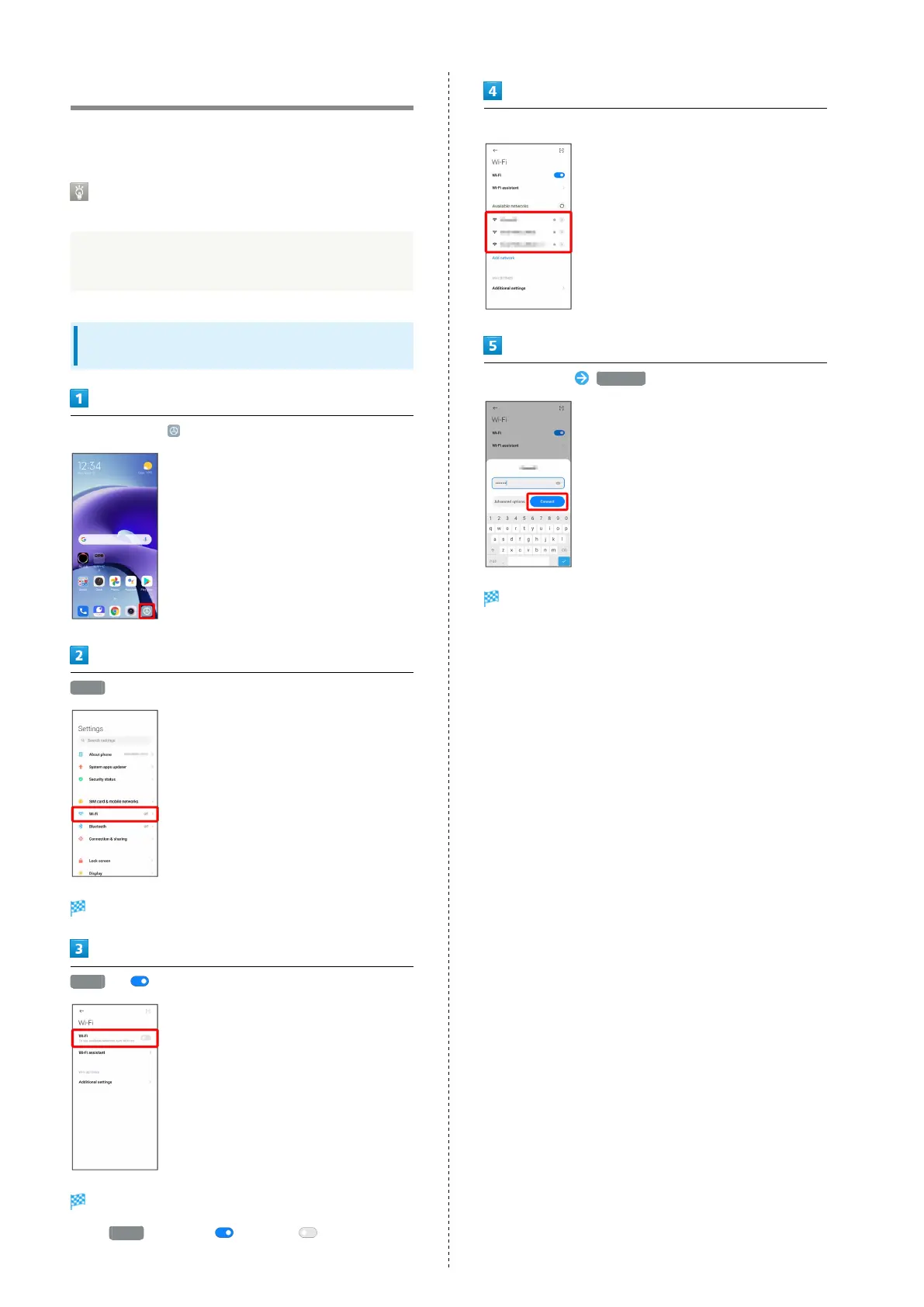
In Home Screen, (Settings)
Wi-Fi
Wi-Fi settings open.
Wi-Fi ( )
Wi-Fi is enabled.
・
Tap Wi-Fi to enable ( )/disable ( ).
Tap Wi-Fi network
Enter password Connect
Handset is connected.
・The password, for a household wireless LAN router, is
sometimes found on a sticker on the router (WEP, WPA, KEY,
etc.). Contact the router manufacturer for information.
For password for a public wireless LAN, check with user's
service provider.
・Entering a password is not required if a Wi-Fi network is
not security protected.















 To Next Page