5-4
ARRIVING ON SITE
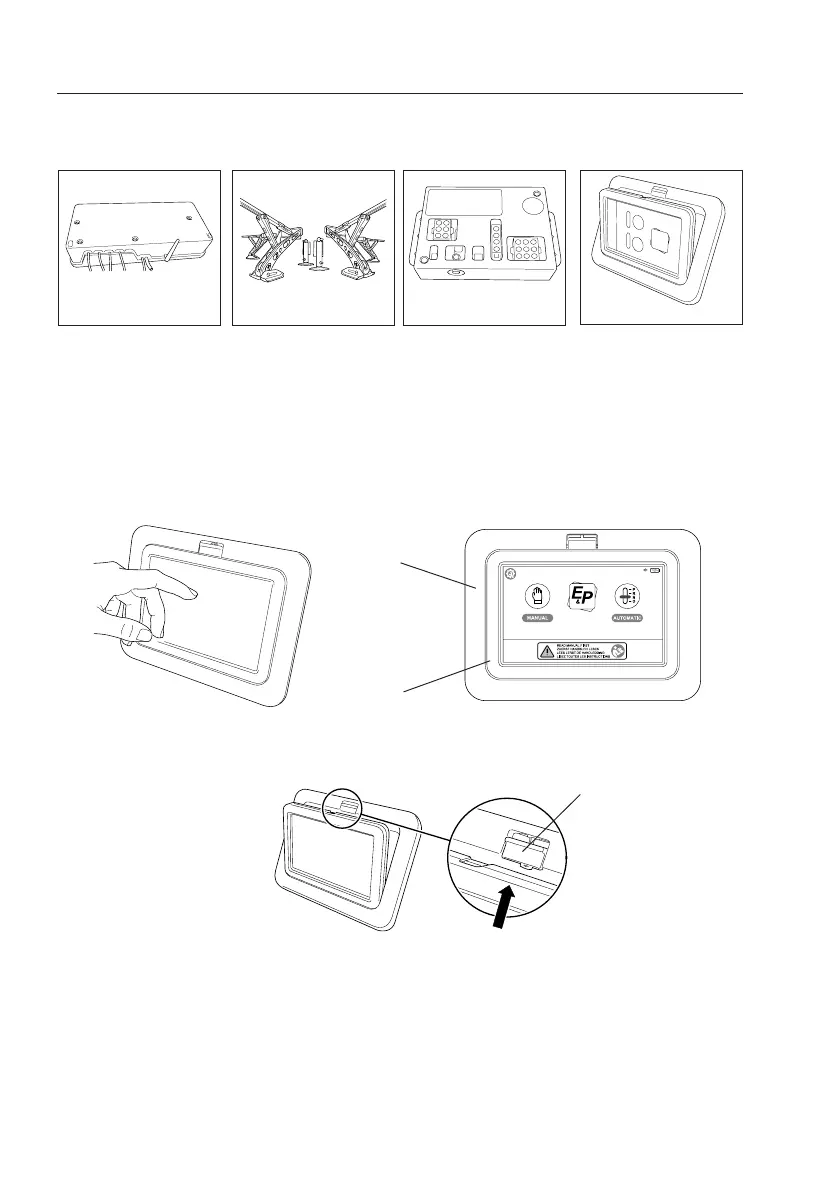
Pump Unit
Hydraulic jacks
Operating system
Touchscreen
In advance
The Touchpanel consists of a removable touchscreen and a mounting frame. The touchscreen
can be used in a fixed (connected to the vehicle) and remote/handheld situation. (separated from
the mounting frame in the vehicle).
Fixed situation
In the situation the touchscreen is built in into a mounting frame, you only have to touch the
screen to activate the touchscreen. By doing this the startup screen will appear in a “landscape”
orientation.
Touch the screen to activate the touchscreen
“landscape” orientation
Remote situation
The touchscreen could
also be taken out of the
mounting frame by pushing
the release slider upwards.
After doing this the
touchscreen functions as a
remote control for
operating the Levelsystem.
Mountingframe
Touchscreen
Release slider
Push upwards to unlock
the touchscreen from
the mountingframe
Remote Control: Touch Panel
System Components


 To Next Page