5-5
ARRIVING ON SITE
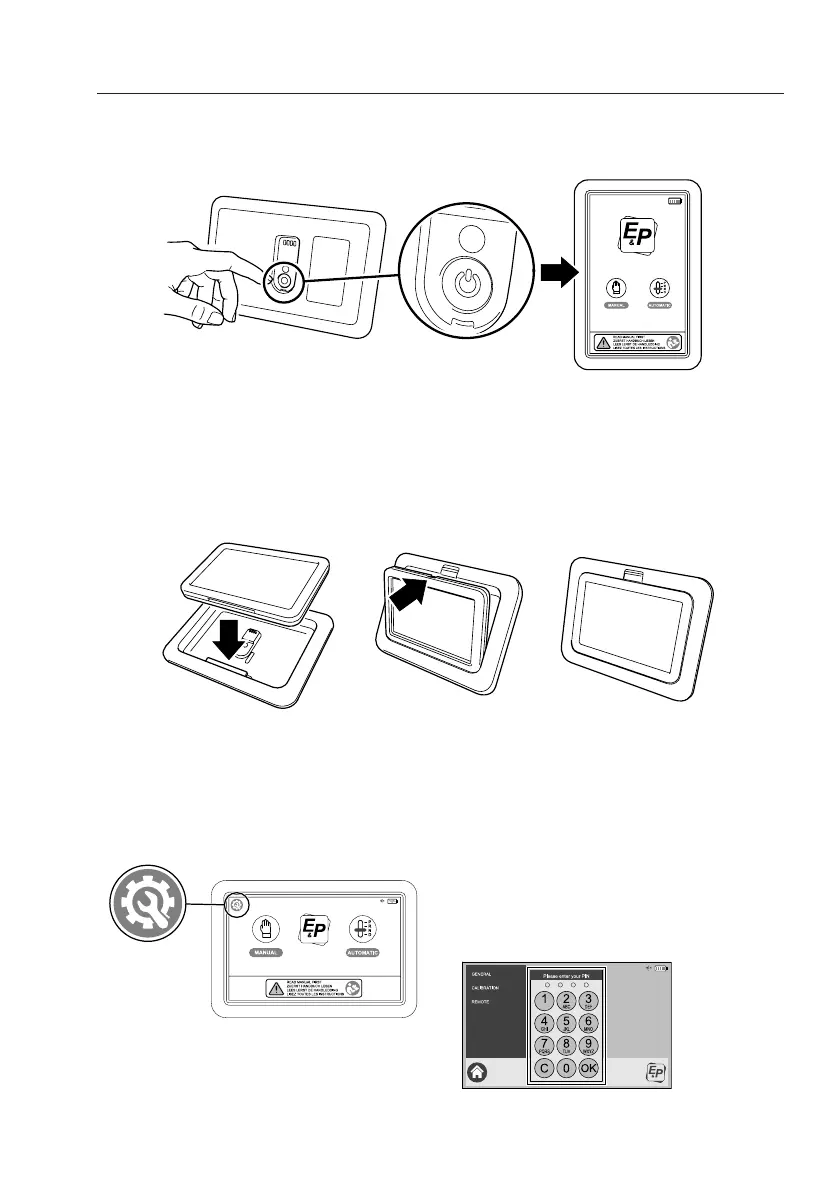
After removing the Touchscreen from the mountingframe, the touchscreen must be activated by
pushing the ON/OFF button on the back-side of the touchscreen. By doing this the startup screen
will appear in a “portrait” orientation.
Replacing the touchscreen
When replacing the touchscreen in the mounting frame, the touchscreen must be placed over the
upright rib located at the bottomside of the mounting frame. After this the touchscreen must be
pushed backwards into the mounting frame. A slight click of the release slider indicates that the
touchscreen is properly locked in the mounting frame.
First time operating
When you use the E&P Hydraulics touchscreen for the first time, it is wise to first determine your
personal language and access code settings. This is possibly by pressing the
“CONFIGURATION” icon at the top left location of the screen.
ON/OFF Button
Push button to activate the touchscreen
“portrait” orientation
place the touchscreen over
the upright rib
push the touchscreen into the
mountingframe
READY: the release slider
locked the touchscreen in the
mountingframe
After pushing the configuration button a screen
will appear in which you have three options:
General, Calibration and Remote. Before
entering one of these options you have to enter
4 times “0000” (factory setting) and OK
push the configuration icon
push pincode
(0000) and OK


 To Next Page