8-26
HOW TO USE YOUR CARAVAN’S EQUIPMENT
Whale iVan Control Panel
iVan“ is equipped with an electronic diagnostic system which will detect fault conditions ranging
from poor gas or d.c. supply to internal Water or Space Heater malfunctions. In the unlikely event
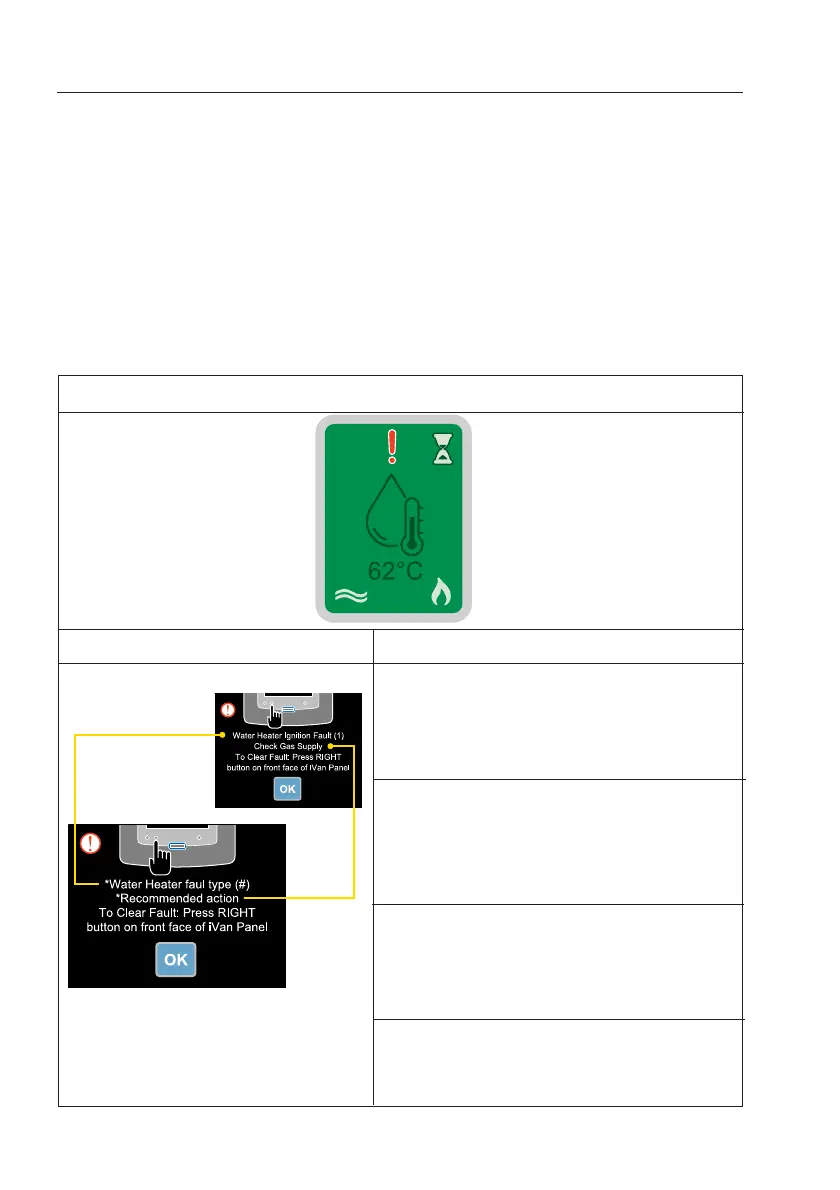
of a fault, this will be indicated by a red ‘!’ on the Water or Space Heater icon on the Home
Screen.
The Water Heater will not operate when a fault is indicated on the home screen. A pop-up screen
will appear when you attempt to operate the Water Heater. The pop-up screen identifies the fault.
As soon as you have completed the suggested actions on the fault screens you must clear the
fault code by pressing OK.
When the lockout has been cleared successfully, the Water Heater will default to ‘Off’. The user
must select the desired power operation to operate the Water Heater. Please follow the advice
on screen, as outlined in the table below.
Step 2 Identity Lockout
Example
Step 1 Space Heater Lockout
Step 3 Recommended Action
Fault type #1 - Inadequate gas supply
1. Check gas
2. Temp <5°C, use Propane rather than Butane
3. Check flues for blockages
4. Go to step 4
Fault type #2-3 - Overheat Fault
1. Check the heater is completely full of water
2. Run pump with one hot tap open until water
flows smoothly
3. Go to step 4
Fault type #4 - Low Voltage Fault
10.5 - 15V d.c. Heater inoperable under 10V
≥10 / ≤15V d.c.
<10 / >15V d.c.
Go to step 4
Fault type #5 - Air Pressure Fault
1. Check flues for blockages
2. Go to step 4


 To Next Page