Xtreme Power Conversion Corporaon
P91, TX91, TX91L, TXVR Service Manual
Page 24
Uninterrupble Power Supply
7.2.3 Conguraon of the charger current on the LCD or by command
Set charger current on LCD:
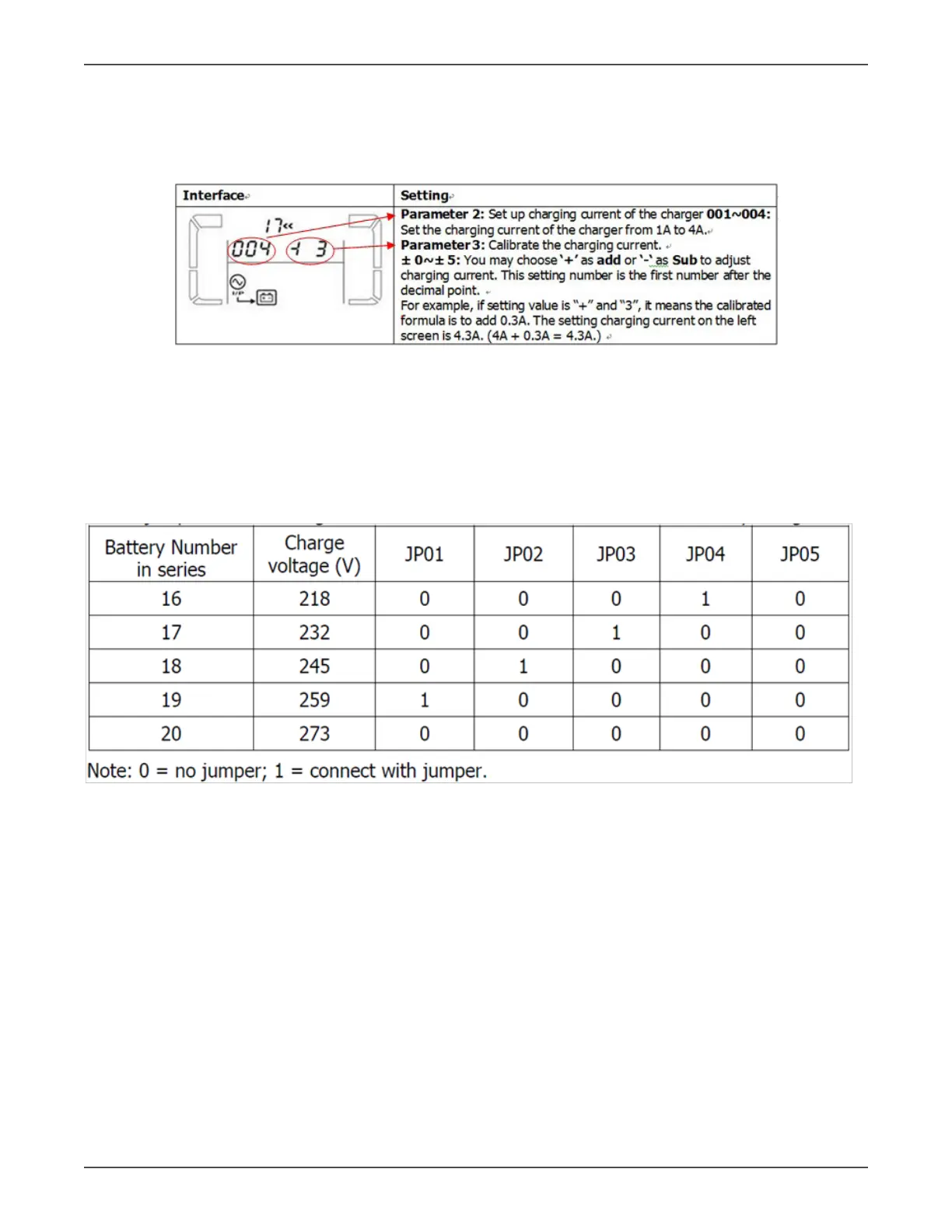
There are two parameter 2 and parameter 3, you can set charger current form 1A/2A/3A/4A by seng param-
eter 2. (See the Figure 7.1).
If you want to adjust charger current, please adjust parameter 3. (See Figure 7.1).
Figure 7.1 Set charge current on LCD
Set charge current by command:
You need set charger current command as follow
7.2.4 Conguraon of charging voltage on the Charger Board or through command
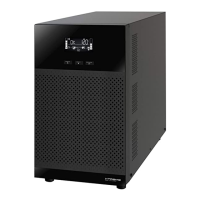
Set 5 jumpers (JP01, JP02, JP03, JP04 and JP05) on the charger mode according to the following table,
to match the actual baery number in series per string.
Table 7.3 Charge Voltage Seng List


 To Next Page