6. Now, press and hold in either the
[
(
MHz
)]
or
[
(
MHz
)
] key for one second
to initiate the Preferential Memory Scan. Only the channels which have the
blinking “
” icon appended to the channel number will be scanned.
7.
T
o cancel the Preferential Memory Scan, just repeat the above procedure,
pressing[▲]or[▼]keytoselect“MEM” in step 4 above.
Memory Bank Scan
When the Memory Bank feature is engaged, the scanner sweeps only memory
channels in the current Memory Bank. However, if the Memory Bank Link Scan
feature is enabled, you may sweep the memory channels in several Memory
Banks which you have selected.
To enable the Memory Bank Link Scan feature:
1.
Set the radio to the Memory mode by pressing the
[
* V
/
M
] key, if necessary.
2.
Press
and hold in the
[
[#BA
N
D]]
key
for
one
second,
then
press
[▲]
or
[▼]
key
to
select
the
rst
Memory
Bank
(“
BANK 1” ~ “BANK10”) you wish to
sweep using Memory Bank Link Scan.
3.
Press
the F/W key momentarily. The current Memory Bank will now be
swept during Memory Bank Scan. A “decimal point” will be appended be
-
tween the “N” and “K” of the Memory Bank number indication (such as BAN.
K 2).
4
. Repeat steps 2 and 3 above, to append the “decimal point” to any other
Memory Banks you wish to sweep.
5.
Now
, press and hold in the
[
* V
/
M] key for one second to initiate the Memory
Bank Link Scan.
6.
T
o remove a Memory Bank from the Memory Bank Link Scan, repeat steps
2 and 3 above, to delete the “decimal point” from the Memory Bank number
indication.
This feature allows you to check the Weather Broadcast Memory Channels for
the presence of the NOAA Alert Tone while operating using VFO scan or Memo-
ry channel scan.
When the W
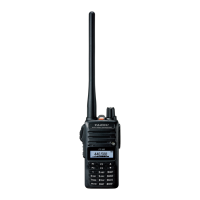
eather Alert Scan feature is engaged, the FT-65R/E will check the
WeatherBroadcastMemoryChannelsforactivityeveryvesecondswhilescan-
ning. If you watch the display carefully, you’ll observe the scanner periodically
shifting to the W
eather Broadcast bank, scanning the Weather channels quickly
in search of the Alert Tone, after which regular scanning will resume for another
veseconds.
To enable the Weather Alert Scan feature:
1.
Press F/W
key then press [0 SET] key to enter the Set mode.
2. Pressthe[▲]or[▼]keytoselectSetModeitem“39: WX ALERT”.
21


 To Next Page