VX-3R/E OPERATING MANUAL8
INSTALLATION OF FBA-37 ALKALINE BATTERY CASE
(
OPTION
)
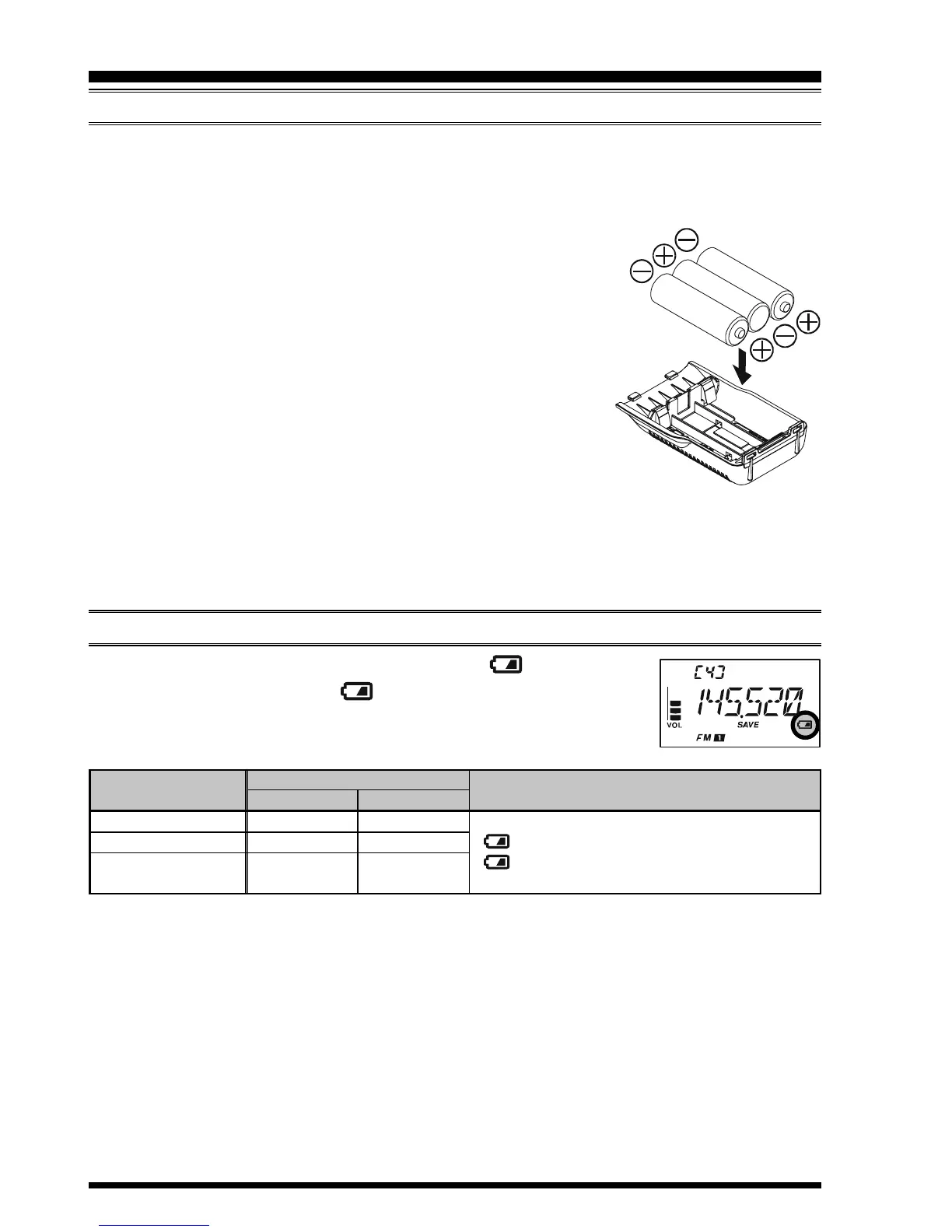
The optional FBA-37 Battery Case allows operation of the VX-3R/E using three “AA”
size alkaline batteries.
When installing batteries, insert the (–) end first, then press in the (+) end so the battery
snaps into place. Always replace all three batteries at the same
time, paying attention to the polarity indicated inside the case.
The FBA-37 must not be used with rechargeable cells. The FBA-
37 does not contain the thermal and over-current protection cir-
cuits (provided in the FNB-82LI Lithium-Ion Battery Pack)
required when utilizing Ni-Cd and Ni-MH cells.
Important Note:
1) The FBA-37 is designed for use only with AA-type Alka-
line cells.
2) If you do not use the VX-3R/E for a long time, remove the alkaline batteries from the
FBA-37, as battery leakage could cause damage to the VX-3R/E and FBA-37.
3) Never connect the external DC power supply to the VX-3R/E, when the FBA-37
Battery Pack is installed in the VX-3R/E.
BATTERY LIFE INFORMATION
When the battery charge is almost depleted, a “ ” icon will ap-
pear on the display. When the “ ” icon appears, it is recommended
that you charge the battery soon.
INSTALLATION OF ACCESSORIES
1: TX: 6 seconds, RX: 6 seconds, and Squelched: 48 seconds.
2: Continuous signal reception.
The current battery voltage can be displayed manually on the display, via the Set Mode
Item 23: DC VLT.
Battery capacity may be reduced during extremely cold weather operation. Keeping the
radio inside your parka may help preserve the full charge capacity.
OPERATING BAND
144 MHz
1
430 MHz
1
AM/FM
Broadcast Band
2
FNB-82LI
6.0 hours
6.5 hours
20.0 hours
FBA-37
7.0 hours
7.5 hours
25.0 hours
BATTERY LIFE
(
APPROX.
)
BATTERY INDICATOR
No Icon
:
Enough Battery Power
:
Lower Battery Power
(
Blinking
):
Prepare to charge
(or replace) the Battery


 To Next Page