VX-3R/E OPERATING MANUAL12
SELECTING THE OPERATING BAND
The VX-3R/E covers an in-
credibly wide frequency range,
over which a number of differ-
ent operating modes are used.
Therefore, the VX-3R/E’s fre-
quency coverage has been di-
vided into different operating
bands, each of which has its
own pre-set channel steps and
operating modes. You can change the channel steps and operating modes later, if you like
(see page 21).
To Change Operating Bands:
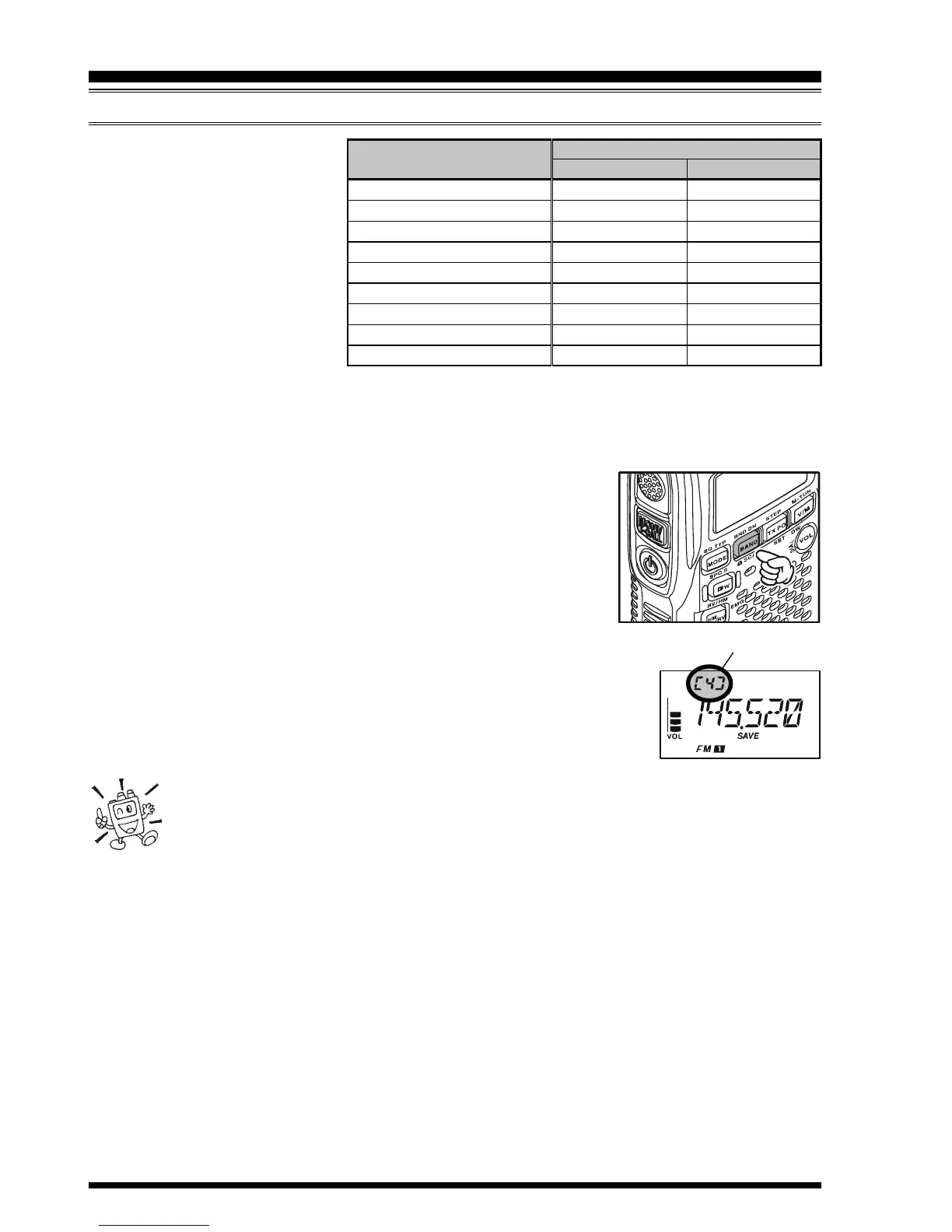
1. Press the
[
BAND
]
key repetitively. You will see the LCD
indication move toward a higher frequency band each time
you press the
[
BAND
]
key.
Indicates a Band Number according to the receiving fre-
quency in the Memory Channel Number Display Slot of the
display.
2. If you wish to move the operating band selection downward
(toward lower frequencies), press the
[
F/W
]
key first, then press
the
[
BAND
]
key.
3. Once you have selected the desired band, you may initiate manual
tuning (or scanning) per the discussion in the next chapter.
1) The VX-3R/E has an AM / FM broadcast radio. You can receive these
bands independently. See page 15 for details.
2) If desired, you may omit (skip) one or more bands from the band selection
loop for faster recall of your favorite operating bands. See page 100 for details.
OPERATION
Operating Band
USA VERSION
1.8 - 30 MHz
30 - 76 MHz
108 - 137 MHz
137 - 174 MHz
174 - 222 MHz
222 - 420 MHz
420 - 470 MHz
470 - 774 MHz
803 - 999 MHz
OPERATING BAND
[
B
AND NUMBER
]
SW Band
[
1
]
50 MHz Ham Band
[
2
]
Air Band
[
3
]
144 MHz Ham Band
[
4
]
VHF-TV Band
[
5
]
Information Band 1
[
6
]
430 MHz Ham Band
[
7
]
UHF-TV Band
[
8
]
Information Band 2
[
9
]
FREQUENCY RANGE
EXP/EU VERSION
1.8 - 30 MHz
30 - 76 MHz
108 - 137 MHz
137 - 174 MHz
174 - 222 MHz
222 - 420 MHz
420 - 470 MHz
470 - 800 MHz
803 - 999 MHz


 To Next Page