VX-3R/E OPERATING MANUAL72
SET YOUR PERSONAL ID
You choose your personal ID from the member list.
1. Press and hold in the
[
TXPO
]
key for one second to enter the Set mode.
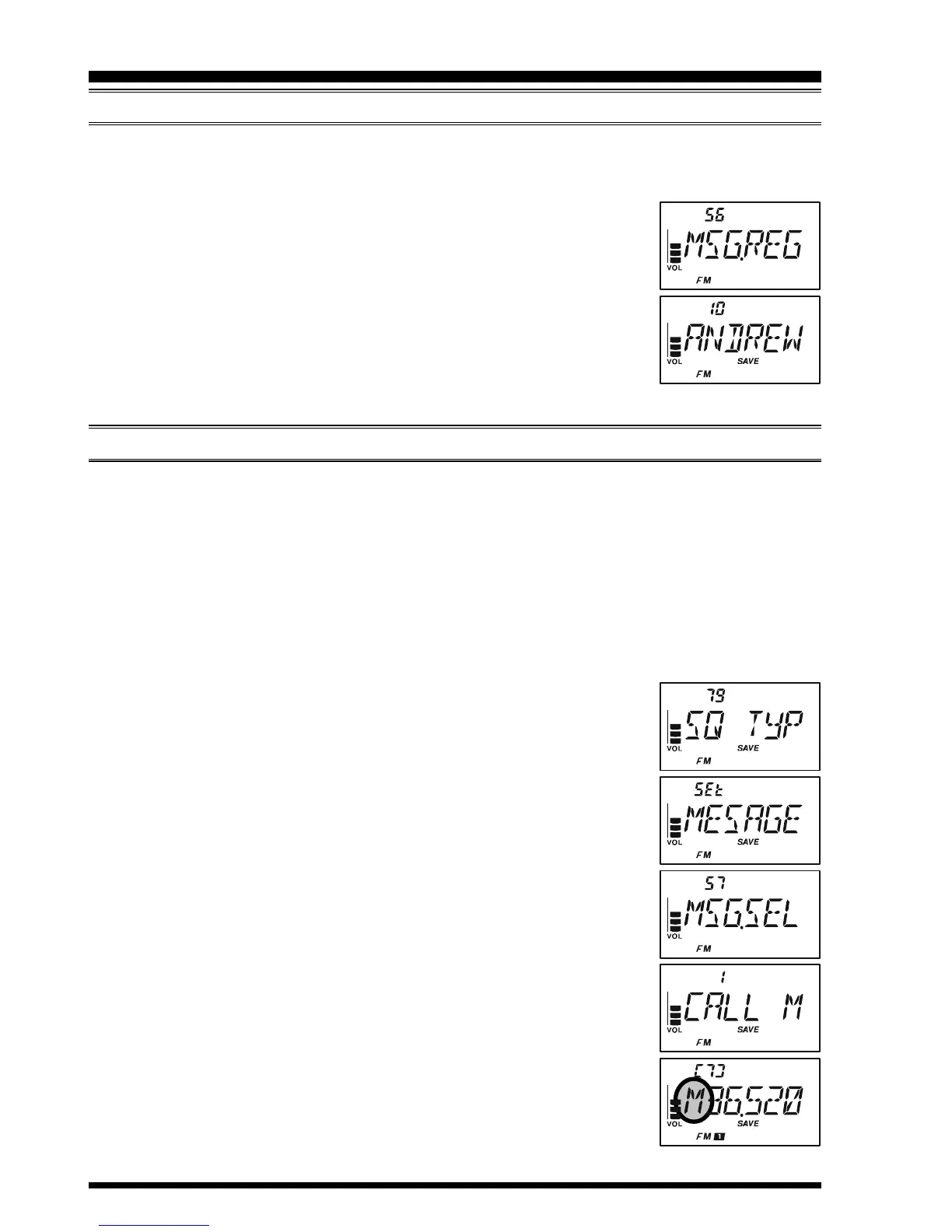
2. Rotate the DIAL knob to select Set Mode Item 56: MSG.REG.
Note: Do not forget to pull the DIAL knob to rotate the DIAL knob.
3. Press the
[
TXPO
]
key momentarily to enable adjustment of this
Set Mode Item.
4. Rotate the DIAL knob to select the member box (1 ~ 20) where
your ID is stored.
5. Press the PTT switch to save the new setting and exit to normal
operation.
SENDING A MESSAGES
The registered message can be sent to the members who are receiving the coordination
frequency. When a message is sent, the transmitter’s ID will be sent also, and the receiver
can identify who sent the message.
The “Personal ID” setting (described previous paragraph) is required for the transmitter’s
ID to be shown with the received message.
1. Set the radio to the coordination frequency.
2. Press and hold in the
[
TXPO
]
key for one second to enter the Set mode.
3. Rotate the DIAL knob to select Set Mode Item 79: SQ TYP.
Note: Do not forget to pull the DIAL knob to rotate the DIAL knob.
4. Press the
[
TXPO
]
key momentarily to enable adjustment of this
Set Mode Item.
5. Rotate the DIAL knob to select “MESSAGE” (to activate the
Message feature).
6. Press the
[
TXPO
]
key momentarily, then rotate the DIAL knob
to select Set Mode Item 57: MEG.SEL.
7. Press the
[
TXPO
]
key momentarily to enable adjustment of this
Set Mode Item.
8. Rotate the DIAL to select the message you wish to send.
9. Press the PTT switch to exit from the Set Mode and activates the
Message feature.
10. When the Message feature is activated, the “M” notation will
appear at the 100 MHz digit of the frequency.
11. Press the PTT switch again (without speaking into the microphone)
to transmit the selected message on the coordination frequency. It
takes approximately 6 seconds to transmit the message.
MESSAGE FEATURE


 To Next Page