VX-3R/E OPERATING MANUAL 77
TO LOCATE AN UNRESPONSIVE OPERATOR USING THE EAI FEATURE
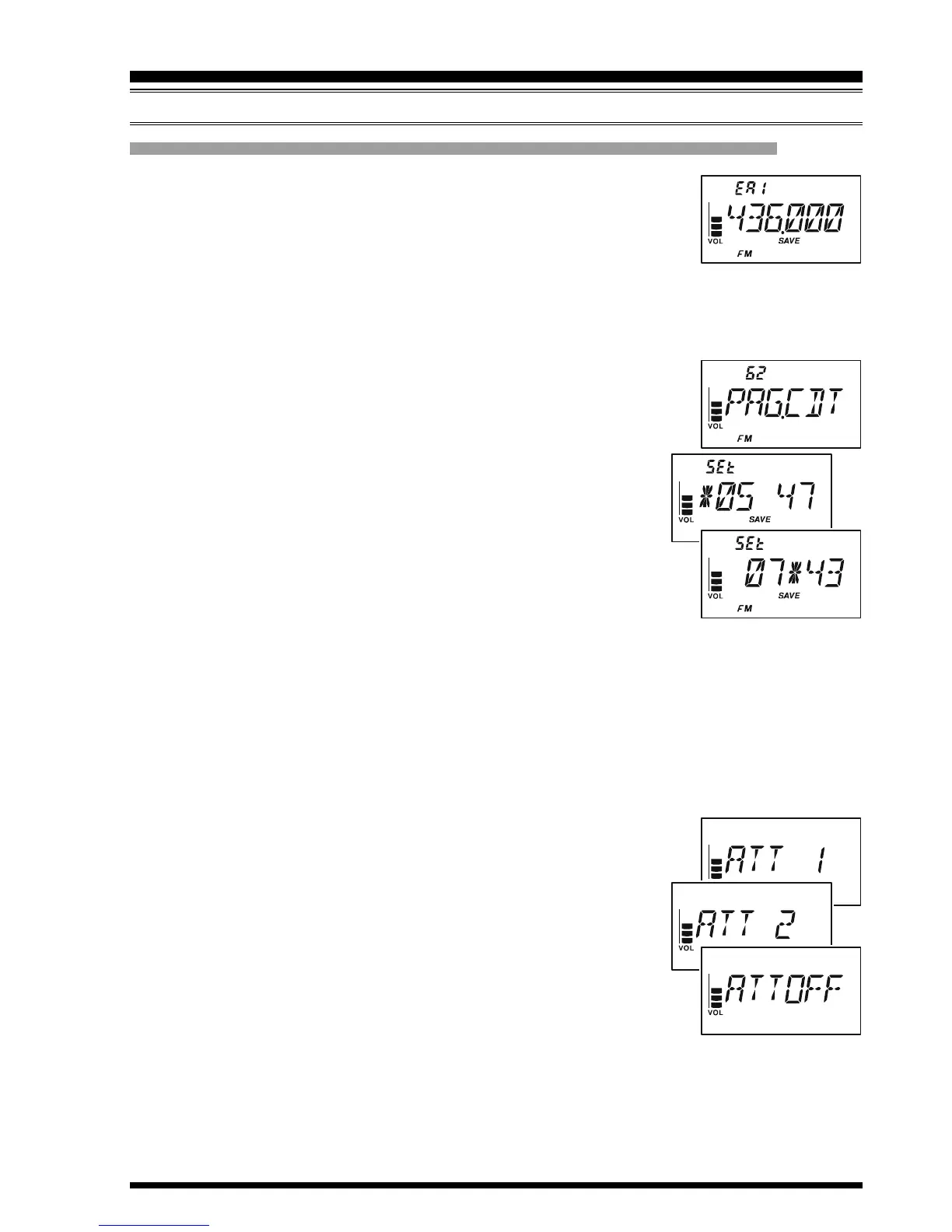
1. Recall the Memory Channel “EAI” (must be the same as the
searched person’s radio), which is found at the end of the “regu-
lar” memory channel.
2. Set the Transmitting Pager Code Memory tone pair to the same
CTCSS tone pair stored in the Receiving Pager Code Memory of the missing person’s
radio.
A. Press and hold in the
[
TXPO
]
key for one second to enter the Set mode.
B. Rotate the DIAL knob to select Set Mode Item 62: PAG.CDT.
Note: Do not forget to pull the DIAL knob to rotate the DIAL
knob
C. Press the
[
TXPO
]
key to enable adjustment of this Set
Mode Item.
D. Rotate the DIAL knob to select the first tone.
E. Press the
[
V/M
]
key.
F. Rotate the DIAL knob to select the second tone.
G. Press the PTT switch to save the new setting and exit from
setting mode.
3. Press and hold in the PTT switch for five seconds. If the EAI signal is received by a
VX-3R/E transceiver programmed with matching CTCSS Receiving Pager Code, the
EAI feature will activate. The lost operator’s radio will transmit in accordance with
the setting of Set Mode Item 31: EAI TIME (For example, in the Interval mode, the
radio will transmit a loud (0.5 second) beep every 2.5 seconds until the EAI timer
expires. In the continuous mode, the radio will automatically transmit continuously
with maximum microphone gain). You may now begin direction-finding efforts.
4. The ATT (Front End Attenuator) is often useful in locating the
missing person's radio, as peaks in weaker signals are more eas-
ily observed. You may select the ATT level “ATT 1 (10 dB),”
“ATT 2 (50 dB),” and “ATT OFF” by pressing the
[
BAND
]
key to reduce the signal.
5. Press the
[
V/M
]
key to exit to normal operation.
EMERGENCY AUTOMATIC ID
(
EAI
)
FEATURE
EMERGENCY FEATURE


 To Next Page