VX-3R/E OPERATING MANUAL38
PROGRAMMING THE USER BEEP
Three User Beep Memories are provided, allowing you to create a unique original beep
tone.
Each User Beep Memory can store up to 64 steps with three octaves (“C1” through “B3”).
1. Press and hold in the
[
TXPO
]
key for one second to enter the Set mode.
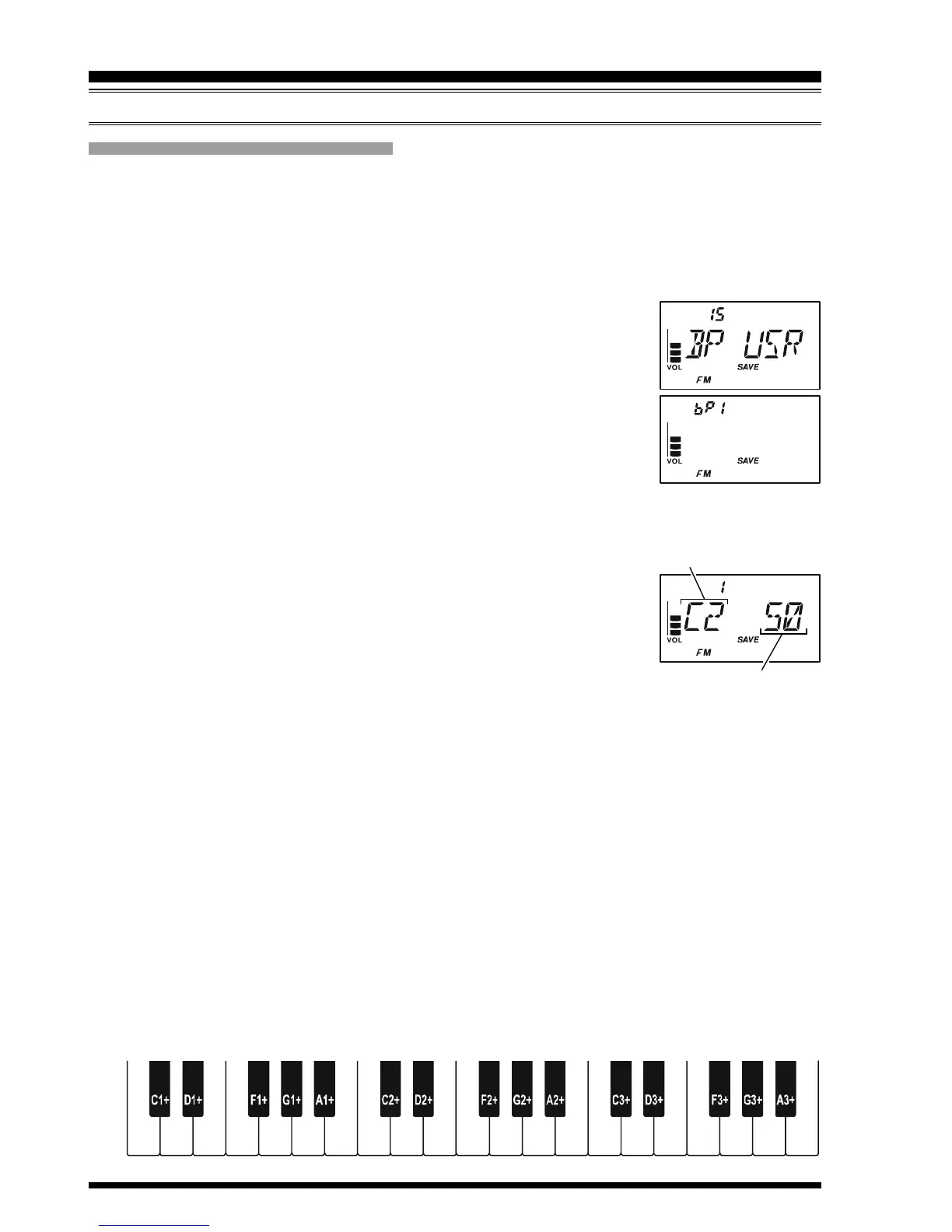
2. Rotate the DIAL knob to select Set Mode Item 15: BP USR.
Note: Do not forget to pull the DIAL knob to rotate the DIAL
knob.
3. Press the
[
TXPO
]
key momentarily to enable adjustment of this
Set Mode Item.
4. Rotate the DIAL knob to select the memory slot into which you
wish to store your programmed beep. Available selections are
bP1, bP2, and bP3. The previously stored beep will be displayed.
5. Press the
[
V/M
]
key to enable programming the beep. Press and hold the
[
HM/RV
]
key for one second to clear any previous beep, if desired.
6. Rotate the DIAL knob to select the first beep tone of the User
Beep.
7. Press the
[
V/M
]
key, then rotate the DIAL knob to set the length
of the first beep tone. Available selections are 1 (0.1 sec) - 250
(2.5 sec).
8. Press the
[
V/M
]
key to accept the first beep tone of the User Beep.
9. If you make a mistake, press the
[
BAND
]
key to back-space the cursor, then re-enter
the correct beep tone or length.
10. Repeat steps 6 - 9 until you have completed the User Beep.
11. When there is a beep tone which you wish to delete, bring the cursor to that beep tone
using the
[
BAND
]
/
[
V/M
]
key, then press the
[
MODE
]
key repeatedly until the “dEL”
notation appears in the Memory Channel Number display slot. Press and hold in the
[
MODE
]
key for one second to delete that beep tone.
12. When you wish to add a beep tone into the beep tone strings, move the cursor to the
desired place where you wish to enter the beep tone using the
[
BAND
]
/
[
V/M
]
key,
then press the
[
MODE
]
key repeatedly untill the “InS” notation is displayed in the
Memory Channel Number display slot. Press and hold in the
[
MODE
]
key for one
second to add the beep tone.
CTCSS/DCS/EPCS BELL OPERATION
CTCSS/DCS/EPCS OPERATION
C2C1 C3D2D1 D3E2E1 E3F2F1 F3G2G1 G3A2A1 A3B2B1 B3
Tone Length
Beep Tone


 To Next Page