190 Digital I/O, Setup, and Utilities
02R User’s Guide
Input Signal Select
The 02R has 24 built-in analog input connectors; the individual input
channels (MIC/LINE 1 through 16) and the stereo input channels (LINE
17/18 through 23/24). You can route two of the 2-track digital inputs to the
stereo input channels (2TR IN D1 to LINE 17/18 and 2TR IN D2 to LINE
19/20). You can also convert the individual input channels (MIC/LINE 1
through 16) to tape return channels, allowing you to perform 32-track
mixdowns with the 02R.
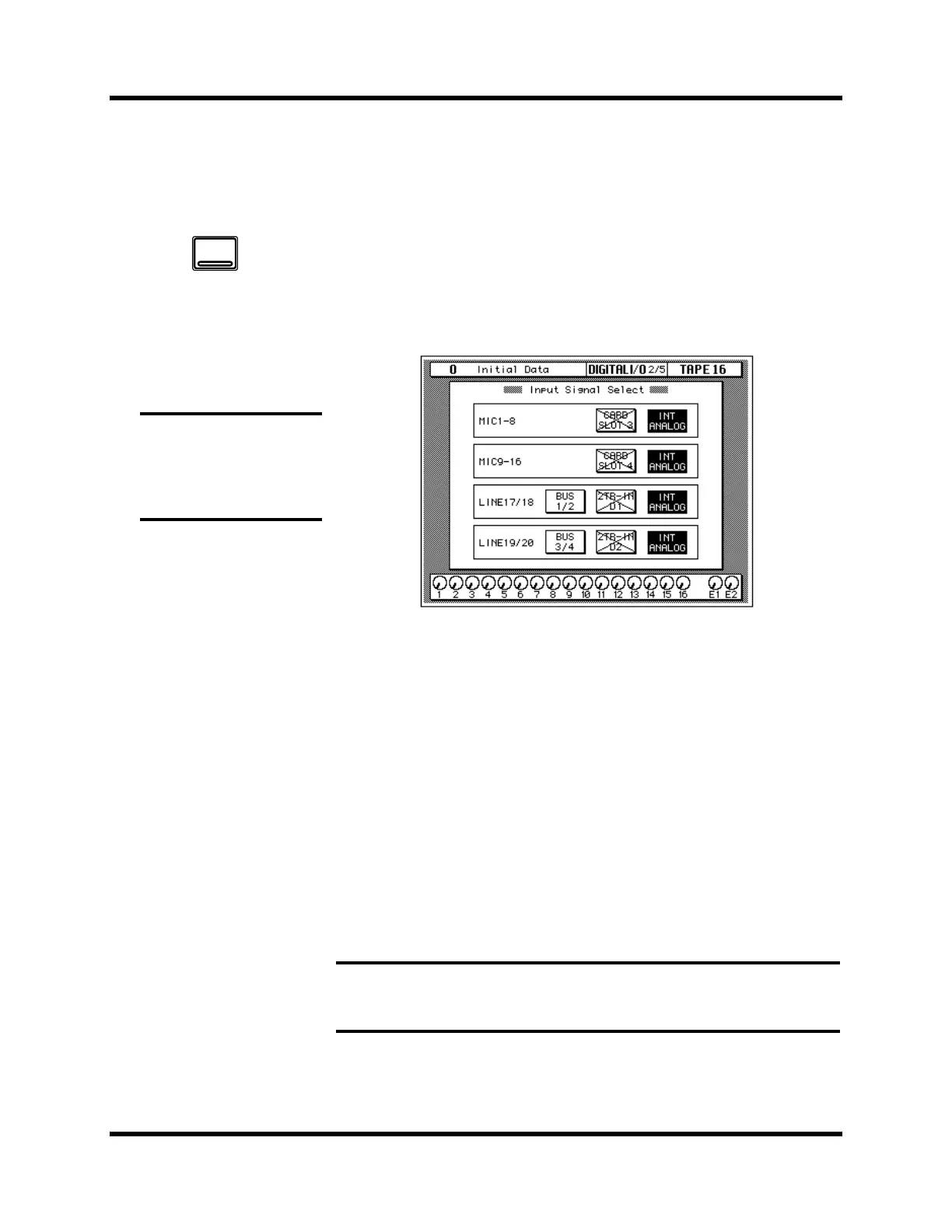
Shown below is the DIGITAL I/O 2/5 page—Input Signal Select.
There are four boxes on this page.
The first box is for MIC 1-8 (MIC/LINE 1 through 8). You can select “CARD
SLOT 3” or “INT ANALOG” (the default). If there is no digital I/O card in
slot 3, the selection will fail.
The second box is for MIC 9-16 (MIC/LINE 9 through 16). You can select
“CARD SLOT 4” or “INT ANALOG” (the default). If there is no digital I/O
card in slot 4, the selection will fail.
The third box is for LINE 17/18. You can select “BUS 1/2”, “2TR-IN D1”, or
“INT ANALOG” (the default). If there is no digital signal (no wordclock
present) at the 2TR IN DIGITAL connector #1, the selection will fail.
The fourth box is for LINE 19/20. You can select “BUS 3/4”, “2TR-IN D2”,
or “INT ANALOG” (the default). If there is no digital signal (no wordclock
present) at the 2TR IN DIGITAL connector #2, the selection will fail.
Note: You cannot select 2TR-IN D1 or 2TR-IN D2 for digital input/output if
the corresponding switch (2TR-D1 or 2TR-D2) for either connector has been
selected with the CONTROL ROOM monitor switches.
1. Use the [DIGITAL I/O]
button to locate the
DIGITAL I/O 2/5 page.
2. Use the CURSOR buttons
to select the desired
icons. Change the
setting by pressing the
[ENTER] button.
Note: If there is no digital
I/O card or signal present
when you select a digital
input, the default analog
selection will not be changed.
DIGITAL
I/O



 To Next Page