210 Digital I/O, Setup, and Utilities
02R User’s Guide
Emphasis Monitor
This function allows you to monitor the emphasis information of the digital
inputs. If an input digital signal was recorded with emphasis—a technique
used in early digital recordings to compensate for the deficiencies of the
hardware of the period, similar to Dolby® or dbx® noise reduction for
analog—the 02R can compensate by applying de-emphasis to the signal
before further processing.
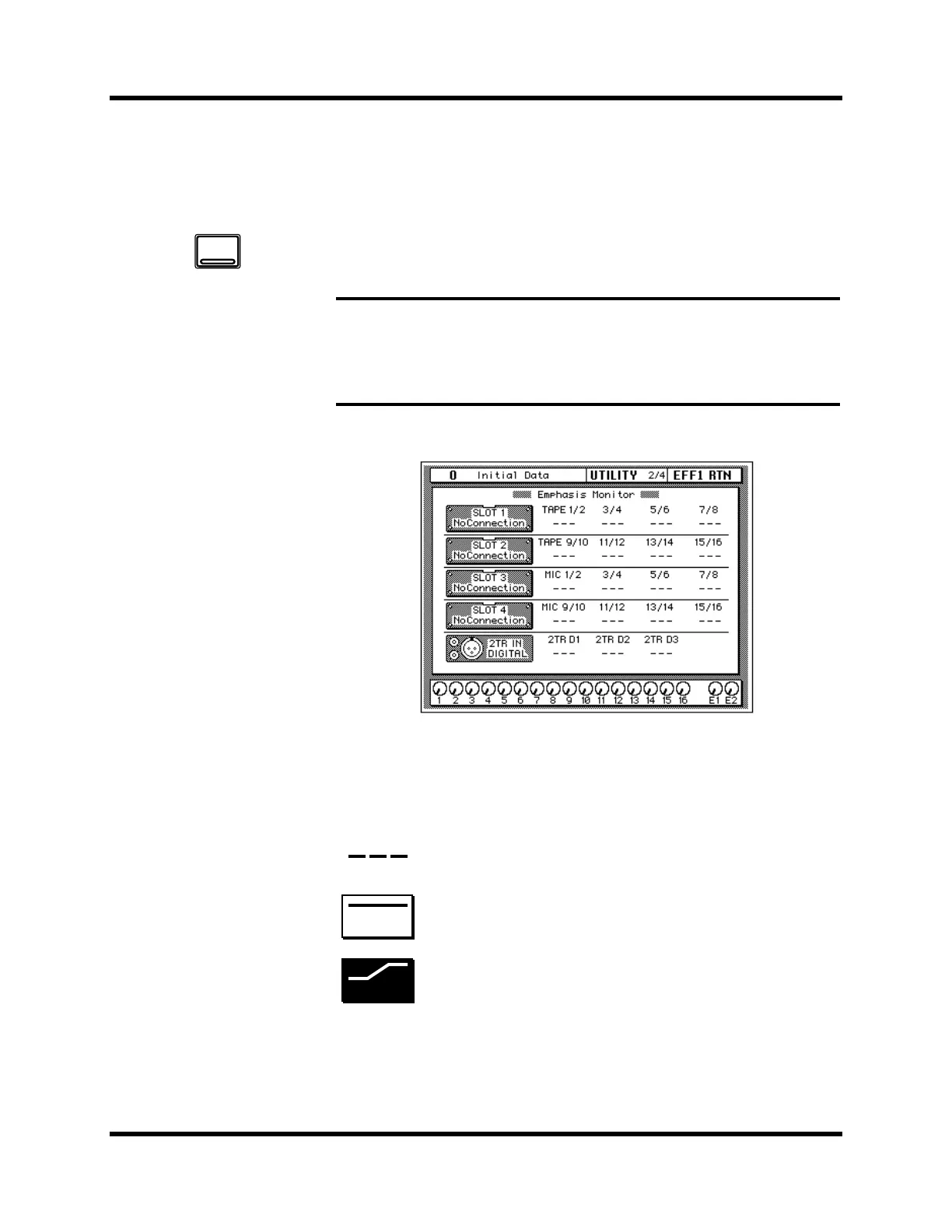
Shown below is the UTILITY 2/4 page—Emphasis Monitor.
This page allows you to monitor the emphasis information of the signal
input from each digital input jack of optional slots 1-4 and 2TR DIGITAL
IN 1-3 connectors. One of the following three icons will appear depending
on the status of the input signal:
Note: When the 02R receives data that has been processed with emphasis ON, it
will automatically process the data by applying de-emphasis. It will continue
processing the signal internally and will subsequently out put the data with
emphasis OFF. Regardless of whether a signal has been received with emphasis
ON, the 02R will always output the signal with emphasis OFF.
No signal or an invalid signal is being input.
Valid digital audio signal is being input. De-emphasis is
not required and is off for the signal.
Valid digital audio signal is being input. De-emphasis is
required and is set to on for the signal.
1. Use the [UTILITY] button
to locate the UTILITY 2/4
page.
UTILITY
OFF
ON



 To Next Page