226 Installing Options
02R User’s Guide
Wordclock Selection
1. Turn on your AES/EBU compatible multitrack digital recorder and
then the 02R.
It is always important to observe the correct order for turning on
equipment in a studio. Start with the AES/EBU compatible multitrack
and mastering recorders and the signal processors, then the 02R, and
finally the monitoring amplifiers and other downstream gear.
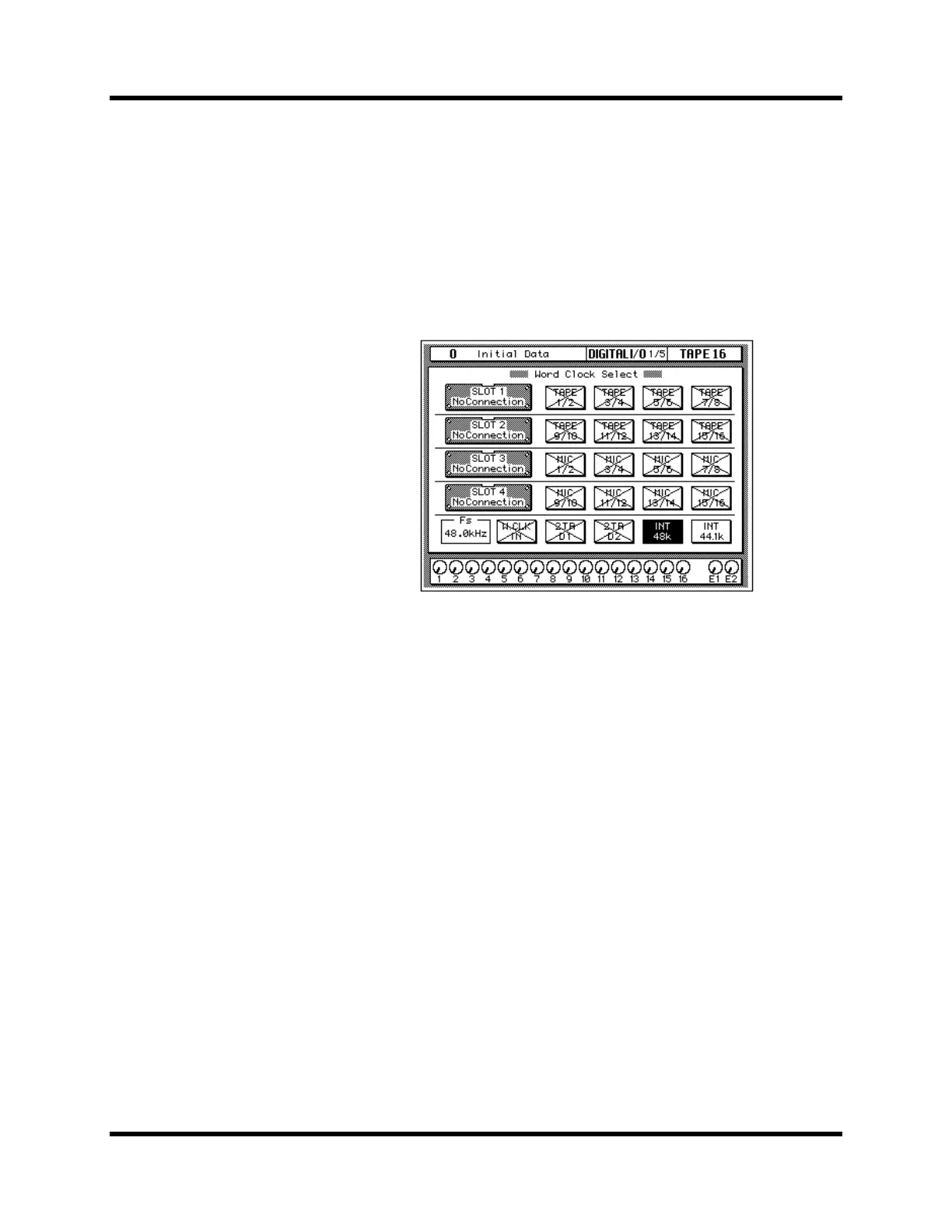
2. Use the [DIGITAL I/O] button to locate the DIGITAL I/O 1/5 page.
If the card was installed properly, the 02R will identify it in the
appropriate slot.
3. Use the CURSOR buttons to select the wordclock source.
If your AES/EBU compatible multitrack digital recorder has a
dedicated wordclock output connector, use the CURSOR buttons to
select the W.CLK IN box and press the [ENTER] button. If the
multitrack digital recorder does not have a dedicated wordclock
output, select the TAPE 1/2 box—the first box in the SLOT1 row—and
press the [ENTER] button.
The current wordclock source is indicated by a highlighted icon. See
“Word Clock Select” on page 188 of the User’s Guide for further details.



 To Next Page