23
A-S2000
A-S2000
5. 本機の電源コードをACコンセントに接続します。
このとき、POWERON/OFFスイッチはOFFに
します。
6. FlashSta.exeを起動します。
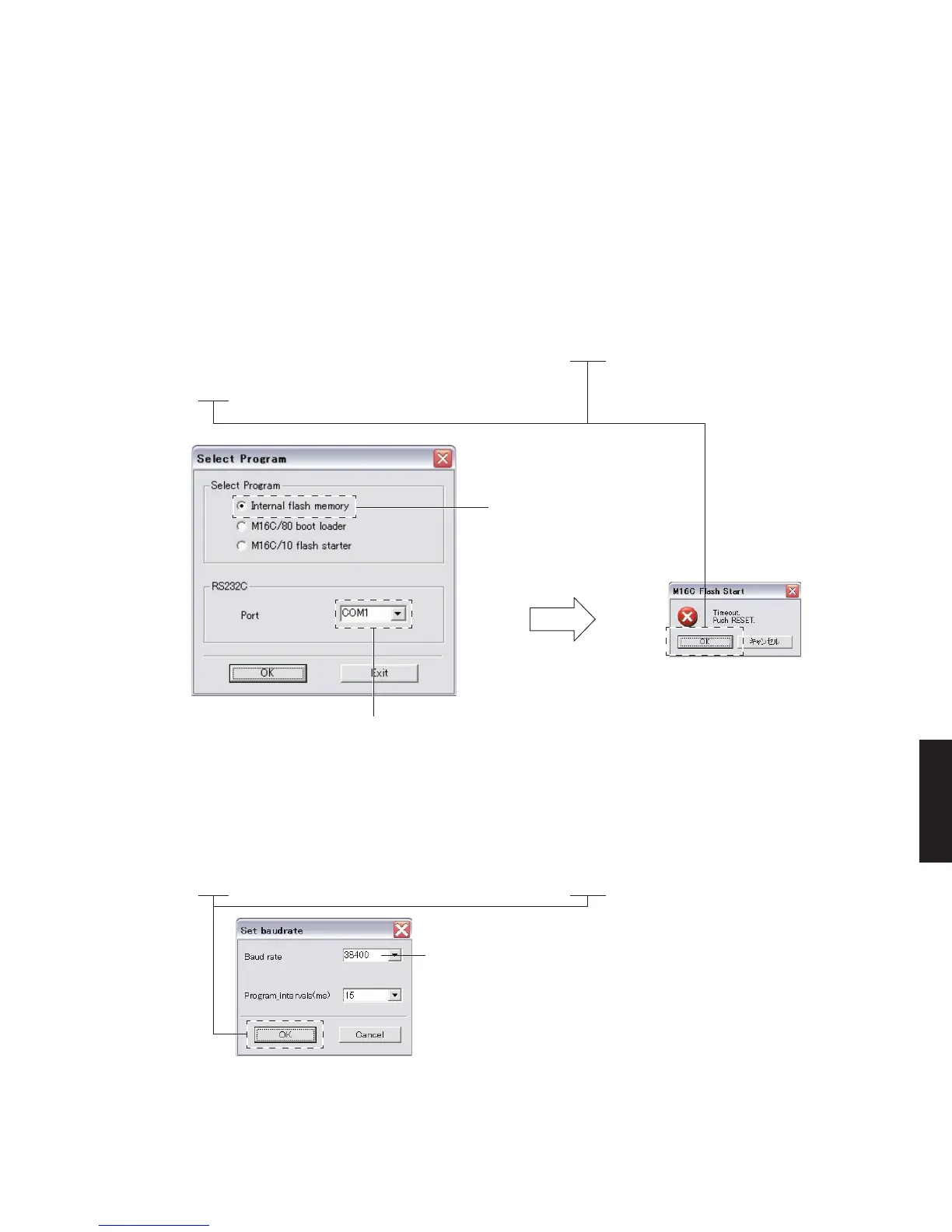
SelectProgramが表示されます。(Fig.2)
7. SelectProgram:Interflashmemory、RS232C
Port:COMx(本機と接続されているPCのシリア
ルポート)を選択します。(Fig.2)
8. 設定確認後、[OK]をクリックします。約5秒後、
M16CFlashStartが表示されます。(Fig.2)
9. POWERON/OFFスイッチをONにします。
10.[OK]をクリックします。(Fig.2)
Setbaudrateが表示されます。(Fig.3)
5. Reconnect the power cable of this unit to the AC
outlet. At this time, set the “POWER ON/OFF”
switch to the OFF position.
6. Start up “FlashSta.exe”.
“Select Program” is displayed. (Fig. 2)
7. Select Program: “Inter flash memory”, RS232C Port:
“COMx (serial port of the PC connected to this unit)”.
(Fig. 2)
8. After confirming settings, click [OK]. About 5 sec-
onds later, “M16C Flash Start” is displayed.
(Fig. 2)
9. Set the “POWER ON/OFF” switch to the ON posi-
tion.
10. Click [OK]. (Fig. 2)
“Set baudrate” is displayed. (Fig. 3)
Fig. 2
Select “Inter flash memory”.
Interflashmemoryを選択します。
Select the serial port of the PC connected to the main unit.
本機と接続されているPCのシリアルポートを選択します。
After a 5 seconds / 約5秒後
Fig. 3
Select 38400bps or below for the baud rate.
* Reduce the baud rate if a transmission error occurs fre-
quently.
通信速度は38400bps以下を選択します。
※ 送信エラーが多発する場合は、通信速度を下げてくだ
さい。
11. Baudrate:38400、Programintervals(ms):
15を選択します。(Fig.3)
12.[OK]をクリックします。(Fig.3)
11. Select “38400” for Baud rate and “15” for
Program_intervals (ms). (Fig.3)
12. Click [OK]. (Fig.3)


 To Next Page